
Inspiring
July 14, 2019
Answered

Navigating in full screen mode

  • July 14, 2019
  • 2 replies
  • 5288 views

I know I'm probably making a foolish mistake, but when I enter full screen mode, the right and left arrows only work to advance one screen. After that, it drops a cursor into the text on the screen, and I have to advance through all the text before it will change screens. I'm reasonably sure that I used to manage this successfully, but I can't get it done now. If I open the same document in Acrobat Reader DC, it seems to work fine. Any idea what I'm doing wrong? Thanks.
This topic has been closed for replies.
Correct answer AAAlter

Hi There,

Apologies for the inconvenience caused as the problem still persists. Is this occurring with a specific PDF file or with any file that you open in full screen mode?

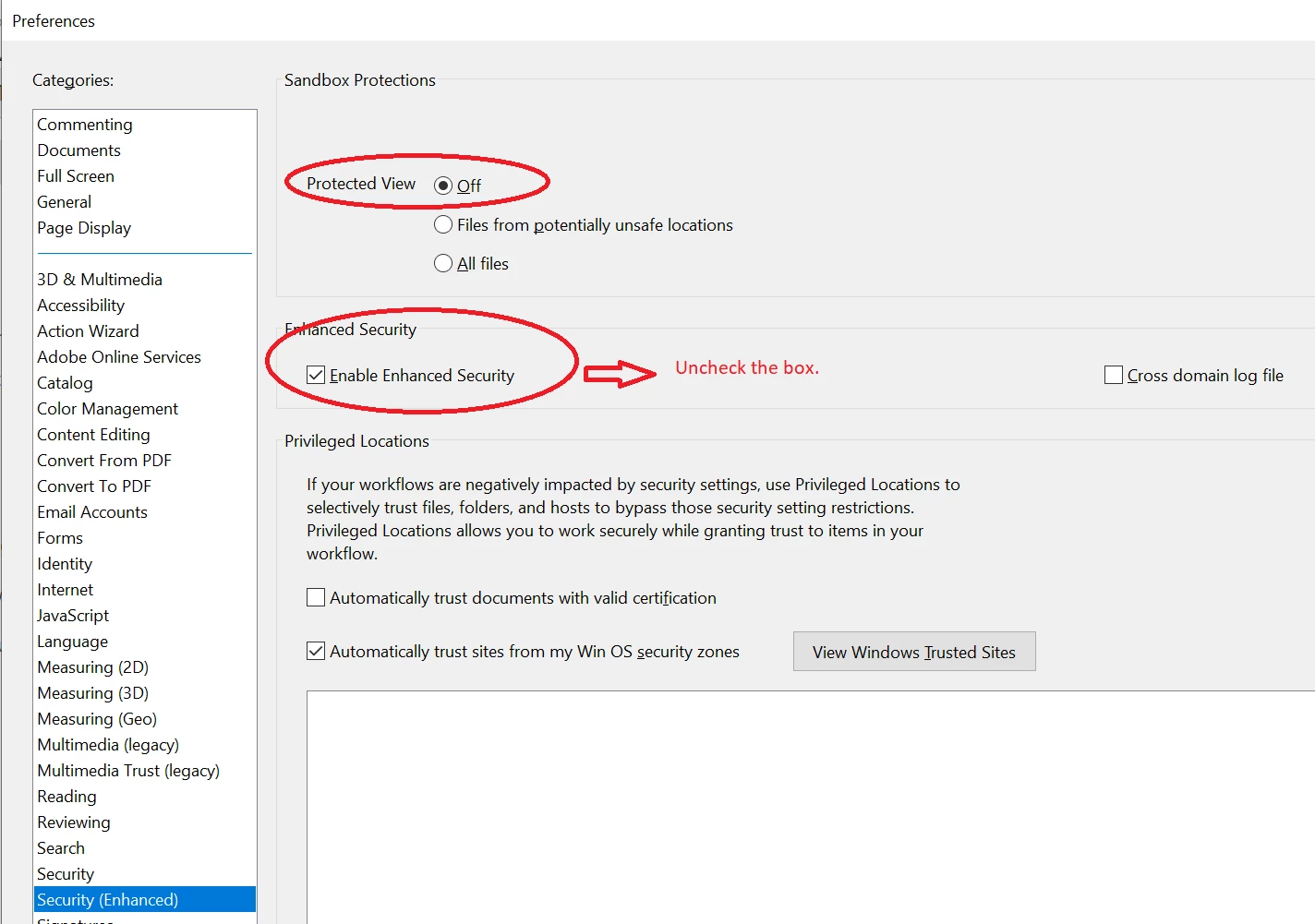
You may please try turn off the protected mode and uncheck the enhanced security option as described below:

  • Go to Edit>Preferences>Enhanced Security>Protected view off. and uncheck the enabled enhanced security.
  • Reboot the system and try again.

    Note: This is for testing purpose, please turn on the security after testing.

Keep us posted with the results.

Regards,

Amal


A complete uninstall and reinstall fixed the issue, except that I can't register my software now. I'll contact Customer Support.

2 replies

jane-e
Community Expert
July 16, 2019

Hi AAAlter

Check Preferences > Full Screen and turn on Left click to go forward one page; right click to go back one page.

Also:

  • Try Up/Down and Return/Shift+Return while in Full Screen mode and
  • turn on "Show Navigation Bar" in Preferences for Full Screen.

Jane

AAAlterAuthor
Inspiring
July 16, 2019

Thanks for the suggestion, but no joy. It was already checked. On a whim, I tried unchecking it, and it seems to have no impact on the issue.

AAAlterAuthor
Inspiring
July 16, 2019

Hi AAAlter,

Did you try:

  • Up/Down and Return/Shift+Return while in Full Screen mode and
  • Turn on "Show Navigation Bar" in Preferences for Full Screen?
    (This will display a set of buttons in the lower left on your machine only that you can use to navigate.)

Here’s another idea:

Sometimes another program takes over keyboard shortcuts. Boot up in Safe Mode and open only Acrobat Reader. Do the Right/Left shortcuts work now in Full Screen mode?

~ Jane


Up/down work, but they only move the cursor through the text. Eventually, that triggers a page change, but it's not helpful.

Enter/shift enter work as expected, but they don't help when using a remote presentation clicker.

Show navigation has no effect.

I don't think it's from another program taking over the keyboard, because the keys do move the cursor through the text, and it works correctly when I run Acrobat Reader.

Inspiring
July 15, 2019

Hi There,

I understand the situation, as described above you are experiencing the problem with page navigation in full-screen mode, we have tried to recreate the issue on our end and its working fine. To better understand the issue we need some more information.

  • What is the version of Adobe Acrobat DC  that you are using?
  • What is the OS of the computer and what is the version?

In the meantime, you may try the following troubleshooting steps:

If that doesn't work,

I hope this will help, keep us posted with the results.

Regards,

Amal

AAAlterAuthor
Inspiring
July 15, 2019

Amal, thanks for your reply.

I have installed Acrobat 17.011.30143.

I am running Windows 10.0.17134 X64.

There are no updates available.

I have already run repair and rebooted and reset preferences.

The problem persists.

I will insert pictures that show a little glimpse of what happens.

I don't see an obvious way to send you a copy of the file, but it doesn't seem to be limited to any particular file anyway.

Hope this helps.

AAAlterAuthor
Inspiring
July 15, 2019

The same file run on a different laptop with the same Acrobat version seems to work just fine.