


April 23, 2021
Question

OCR clear text, Edit PDF blurred !

  • April 23, 2021
  • 1 reply
  • 7706 views

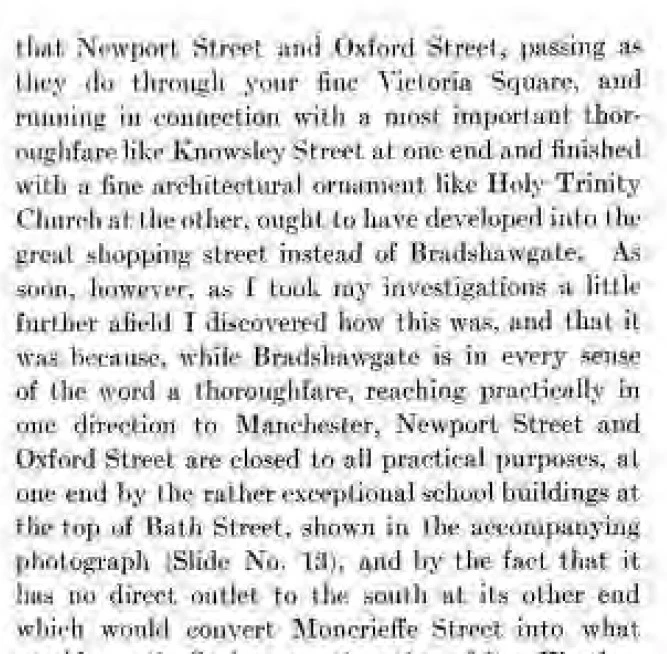
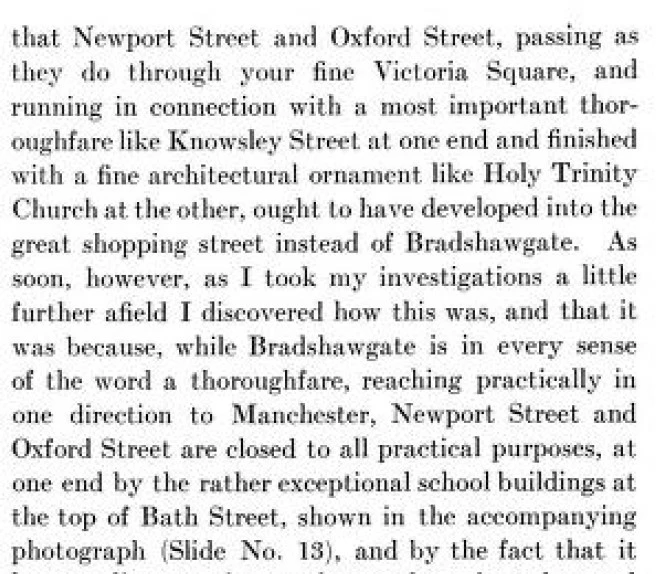
Open a old book page from file (scanned) open from file in OCR, save as PDF, go to Edit PDF, the text changes to very blurred poor quality ? I've used AA for quite a while using scanned old text, so I know my way around, I use a different scaning software but only started trying OCR. below is in OCR 'enhance' ! the better one lower is from file before OCR !


1 reply

Amal.
Community Manager
Community Manager
April 23, 2021

Hi Steve


Hope you are doing well and sorry for the trouble. As described, when you go to go to Edit PDF, the text changes to very blurred poor quality.


- Is this a behavior with a particular PDF file or with all the PDFs? Please try with a different PDF file and check.


- What is the workflow/steps you did to create the PDF  from the scanned document?


- What is the version of the Adobe Acrobat DC you are using? To check the version go to Help > About Acrobat and make sure you have the latest version installed. Go to Help > Check for Updates and reboot the computer once.


You may also try to reset the Acrobat preferences to default as described in the help page: https://community.adobe.com/t5/acrobat/how-to-reset-acrobat-preference-settings-to-default/td-p/4792082 and check if that works


Also, please try to create a new test user profile with full admin rights or enable the root account in Mac and try using the application there and check.


Regards

Amal

April 30, 2021
I've been using a software called Scan Tailor for a couple of years. They
come is a TIF. never been any problem. I don't export as a PDF but as a PNG
or JPG.
Not using OCR for now.

Also on going problem. I get this 'watch' curser (see SS) I've exited twice
and it's sill there.
[image: 20210430_105545.jpg]
May 1, 2021
Ongoing; I've uninstalled AA and now I can't get it install, this program
has given me so much trouble and I thought it was a simple program