
Participant
June 19, 2024
Answered

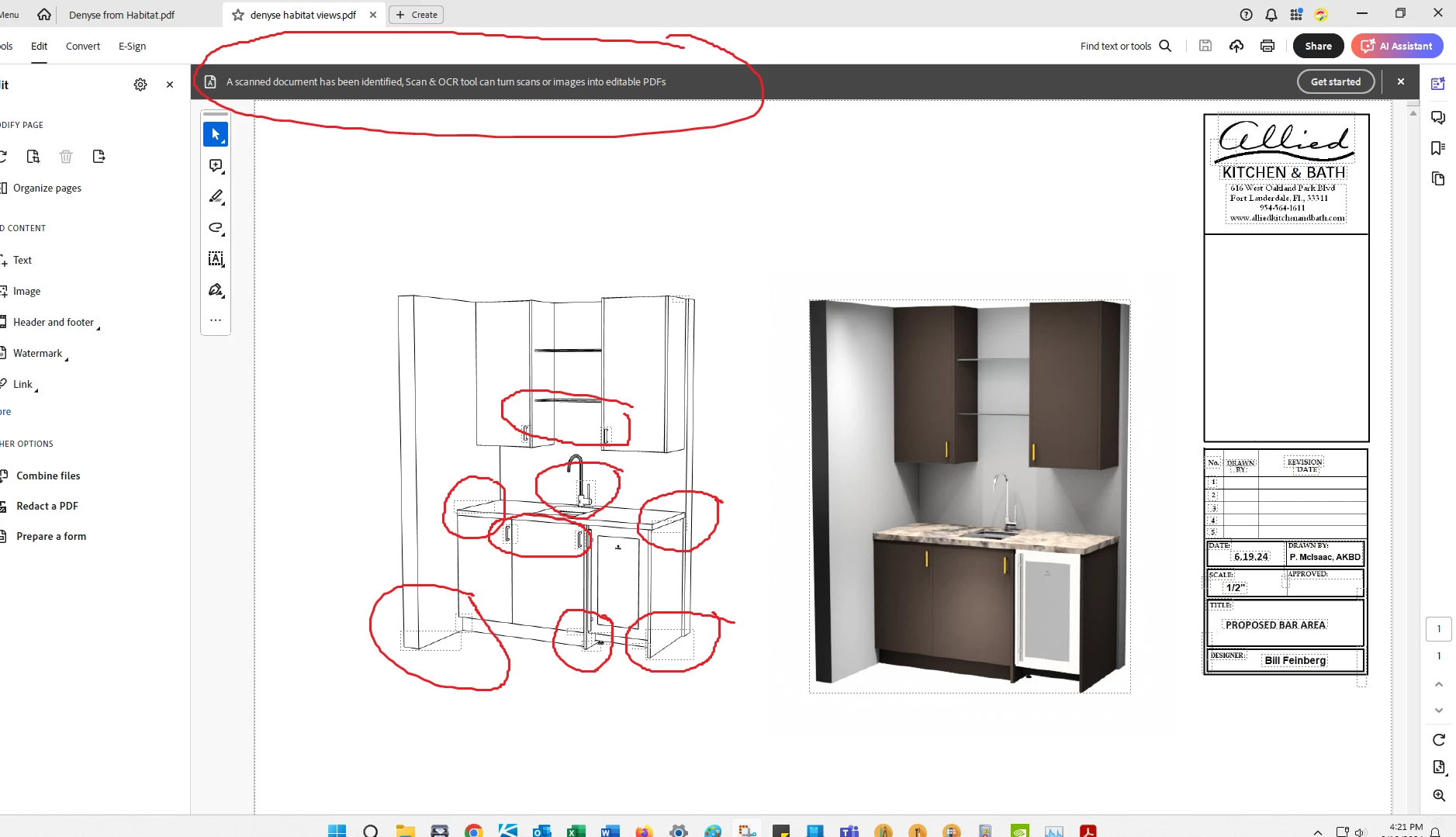
OCR is recognizing non-text as text

  • June 19, 2024
  • 1 reply
  • 1137 views

 I suspect my PC has issues as I have had random problems in Adobe & other applications. IT has bebuilt my profile, reinstalled my Windows, replaced a noisy power module all to no avail. They called Dell, who sent a tech out and he diagnosed other issues, so it was sent back to the factory. The factory could not recreate the issues, so they sent it back. I am now trying to sort out each app and determine if the issues I have are app related or not. My IT folks just uninstalled and then re-installed my Adobe Acrobat Pro 2024 because it was timing out all the time. Since they did that the OCR is recognizing non-text as text. There are bounding boxes around parts of images and the images are now multi-layered when they were not before. This is a problem for me. Is this how it is supposed to operate?
This topic has been closed for replies.
Correct answer Amal.

Hi @Peggy36316232yzj7 

Hope you are doing well and sorry to hear that

Is this an issue with a particular PDF file or with all the PDFs? Please try with a different PDF file and check.

What is the version of the OS and the Acrobat DC you are using? To check the version go to Help > About Acrobat and make sure you have the recent version 24.02.20857 installed. Go to Help > Check for updates and reboot the computer once.

Also try to repair the installation from the help menu (Win Only) and see if that works.

Please try to reset the Acrobat preferences as described here https://community.adobe.com/t5/acrobat-discussions/how-to-reset-acrobat-preference-settings-to-default/td-p/4792082

You may also try to create a new test user profile with full admin rights in Win and try using the application there and check.


~Amal

1 reply

Amal.
Community Manager
Amal.Community ManagerCorrect answer
Community Manager
June 20, 2024

Hi @Peggy36316232yzj7 

Hope you are doing well and sorry to hear that

Is this an issue with a particular PDF file or with all the PDFs? Please try with a different PDF file and check.

What is the version of the OS and the Acrobat DC you are using? To check the version go to Help > About Acrobat and make sure you have the recent version 24.02.20857 installed. Go to Help > Check for updates and reboot the computer once.

Also try to repair the installation from the help menu (Win Only) and see if that works.

Please try to reset the Acrobat preferences as described here https://community.adobe.com/t5/acrobat-discussions/how-to-reset-acrobat-preference-settings-to-default/td-p/4792082

You may also try to create a new test user profile with full admin rights in Win and try using the application there and check.


~Amal

Participant
June 24, 2024

Thank you! I did all but create the new test profile. It is now functioning correctly.

Amal.
Community Manager
Community Manager
June 24, 2024

Hi there


We are glad to hear that. Marking a reply or response “Correct” will help future users with the same issue quickly identify the correct answer.


~Amal