
Participating Frequently
September 12, 2023
Answered

"Always Show Document Pages Size" in "Page Display" preference is suddenly not working !!!

  • September 12, 2023
  • 54 replies
  • 60500 views

I always rely on the Document Page size in the lower left frame bar of any and all PDF windows.  For some reason, today it is gone.  I have restarted Acrobat, rebooted my machine.  I have even deleted the Acrobat preferences and let it create a new preference file.  No matter what, this check box clicked or not clicked, does not yield me what I have relied on for many years.


Thoughts please.


Acrobat DC for Mav. v 2023.006.20320
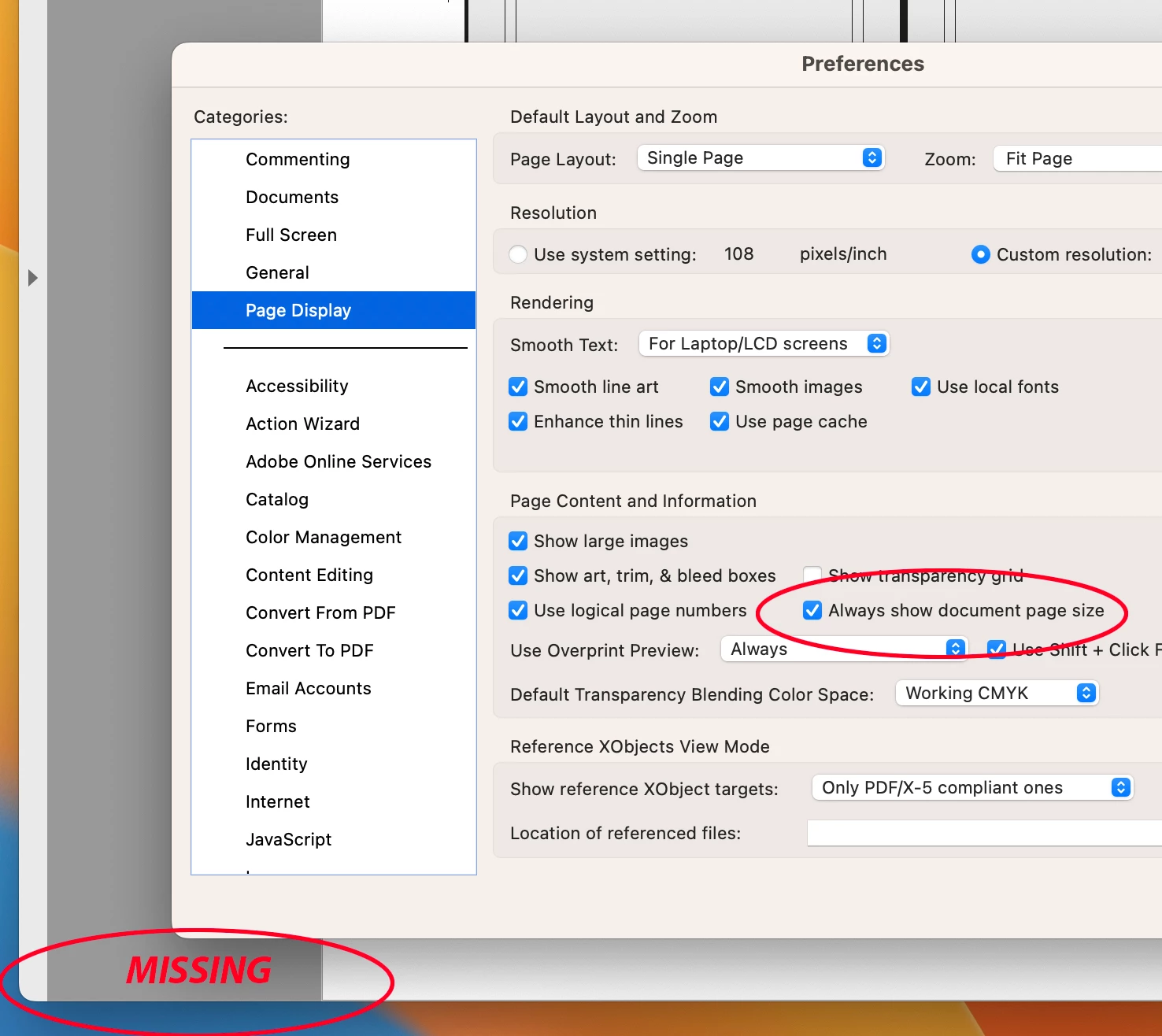


Correct answer AJaycup

The solution is to go to the menu tab, down to view, then select "Disable New Acrobat". This reverts to Adobe UI before it was made to be garbage and will display the page size all the time. As far as I can tell, all the features are still there as well.

54 replies

Amal.
Community Manager
Community Manager
September 20, 2023

Hi all


Hope you are doing well.


This issue is reported to our engineering team and is being worked on. The fix will be available in the future updates.


This change was following the latest macOS guidelines, we have completely overhauled the Acrobat scrolling framework for Mac as part of our September '23 release. This fundamental transition from NSView to NSScrollView significantly impacts the behaviour of the Mac user interface.


Page Dimensions Display: Instead of being positioned at the far left of the horizontal scroll bar as before, you can now see page dimensions by hovering your mouse over the lower-left corner of the page.


For more information, please go through the detailed help article https://community.adobe.com/t5/acrobat-discussions/acrobat-scroll-framework-upgrades-for-macos/td-p/14096153


Hope this information will help


~Amal

John Cee714
Participating Frequently
September 20, 2023

We dont want to hover. We want it somewhere that it shows all the time.

Participant
September 20, 2023

A little late to the party, if you have Pitstop---just go this notice today, but my Acrobat updated last week. 

Still waiting for Adobe to address this issue of Document Page Size in lower Left corner to appear again....PLEASE!!

bluwaterdesigns
Participating Frequently
September 20, 2023

Yeah i recevied the same notification this morning from PitStop Pro after I sent them the selection/anchor points problem on Monday morning.   Hopefully they can get an update out really quickly to fix this.  Everything is moving very sluggish when opening simple business card or letterhead files and has crashed on me a few times.

Dave400
Participating Frequently
September 20, 2023

Also frustrated by this feature being removed unneccessarily, I have a daily need to quickly review the page size of multiple pdfs to ensure they get put through a specific automation queue based on said page size.

Having to hover over multiple pdfs is inefficient and does beg the question asked many a time on this thread of why Adobe thought this would be a good feature.

Incidentally I'm another who have binned the new view off, if Adobe want to refresh the look and feel fine, but leave things on the same positions thumbnails bookmarks to the left, tools to the right.. this is muscle memory...

WythkenPrinting
Participant
September 20, 2023

The whole point of PDF is to manage files ready for print. 90% of the times I open acrobat is to peek at those dimensions on a file, and then close acrobat. Adobe forced the world to adhere to this uniform format, the least they can do is be aware who uses it and for what.


Absolutely useless change, and dimesnions do not appear when I hover despite some of the ridiculous employee replies. I dunno what's more upsetting - if this was goof that they are feigning as intentional design choice or actual "design" by someone out of touch with the software and its purpose. You have our steady subscriber cash please fix what wasnt broken or at least let us have version control thanks.

Participating Frequently
September 20, 2023

Yes, this definately appears to be more of a goof than anything intentional, since they weren’t even aware that the Preferences setting that forces the display of the dims no longer works as intended... Hello... Adopey?

Adobe, simply give your customers their working Preference choice for “Always On” back, and your software development team can keep it set to “Hover Over To See” so they aren’t annoyed by its convenience.

Participant
September 19, 2023

Hey people I found a way around it, my workmate still had the 2021 acrobat app folder on his mac, he transfered it to me and I was able to run the app fine with the size display on the bottom left, there is no rollback option on the CC app so this method can save you a lot of headaches since Adobe obviously doesnt give a single flying 💩 about this problem that affects the entirety of the prepress world.

Participating Frequently
September 20, 2023

Admirable solution, for the time being. (Unfortunately, it’s unavailable to me.)

Participant
September 19, 2023

Can we put back please.....I have to page through documents all the time to make sure all pages are the same size or find ones that are not. if i have to hover on every page it make this task ridiculous. I NEED to see teh page change as a step through it.  STUPIDEST CHANGE EVER!!!

Participant
September 21, 2023

Agree, this hovering thing is ridiculous in a production environment 

Participating Frequently
September 19, 2023

Where is the Downvote button for this post? Seriously, WTF is this?? This is not helpful! Please read the post this is all based on before putting together a useless 8 step reply!

JamT2000
Participating Frequently
September 20, 2023

That's a spam post and looks like the mods have removed it. Fingers crossed that the rest of the posts get noticed by Adobe Acrobat dev team as quickly…

Participating Frequently
September 19, 2023

The scammers are paying more attention than Adobe.

rickselfok
Participating Frequently
September 19, 2023

Artificial Intelligence at its' finest!

rickselfok
Participating Frequently
September 19, 2023

If the program has been rewritten that removbed the Show Document Size, how are these steps going to help? They won't rewrite the program.

Are you a user?

None of this makes any sense.

John Cee714
Participating Frequently
September 19, 2023

Sorry nothing worked also couldnt go to the c:/. Im on a mac and im not clicking on that link.


Thanks