New Participant
November 21, 2017
Answered

Scrambled Text when viewing PDF documents in Acrobat Standard XI [2017]

  • November 21, 2017
  • 26 replies
  • 262600 views

Hi all,


We are running into a strange issue with Acrobat Standard XI when viewing PDF documents sent to us by a client.

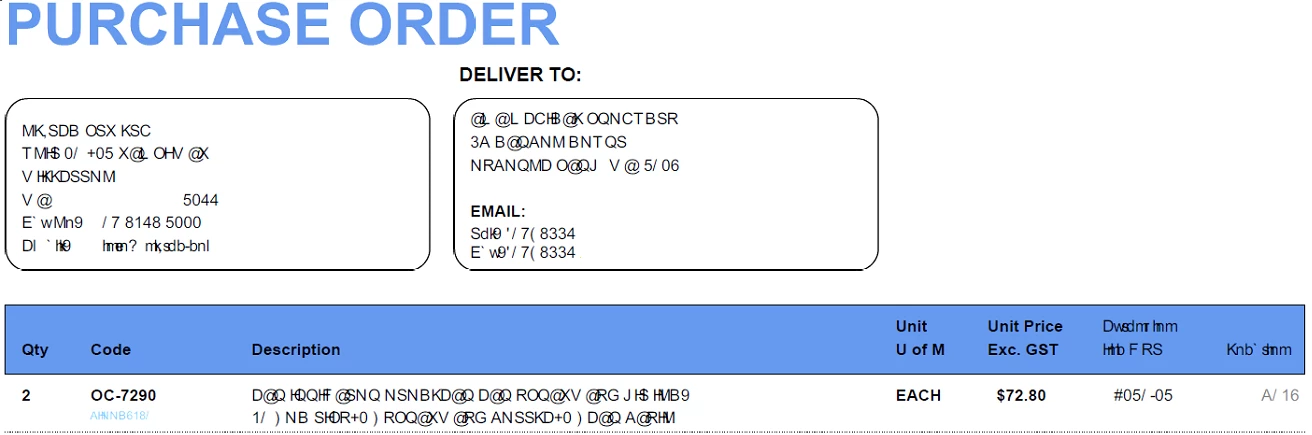
Some of the text appears to be scrambled and unreadable, yet the document looks fine when opened in any Internet browser and even free version of Adobe Reader.

User is on Windows 10 PRO x64.


So far we have tried:


- Repairing Acrobat

- Updating Acrobat

- Fully reinstall Acrobat

- Disabling Document Protection

- Adjusting a couple of the options in the the Acrobat PDF printer options


Here is a snippet of the problem:

Correct answer Bevi Chagnon - PubCom.com

When you see scrambled text, dots, odd characters, or white blocks that look like tofu, it means that the PDF doesn't have the original fonts embedded.


Acrobat tries to substitute with a font on your computer system, but when it can't find a valid substitute, it shows "scrambled" text for some or all of the text


3 solutions, take your pick of which one will work for your situation:


  1. Install the missing fonts on the computer where you're viewing the PDF. Note, however, that this won't fix the PDF and it will still show the scrambled text on another computer.
  2. Return to the original source document and re-export it correctly with the fonts embedded into the new PDF. If you're in Word, use Adobe's PDF Maker (the Acrobat Ribbon/Tab) and drill down in the preferences until you find the option to embed all fonts.
  3. You can attempt to embed the fonts into the existing PDF with Acrobat's Preflight Tool (but it's available only with the Pro version of Acrobat, not Standard or Reader).


Here are the steps:


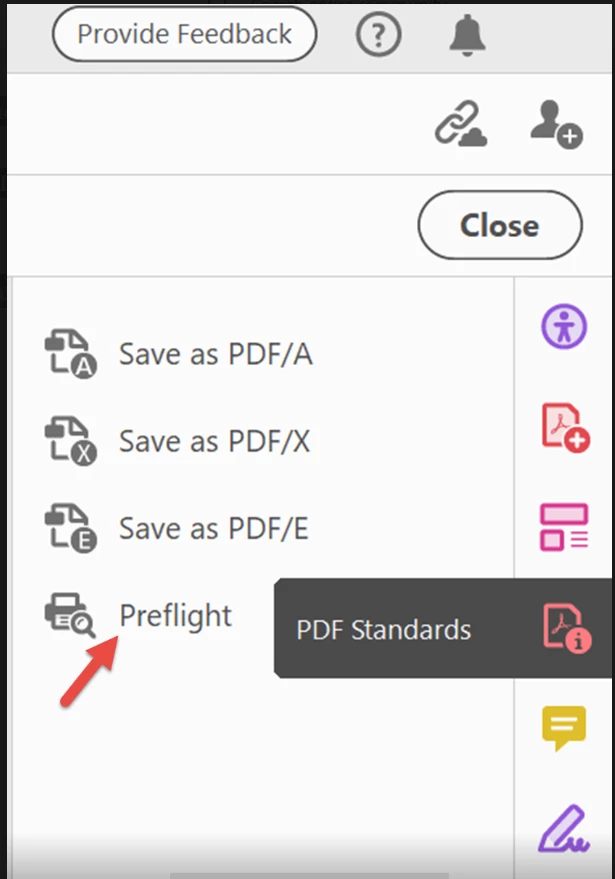
  1. Open the PDF Standards tool panel (if it's not already in your right-side tool set, then open it via the Tools Tab in the upper left of the Acrobat window). Depending upon which version of Acrobat you have, you can also get to this tool via the Print Production / Preflight tools.
  2. Open the PDF/UA Standards section.
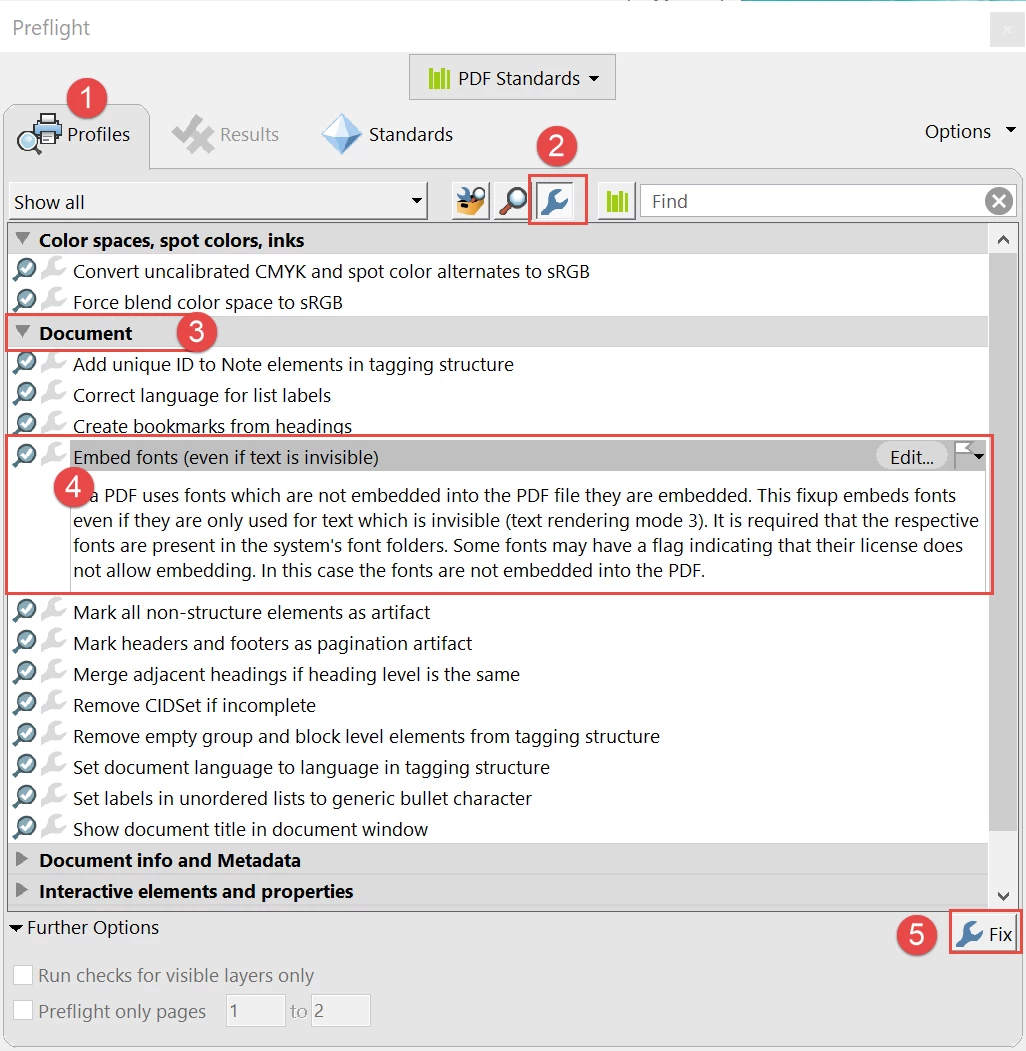
  3. From the Profiles tab, select the blue wrench in the upper menu bar.
  4. Expand the Document section.
  5. Select the Embed fonts utility, and then
  6. Click the FIX button in the lower right (has another blue wrench in the button).


Hope this helps.


One more suggestion: take a quick class in how to make PDFs to prevent errors like this, and how to correct errors in PDFs. Don't swear at our software companies; we all have the responsibility of learning how to use the tools. Flying by the seat of your pants doens't work and just gives you a royal PITA (pain in the "anatomy").

26 replies

New Participant
November 23, 2017

Same problem here. Report from AX.

I turned off "Use Local Fonts" and restarted the machine, that seems to be a temporarily fix.

New Participant
November 23, 2017

Same problem here; Ax 4.0 generated PDF.

A work-around is to create the PDF with embedded fonts. Makes the PDF files a lot larger, but at least it is readable.

Adorobat
Community Manager
Community Manager
November 22, 2017

Hi _NicOl_

Could you please share one of the problematic pdf files with us? You may share the file using Adobe's send and track or via private message.

For send and track, use the following steps:

(1) Visit this link: https://cloud.acrobat.com/send

(2) Click Add files > choose files from my computer

(3) Select the file > create link. You can copy paste the link here in the forums or share it via private message by left-clicking on the person's user name and click Message.

-Shivam

_NicOl_
New Participant
November 22, 2017

Hi,

Same things for me since last week & last update 2018.009.20044.

Some users & customers are impacted ! Not all users are impacted despite the same version.

In some case, restart PC and problem is gone for a short period too, and I see same thing like "henkvanvliet" : @"when I open the pdf, for a split second, I see the scrambled tekst and the it "jumps" to readable".

Fonts used in my PDF :

PDF version :

If I generate one problematic PDF in PDF with embedded font, it not seems to be a problem...

Same problem here ? Strange fonts

Thx

henkvanvliet
New Participant
November 22, 2017

Here the same problem. Also Version 2018.009.20044

Occors since this week.

Happens only with PDF in mail from a few customers. When the PDF is forwarded to someone else no problem.

After cleaning \windows\temp, %temp% and restarting the problem is gone for a short period.

During the period that there is no problem, it strikes me that when I open the pdf, for a split second, i see the scrambled tekst and then it "jumps" to readable.

This also occurs with the forwarded pdf to someone else.

Adorobat
Community Manager
Community Manager
November 21, 2017

Hi Nladm,

As per above-mentioned description, text appears to be unreadable when viewing pdf file sent by a client in Acrobat Std. XI, is that correct?

Could you let us know the dot version of Acrobat XI installed on the machine? To check the version: Identify the product and its version for Acrobat and Reader DC

Does this happen with the pdf files sent by clients only? Have you tried opening other pdf files in Acrobat?

Would it be possible if you can share the problematic pdf file with us? I have sent you a private message, please check the inbox for the same.

Thanks,

Shivam

November 21, 2017

I'm having similar problems with Reader DC 2018.009.20044, suddenly months worth of PDFs are opening much like the above that I know previously worked fine. I can still open them with Foxit and they look fine.

I'm also hearing that some recipients are opening our PDFs and they are scrambled, but our people open them and they are fine.