


Participating Frequently
May 21, 2025
질문

Speichern von geänderten Dateien funktioniert nicht mehr.

  • May 21, 2025
  • 1 답변
  • 2015 조회

Ich verwende Acrobat 64bit in der aktuellen Version 2025.001 auf Windows 11 Pro (alle Updates sind installiert). Seit einiger Zeit (möglicherweise dem letzten Acrobat-Update) kann ich pdf-Dateien nach einer Änderung, etwa dem Einfügen eines Kommentars, nicht mehr speichern. Beim Versuch zu speichern ändert sich der Dateiname. Aus der pdf-Datei wird eine tmp-Datei mit einem kryptischen Namen. Ich kann nur noch „Speichern unter“ wählen und die Original-Datei überschreiben. Dafür muss ich aber jeweils den Speicherort öffnen, was einfach wahnsinnig lästig ist.
Kann mir jemand helfen? Danke. Stefan
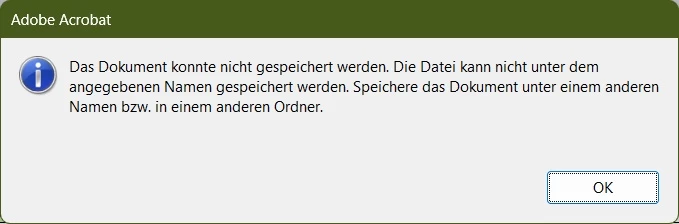
Es erscheint folgende Fehlermeldung:
1 답변

Community Manager
May 21, 2025

@stefanv16742216

Hi Stefan, 


Thank you for reaching out with your question. Sorry for the troubled experience. 

Judging from the screenshot, the file name does not match the file name convention, which is triggering the problem. To validate that issue, you may create a one-page PDF for testing, try saving it locally, and check if the issue is reproducible.


Also, please share the following:

1. Are you using any third-party plugins with Acrobat?

2. Are you saving files locally to the machine?

3. The files you are trying to edit or comment, are those locally saved files?


Lastly, could you share a video showing the problem from the start to the end with your workflow? 


~Tariq

Participating Frequently
May 21, 2025

Hi Tariq,
vielen Dank für die schnelle Antwort. Zu Ihren Fragen:
1. Ich nutzen keine third-party plugins in Acrobat.
2. Ich speichere die Dateien in unserem lokalen Netzwerk (Local area network)

3. Die bearbeitete Datei habe ich im lokalen Netzwerk geöffnet und bearbeitet. "Speichern" funktioniert nicht, "Speichern unter" und überschreiben der originalen Datei schon.

Noch eine Information: Aufgrund IHrer Frage habe ich die Datei auf die lokale Festplatte kopiert. Dort konnte ich die Datei nach Bearbeitung direkt speichern.

Das gewünschte Video finden Sie im Anhang.

Vielen Dank, Stefan

Community Manager
May 21, 2025

Stefan, 


Thank you for sharing the video and requested information.


Acrobat may face issues when saving directly to mapped or network drives.


Here’s why:

When you save a PDF in Acrobat, it doesn’t just update the file in place — it creates a new temporary copy, writes your changes, and then attempts to replace the original. On network drives, this process can fail if:

  • The file was modified externally or appears changed due to sync/cache delays.

  • There’s a permissions or locking issue on the network share.  

  • Antivirus or sync tools interfere with Acrobat’s save process.

Workarounds:

  • Save to your desktop first, then manually move the file to the network location.

  • Or try using the full UNC path (\\server\folder\file.pdf) instead of a mapped drive (e.g., Z:\).

  • Make sure Acrobat and your system are fully updated.

You may discuss this with your Network admin or IT admin, who managed the network and the network drive permissions.


~Tariq