


- Home
- Acrobat
- Discussions
- Re: submit button to change appearance based on f...
- Re: submit button to change appearance based on f...

Copy link to clipboard
Copied
In my form I have a signature field and a date field with a submit button below it. My goal is when either both or one of these fields are empty the submit button is grey and read only. It becomes enabled only after both fields are entered. My script works beautifully with the signature field, but the date field doesn't seem to effect the button regardless.
Here is my script:
if ((this.getField("Employee_Signature").value.length === 0)&&(this.getField("Date").value.length === 0)){
this.getField("Submit").fillColor = ["RGB", 192/255, 192/255, 192/255];
this.getField("Submit").readonly = true;
} else {
this.getField("Submit").fillColor = ["RGB", 0/255, 170/255, 0/255];
this.getField("Submit").readonly = false;
}
I have this script running in both the signature field and the date field. Here is the location of the signature field script:

and here is where I have it for the date field:
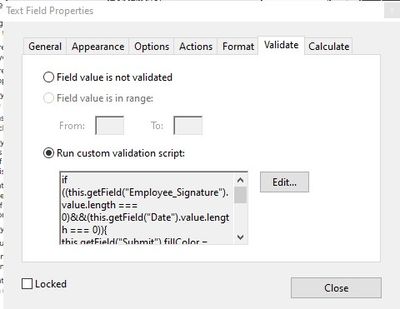
My script doesn't appear to have any errors, I've tested it, but is it missing something? Or am I putting the script in the wrong place?



Copy link to clipboard
Copied
Thank you for all your help. It turns out the script was still missing something. I believe it was still only reading that as long as one of the two fields had a value greater than 0 then it was ok to enable the button, but both fields needed to be greater than zero. This final script is really rough, but it works exactly how I need it to. If someone can rewrite my script to do the same thing but not as messy please do!!!
if (!(this.getField("Employee_Signature").value.length == 0) && !(event.value.length == 0)){
this.getField("Submit").fillColor = ["RGB", 0/255, 170/255, 0/255];
this.getField("Submit").readonly = false;
} else {
this.getField("Submit").fillColor = ["RGB", 192/255, 192/255, 192/255];
this.getField("Submit").readonly = true;
}
 11
Replies
11
11
Replies
11




Copy link to clipboard
Copied
In the latter, change this line:
this.getField("Date").value
To:
event.value
Copy link to clipboard
Copied
So my script for both the signature field and the date field still would be the same but like this instead?
if ((this.getField("Employee_Signature").value.length === 0)&&(event.value.length === 0)){
this.getField("Submit").fillColor = ["RGB", 192/255, 192/255, 192/255];
this.getField("Submit").readonly = true;
} else {
this.getField("Submit").fillColor = ["RGB", 0/255, 170/255, 0/255];
this.getField("Submit").readonly = false;
}
Am I putting the script in the correct locations?
Copy link to clipboard
Copied
No, that's not what I said. The version with event.value should only be used under the text field.
Copy link to clipboard
Copied
I currently have the signature field as:
if ((this.getField("Employee_Signature").value.length === 0)&&(this.getField("Date").value.length === 0)){
this.getField("Submit").fillColor = ["RGB", 192/255, 192/255, 192/255];
this.getField("Submit").readonly = true;
} else {
this.getField("Submit").fillColor = ["RGB", 0/255, 170/255, 0/255];
this.getField("Submit").readonly = false;
}
and the date field as
if ((this.getField("Employee_Signature").value.length === 0)&&(event.value.length === 0)){
this.getField("Submit").fillColor = ["RGB", 192/255, 192/255, 192/255];
this.getField("Submit").readonly = true;
} else {
this.getField("Submit").fillColor = ["RGB", 0/255, 170/255, 0/255];
this.getField("Submit").readonly = false;
}
This doesn't work. The button is responding to both fields but not together. Both fields need to be filled for the submit button to enable. It's not behaving that way.
Copy link to clipboard
Copied
Can you share the actual file with us?
You can attach it to the original message using the tiny paperclip icon at the bottom when you edit it, or upload it to a file-sharing website (like Dropbox, Google Drive, Adobe Cloud, etc.), generate a share link and then post it here.
Copy link to clipboard
Copied
https://drive.google.com/file/d/1WV6O2P-Kvw4Ilj4T_so7xj7P-ZryT6Kf/view?usp=sharing
Here is a modified file. It contains all the relevent fields.
Copy link to clipboard
Copied
Get rid of the signature field and use the following as the custom calculation script of the Date field:
if (this.getField("Employee_Signature").value.length == 0 && event.value.length == 0){
this.getField("Submit").fillColor = ["RGB", 192/255, 192/255, 192/255];
this.getField("Submit").readonly = true;
} else {
this.getField("Submit").fillColor = ["RGB", 0/255, 170/255, 0/255];
this.getField("Submit").readonly = false;
}
If you see it's not "kicking in" add this line to the top of the script, and then remove it after it has executed:
app.alert(event.value.length);
Copy link to clipboard
Copied
Remove the signature field altogether or just the script within the field?
I've tried removing the script within the field and following the script and app.alert(event.value.length); then removing it as per your suggestion. The submit button only responds to the date field.
Copy link to clipboard
Copied
Remove the script from the signature field. Use the one I provided as the calculation script of the date field.
Copy link to clipboard
Copied
Thank you for all your help. It turns out the script was still missing something. I believe it was still only reading that as long as one of the two fields had a value greater than 0 then it was ok to enable the button, but both fields needed to be greater than zero. This final script is really rough, but it works exactly how I need it to. If someone can rewrite my script to do the same thing but not as messy please do!!!
if (!(this.getField("Employee_Signature").value.length == 0) && !(event.value.length == 0)){
this.getField("Submit").fillColor = ["RGB", 0/255, 170/255, 0/255];
this.getField("Submit").readonly = false;
} else {
this.getField("Submit").fillColor = ["RGB", 192/255, 192/255, 192/255];
this.getField("Submit").readonly = true;
}
Copy link to clipboard
Copied
This didn't work. The button is responding to both fields but not together. Both fields need to be filled for the submit button to enable. It's not behaving that way.


Get ready! An upgraded Adobe Community experience is coming in January.
Learn more
 AdChoices