


Participating Frequently
April 22, 2020
Answered

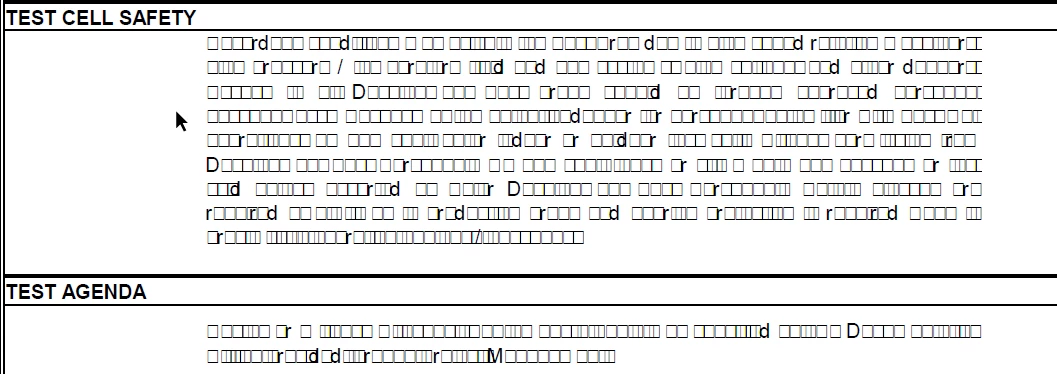
Text looks like a bunch of squares and and junk

  • April 22, 2020
  • 6 replies
  • 97889 views

Hi Community,

 Hope this post finds you well.


I'm having an issue reading a PDF document in Adobe Acrobat reader DC and it shows bunch of circles and squares for some text content. (this happens on all machines for all users) 


If the same problematic document is opened in NitroPDF or Acrobat DC Pro or even chrome browser the text is displayed correctly.


This problematic document was created from  merging two other source documents using Acrobat DC Pro and both source documents looks fine in any of the  readers (reader ,pro,chrome etc). 

This happens on regualr basis but not all the times. 


The problem reading is only with Adobe acrobat reader and we cant ask our customers to buy DC Pro or Nitro PDF because they are not able to read some text.

Kinldy suggest 

screen shots below

Problematic document ;


Correct answer

Same problem, half of text on a page suddenly became squares with Xs in them, sometimes whole pages were affected. The only thing to help was changing the font to something else, then changing it back manually. Took a lot of time, but less time than reformatting, reloading, and all the other things listed here. Some documents were created in Adobe, others were shared by clients. There was no consistency in the errors. 

6 replies

Participant
December 23, 2024

Nothing suggested here worked for me, but what did work is this:

1. In Acrobat Pro, go to File > Export a PDF > JPEG. This will create individual JPEGs for each page
2. In Finder (Mac) or Explore (PC) , select all of the created JPEGs, right click, open in Acrobat Pro. A prompt will ask if you want to combine the files into one PDF, say YES. Adobe OCR functionality converts the image back to text in a supported font!
3. Edit the newly created PDF Adobe OCR functionality converts the image back to text in a supported font!

4. Copy and paste.

Participant
October 7, 2024

Hi, 

I have just had to work on this same issue for a client. They are using Nitro pro and send out invoices created in Nitro to their clients whom invariably have Adobe Reader as the minimum requirement. I recreated the issue having installed Nitro and in order for documents to be readable in Adobe Reader you need to print to PDF in Nitro. 

When opening the 'printed' document in Adobe, you are able to view the text as intended. 

This purely is a workaround. Getting to the bottom of why is on my next agenda but you don't need to spend time re-creating documents from the beginning and this will hugely avoid precious time being wasted. 

Once I know what is going on I will share it. 

Participant
April 7, 2021

Hello all,


I'm not sure if this is still an issue for you like it just was for me.

I was able to find a fix.

Click Edit> Preferences and go to "Documents" (This is inside of Adobe) unckeck the "Save As optimizes for Fast Web View.


Correct answer
June 16, 2021

Same problem, half of text on a page suddenly became squares with Xs in them, sometimes whole pages were affected. The only thing to help was changing the font to something else, then changing it back manually. Took a lot of time, but less time than reformatting, reloading, and all the other things listed here. Some documents were created in Adobe, others were shared by clients. There was no consistency in the errors. 

Participant
July 7, 2021

This is happening to me too with a document i use all the time. Suddenly now it is getting all these boxes when combined with other files to create a new pdf. any thoughts on why this is happening all of a sudden? I can't recreate this document without HOURS of time.


Amal.
Community Manager
Community Manager
April 29, 2020

Hi Vishyk


We are sorry for the trouble and the delay in response. As described you are not able to view the PDF content and getting squares ad circles. It seems that the fonts were not properly embedded into the PDF file while creating from Word or Excel


Please try to recreate the PDF file from Word Or Excel from the Acrobat Ribbon present in the toolbar at the top and try the following setting.

1. Click On the Acrobat Ribbon in Word or Excel > Preferences


2. Go to Advanced settings


3. Go to Fonts and Select Embed All fonts and click OK 


Additionally, you may also refer to the help article (https://helpx.adobe.com/acrobat/using/pdf-fonts.html) and see if that helps.


Let us know how it goes.


Regards

Amal

vishykAuthor
Participating Frequently
May 5, 2020

Hi Amal,

 Thank you for your reply.

we are not facing issue when creating PDF from word or excel.

The problem is  we have some pdf files ,call it as source PDF files, which all looks good and no issues reading in any PDF viewer (acrobat reader, pro , nitro,chrome ) but when those source pdf files are merged in to a different file using acrobat pro , the merged file have this problem ,where we see circles and squares  and also we see this circles and squares in the merged file in the place wher this source document was embedded. This issue is only seen in acrobat reader and pro but that mereged pdf looks fine when opened in Nitro and  chrome.


I suspect this is an issue with merge in acrobat pro and we have seen this issue more with source pdf files which were generated with word document , but remember when we got that source PDF file created from word , we dont have the issue, only after merging in to a different PDF file using acrobat pro,  this issue seems to happen in the merged file.


Following is the work around which has helped us i.e 

Saving the source PDF file as PDF/E and then merging to destination file , but this seems to be an extra step and takes lot of time doing it even it is not required in most cases.


Kindly help.


Amal.
Community Manager
Community Manager
May 8, 2020

Hi there


Thank you for sharing the information in detail. As described the source files look good however after merging the files together the text becomes unreadable.


Would you mind sharing the source/original PDF files and the merged PDF file having the issue so we can check it at our end? Please upload the files to the document cloud (https://documentcloud.adobe.com/link/home/) generate the link and share it with us for testing.


Regards

Amal

vishykAuthor
Participating Frequently
April 23, 2020

It is kind of mix, Acrobat Pro & Adobe Acrobat Reader are on one user's machine and  Nitro PDF and  Adobe Acrobat Reader are on a different machine and some have only acrobat reader ( basically every one has reader becuase its free ) . I'm not sure if it is a font issue on a computer, because the guy who has both nitro and reader, can see text in problematic file in nitro but not on adboe reader on same machine.


I strongly feel it is with Adobe Pro when merging documents it causes this issue.


It is not happening with every PDF but some specific PDF's which were basically created from word or excel. The work around which is currently  helping is to save such PDF's as type PDF/E and merging after that is not an problem.


I  updated to latest Adboe reader (2020.006.20042) on my windows 10 machine and still see the same issue (junk characters , squares and circles)


ls_rbls
Community Expert
Community Expert
April 23, 2020

Yes that seems more like Preference setting.


See here for additional insights: https://community.adobe.com/t5/acrobat/junk-characters/td-p/9848847?page=1 


But to be certain, there are two ways of finding  out.


One is to make certain what type of font encoding is being used in the source software that produces the PDF.


For example, I would run the Accessibility Checker in MS Word, to help determine what other underlying issues may be related and fix it before exporting such file to PDF.


If the error manifest again after that, Adobe Acrobat also have an Accessibility Checker.


Run a Full Report amd it will tell you what the problems are.


With that info you can narrow down the issue(s) and with the aid of the Print Production Tool you can test and analyze the file.


This is helpful because you also have pre-flight presets that are customizable, allowing you to test and get the issue resolved.


Or you can just hit Analyze and Fix, and see if  with the default Acrobat preflight profiles the PDF actually gets repaired.


Sometimes this works and sometimes it doesn't.


From what I've read in the Adobe Helpx guidance , when this happens your only option is to recreate the original file.


ls_rbls
Community Expert
Community Expert
April 22, 2020

Is Adobe Acrobat Pro , Adobe Acrobat Reader and Nitro PDF in the same computer where this file is opened>


Is this happenning with just this one file or every PDF?


What is the latest version update that was applied to Adobe Reader? And what operating system is running in that computer?