


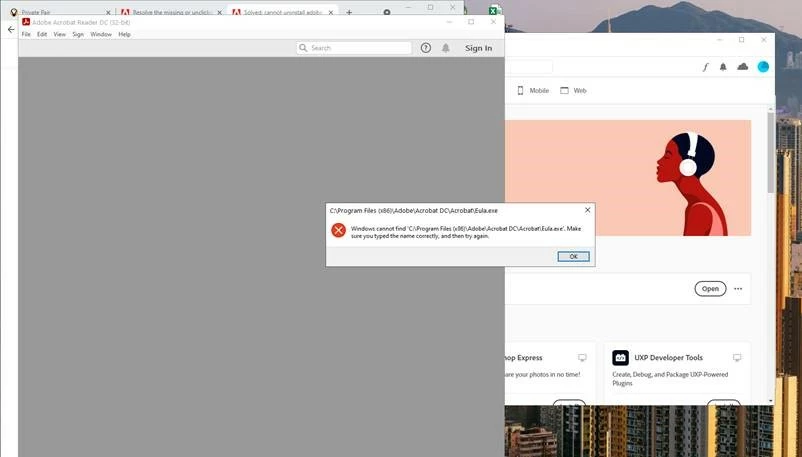
Windows cannot find 'C:\Program Files (x86)\Adobe\Acrobat DC\Acrobat\Eula.exe
Hi! Included in this post is a screenshot (First picture) of an error message I get every time I try to open Adobe Acrobat. This message makes it impossible for me to use Acrobat. (I am using Windows 10, 64-bit)
To fix this problem, I first tried to uninstall Acrobat using the Adobe Creative Cloud app, hoping that reinstalling it would fix the issue. Clicking the uninstall button on the creative cloud app does nothing, however, and Adobe still says that I have Acrobat installed on my computer. I then uninstalled Acrobat using the Add or Remove Programs feature from System Settings, but the creative cloud still says Acrobat is installed on my computer and will not let me reinstall it. My company then removed my account from our Adobe profile access plan and then re-added me. Even after logging back in and reinstalling the creative cloud app, it STILL says I have Acrobat installed and will not let me uninstall it. I am not sure what else I can do at this point... If somebody could help me, I would very much appreciate it!
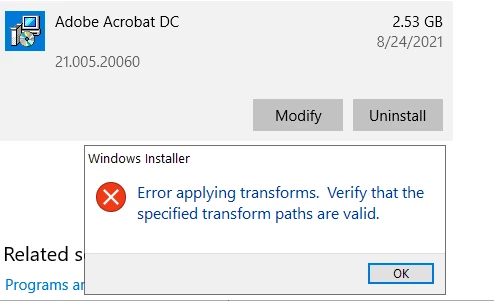
One thing to note: In the Add/Remove Programs window in System Settings, there is a program called Adobe Acrobat DC that is still installed on my computer for some reason, even though I already uninstalled Acrobat. Trying to uninstall this application from my computer results in an error message, which you can see in the second picture.
Thank you!!
 AdChoices