
Participating Frequently
July 10, 2023
Question

Wingdings replacing courier text in old pdf

  • July 10, 2023
  • 1 reply
  • 2487 views

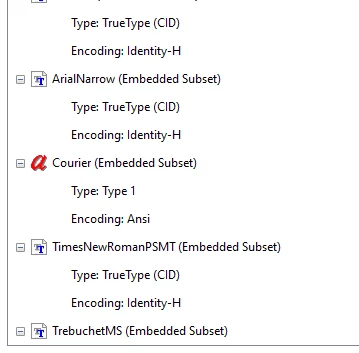
A colleague is having a problem with a pdf containing 151 schematics for one of our buildings. The pdf was created in 2009 by the architectural firm hired for the renovation. When she opens the file, the information section for each page has been replaced by wingdings.  She sent the file to me to review. I opened it on a mac and pc. I have the same issue that she did. I use Adobe Acrobat Pro and she uses Reader. I do not get an error message when I open the file. When I highlight the wingdings, the font is listed as courier. If I change the font to Arial, nothing changes. The wingdings stay.  If I select and copy the wingdings, paste into a generic text editor, the correct text pastes. The document properties section says that courier is an embedded subset. 
 

Here is how the wingdings appear on the page:

Any help is appreciated.  I tried this solution about embedding fonts posted here (https://community.adobe.com/t5/acrobat-discussions/text-changes-to-special-symbols-with-saving-pdf-in-acrobat/m-p/10634321) and it did not work.

This topic has been closed for replies.

1 reply

Brad @ Roaring Mouse
Community Expert
Community Expert
July 10, 2023

If you open the file in another viewer besides Acrobat, even a browser, does it show the same issue?

Meanwhile, in Acrobat, create an inventory (Print Production > Preflight > Options...). You can deselect any box except Fonts and click OK. Look at the report and see if it has any better info for you for where the fonts are going awry.

KathrynLAuthor
Participating Frequently
July 12, 2023

Thank you for the information. I created an inventory for the first page. Nothing seems wrong with the Courier properties. This is the first time I've run an inventory, so I may not be interpreting the results correctly.

Brad @ Roaring Mouse
Community Expert
Community Expert
July 14, 2023

Thank you so much for helping me with this! I really appreciate it. I will let them know that that the easiest fix is scanning our hard copies and creating a new pdf. Of course, contacting the architectural firm to see if a new pdf can be created is the other option. 


There's no need to scan these. That would give you a worse product. The schematics themselves are just fine. For the sample file you sent me, I was able to open in Illustrator, delete the wonky "wingding" characters, chnage the white Courier type to Black, then re_PDF it. Took less than 2 minutes. Of course, you DO have 151 of these, so there would be some time involved. I've sent you back a fixed one.

But yes, if the architecural firm still has the original files, (even though the seem to be from 17 years ago), it may be easier for them just to redo the PDFs... hoping whatever caused the wonky issue doesn't happen.