
Known Participant
October 7, 2024
질문

Workaround needed for "Print" Action limitation in Action Wizard

  • October 7, 2024
  • 2 답변들
  • 1250 조회

Hello,


I need a workaround for the "Print" Action limitation which does not allow me to "Specify settings". 
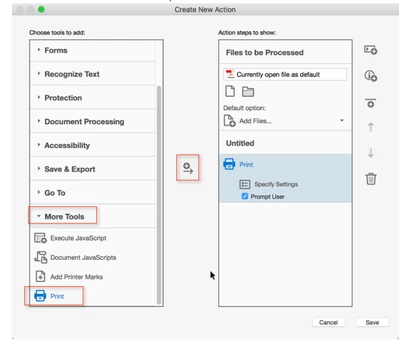
Instead, when I click on the "Specify Settings", it says it will default to what my printer is set to:
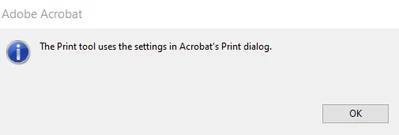
 

This is not helpful to me b/c I have over 100+ users who use this action wizard to process their files and I cannot tell them what setting to have. Plus, they would have to do this everytime which would be annoying. It would be great if the action wizard automatically sets the setting (File >Print and then select "Adobe PDF" for the Printers). This is the setting I would want it to resort to when a user uses my action wizard. Is there a work around for this? Note, I need it to save the pdf only in this manner: File >Print and then select "Adobe PDF" for the Printers. Can a javascript be written for this?


Thanks.

Sue


이 주제는 답변이 닫혔습니다.

2 답변

suemo22작성자
Known Participant
October 7, 2024

Very good question. I thought it would be confusing if I explained why. I am finding that if I don't re-save the pdf's as in this manner: File >Print and then select "Adobe PDF" for the Printers before running them through my automatic labeling action wizard, the headers and footers get removed. The only way I found I could avoid this was to re-save them as pdf's  File >Print and then select "Adobe PDF" for the Printers. Hence, I thought the best thing to do is to always re-save all of my pdf's before runnign them through my labeler action wizard.


I will try the javascript and get back to you. Thank you.


Sue

PDF Automation Station
Community Expert
Community Expert
October 7, 2024

What is the purpose of processing PDF files and printing them as PDFs?  Your answer will help me provide a solution.  Instead of Print for the action use Execute JavaScript and then use the following script:

var pp=this.getPrintParams();
pp.printerName="Adobe PDF";

pp.interactive=pp.constants.interactionLevel.silent;
this.print(pp);


Make sure you have the following settings in your Adobe PDF printer:


suemo22작성자
Known Participant
October 16, 2024

Hello, 


For the javascript provided by PDF Automation Station, is there a way to make it so it saves to a particular folder such as "../Prepped/" instead of having users adust their printer settings as you suggested? I have a folder where all of the processing is happening and it would be really useful to have it just save to it.

suemo22작성자
Known Participant
October 16, 2024

When you are printing to PDF using the Adobe PDF printer, you are not saving, you are sending the document to the printer with some settings set out in the getPrintParams script.  The printer takes over and uses the setting preferences for those not laid out in the script.  You would have to adjust the printer settings to point to your folder under "Adobe Output Folder" in the screenshot I provided.  You can also make a copy of the Adobe PDF printer, name it something else, use that name in the script and only use that printer for processing this way.


Can you explain the last part of your suggestions  - "you can also make a copy of the Adobe PDF printer, name it something else, use that name in the script and only use that printer for processing this way" - by providing an example of how one would do this with the javascript in the action wizard or preset action in the action wizard? I am not following.