


Participating Frequently
June 26, 2025
질문

Acrobat Reader 的字體包和拼寫詞典包,有下載點2024.X版嗎

  • June 26, 2025
  • 2 답변들
  • 1200 조회

Acrobat Reader 的字體包和拼寫詞典包,有下載點2024.X版嗎

下列這些都是2023.X版,會跳出版本太舊

32

https://helpx.adobe.com/tw/acrobat/kb/windows-font-packs-32-bit-reader.html

64

https://helpx.adobe.com/tw/acrobat/kb/font-pack-spelling-dictionary-64-bit-windows.html#sa_src=web-messaging 
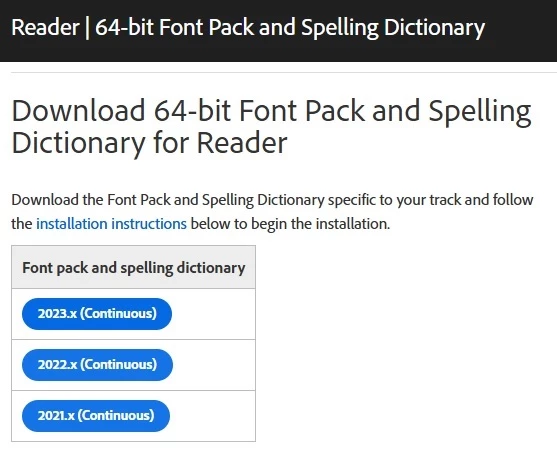
試過沒辦法安裝

2 답변

JR Boulay
Community Expert
Community Expert
July 3, 2025

[MOVED TO THE ACROBAT READER DISCUSSIONS]

Acrobate du PDF, InDesigner et Photoshopographe
creative explorer
Community Expert
Community Expert
June 30, 2025

@responsible_dynamism5392 Given that you're encountering a "version is too old" message when attempting to install the 2023.x font packs, and your earlier "referenced memory" error indicates a fundamental problem, it strongly suggests a mismatch between your current Adobe Acrobat Reader installation's specific version/build and the font pack's expected compatibility. Even though the font pack is for "2023.x," if your Reader is a more recent 2024.x or 2025.x release, or a specific "Continuous" track build that has moved beyond what that particular font pack targets, the installer will correctly flag it as incompatible.

But, do you really need a font pack? I know, I don't install fonts. And if I need to install a font, I just do that font family. The standard practice when creating a PDF is for the fonts used in the document to be embedded directly within the PDF file itself. This means the PDF carries its own fonts, so the viewing application (Acrobat Reader) doesn't need to find them on your system or from an external pack to display or print the document correctly. This is the ideal scenario and what happens with well-formed PDFs. 

If you cannot find a "2025.x" explicitly listed, try installing the latest available "Continuous" track font pack from the official Adobe page that matches your architecture (32-bit or 64-bit). If that still gives a "too old" error, it implies that either the truly latest font pack isn't yet publicly available for direct download for your exact build, or your Acrobat Reader installation itself might need a fresh download of the entire application from Adobe's main site to ensure all components are perfectly aligned.

Good luck! 

m
Participating Frequently
July 1, 2025
您好:
有試過由Acrobat Reader主站(https://get.adobe.com/tw/reader/)下載
應用程序25版本(安裝2台PC測試狀況一樣),但還是出現缺字型之後跳出引導下載畫面(
https://helpx.adobe.com/acrobat/kb/windows-font-packs-32-bit-reader.html)
後面有試過安裝23版本主程式(安裝2台PC測試,一台25版本移除裝23版,一台直接裝23版,狀況一樣),測試開PDF一樣
引導下載字型(2台23版測試安裝字型後可正常顯示),但字型安裝完成後再次開PDF正常可開啟。

請問Adobe 官方頁面最新可用“Continuous”軌道字體套件,25.001.20531要到哪下載
Community Manager
July 1, 2025

Hi @responsible_dynamism5392


Thanks for reaching out, i am checking internally with the product team about your experience. 

Once i have information to share i will keep this discussion updated.


~Tariq