



Fame-BugZ
Participant
April 27, 2020
Question

Acrobat Reader DC can't read Thai font.

  • April 27, 2020
  • 2 replies
  • 11525 views

Hi, I've found some problems that the Reader couldn't read Thai font (in comment section). I've already installed the Extended Asian Language Pack, but it didn't work. I don't know how to fix it, I've tried to reinstall the program but the problem is still there. Does anyone has any idea? Please give me some suggestion. Thank you!
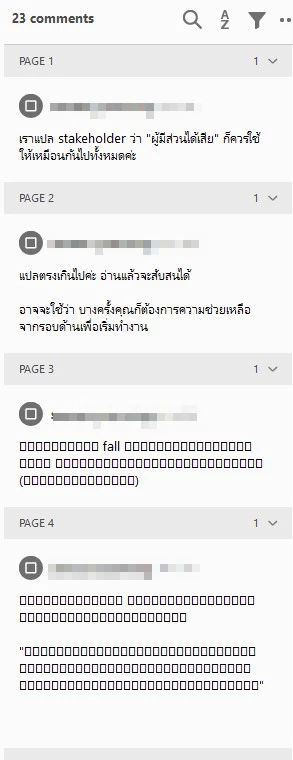


2 replies

Participant
May 20, 2024

For 2024. Go to 'Edit > Preferences > Commenting > Font' then select font that support Thai language e.g., Tahoma, Cordia New, Browallia New.

Amal.
Community Manager
Community Manager
May 4, 2020

Hi there 


we are sorry for the trouble and the delay in response. It seems like the Thai font is not embedded in the PDF file or its not available/installed on your computer.


Please try the following preferences settings and see if that works


Go to Edit (Windows), Adobe Acrobat Reader DC (Mac) > Preferences > Page Display > Under Rendering, Select 'Use local fonts' > Click OK and check


For more information please refer to the help article (https://helpx.adobe.com/acrobat/using/pdf-fonts.html)


Let us know how it goes.


Regards

Amal

Participant
September 22, 2020

I'm using Mac Catalina and Adobe Acrobat Reader Version 2020.012.20041.

It seems that this version of Reader cannot handle Thai language at all. Here's part of a document originally edited with Mac Preview:

Here's what that same document part looks like when attempting to edit in Reader:

Here's my preferences for Page Display.

How do I select the font in Reader if I want to enter or edit Thai text? I don't see any place to do that. It's easy in Mac Preview but it seems to be impossible in Reader.

Amal.
Community Manager
Community Manager
September 28, 2020

Hi there


We are sorry to hear that.


Acrobat supports the entry and display of Thai and Vietnamese text. In Windows only, Arabic and Hebrew are also supported. By default, Right-To-Left Language Options is enabled under Arabic and Hebrew regional settings (in Windows).


For more information please look at the help page https://helpx.adobe.com/acrobat/using/asian-cyrillic-right-to-left.html#hebrew_arabic_thai_and_vietnamese_language_pdfs


Hope this information will help


Regards

Amal