
Exit
  • Global community
    • Language:
      • Deutsch
      • English
      • Español
      • Français
      • Português
  • 日本語コミュニティ
  • 한국 커뮤니티
0

Adobe Acrobat Reader 2021.007.200.95

New Here ,
Oct 01, 2021 Oct 01, 2021

Dear Sir/Madam,

Since we have updated our Adobe Acrobat Reader DC to version 2021.007.200.95 we are unable to preview PDF attachements within outlook we get the below.
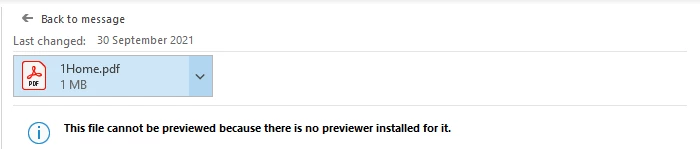
broxapltd_1-1633093520490.png


This is on Windows 10H1 Build 64Bit.

After doing some research online and tried many fixes suggested, it still doesnt resolve the issue a remove and reinstall has also been carried out with both Adobe Reader and Office 365.

Has anyone else come across this before and if so what was the fix.


TOPICS
General troubleshooting
545
Translate
Report
Community guidelines
Be kind and respectful, give credit to the original source of content, and search for duplicates before posting. Learn more
community guidelines
Adobe Employee ,
Oct 04, 2021 Oct 04, 2021

@broxapltd Can you please try the workarounds suggested here and let me know if that works?https://community.adobe.com/t5/acrobat-discussions/pdf-previewer-not-working-in-outlook/m-p/12431881... 


Also posting summarized version of the workaround:

You can download the .reg file shared below and double click on it and registry entries would be automatically created.

https://documentcloud.adobe.com/link/track?uri=urn:aaid:scds:US:e94a84df-fa43-4b26-99bf-c1906c783c2b 


Please note that running .reg files changes the system configuration, so please ensure to verify the source and content of the file before running it on your system.

Thanks,

Ankit 

Adobe Acrobat software engineer

 
Translate
Report
Community guidelines
Be kind and respectful, give credit to the original source of content, and search for duplicates before posting. Learn more
community guidelines
Community Expert ,
Oct 05, 2021 Oct 05, 2021
LATEST

MOVED TO THE ACROBAT READER FORUM


Acrobate du PDF, InDesigner et Photoshopographe
Translate
Report
Community guidelines
Be kind and respectful, give credit to the original source of content, and search for duplicates before posting. Learn more
community guidelines