
November 22, 2017
Answered

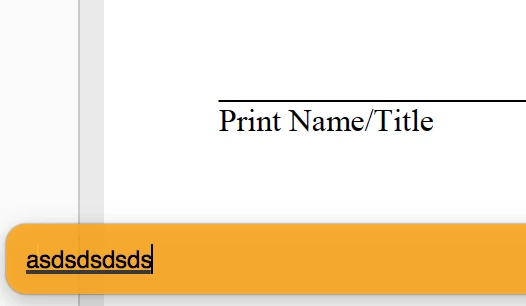
Adobe Acrobat Reader DC make me type in the orange bar in the bottom before fill in form

  • November 22, 2017
  • 4 replies
  • 5543 views

Hi,


For some reason, my Reader starts to make me type data into (fillable) form by the yellow/orange bar in the bottom first, then it fills in to the field when I am done typing. This is very annoying for me. I've been trying to turn it off, and just let me type into the form field directly. I am using Acrobat Reader DC, version 2018.009.20044. I'm using MacOS. Could somebody help me turn this feature off?


Thanks
 

Correct answer paulj67263860

We just had this problem occur on a Mac. Went into the System Settings > Accessibility > Keyboard > Keyboard Settings... > Input Sources "Edit" > and then removed the international and US keyboard and just left the US keyboard. This solved the problem. Strange.

4 replies

paulj67263860Correct answer
Participant
December 20, 2024

We just had this problem occur on a Mac. Went into the System Settings > Accessibility > Keyboard > Keyboard Settings... > Input Sources "Edit" > and then removed the international and US keyboard and just left the US keyboard. This solved the problem. Strange.

AnandSri
Community Manager
Community Manager
February 28, 2025

Hello!


Glad to hear the issue is resolved! Thank you for sharing the steps that worked for you—it will help other community users.


^AB

Participant
June 6, 2022

Have anyone resolve this issue? I encountered this last week too and don't know how to fix it.

Participant
June 7, 2023

The above issue is still hapenning. Does anyone have the solution. Could not fill the PDF forms with Japanese characters using latest adobe acrobat on lates MAC OS with M1 chip.

Meenakshi Negi
Community Manager
Community Manager
June 8, 2023

Hi Manasa26731526hjrc,


Thank you for reaching out.


Could you please share more details about this issue?

Did you notice the behavior change recently? Also, check if it happens only when using languages other than English.

Share the Acrobat and Mac OS version numbers. It would be helpful if you could share the screen recording of the workflow for a better understanding. 


Thanks,

Meenakshi


Participant
April 27, 2020

Hello, I'm a student user of Adobe Acrobat Pro DC.

I'm having this problem... whenever I type something into the PDF file through editing tool, an orange bar with the texts I am typing pops up on the top of my screen, and it really bothers me. It seems like there are few more users having the same problem with me (link underneath), but they haven't got the answer from the community yet. So I'm asking this again - are there any ways that I can deactivate this orange box? (If it helps, I am using the MacOS)

Please help me get rid of this orange bar 😞 Thank you...


https://community.adobe.com/t5/acrobat-reader/adobe-acrobat-reader-dc-make-me-type-in-the-orange-bar-in-the-bottom-before-fill-in-form/td-p/9549286?page=1

Amal.
Community Manager
Community Manager
April 28, 2020

Hi Synnn,


We are sorry for the trouble. As described, the orange pop-up bar when typing in PDF


Is this a behavior with a particular PDF file or with all the PDFs? Please try with a different PDF file and check. If its a file specific issue please share the file with us for testing.


What is the version of the Adobe Acrobat DC you are using? To check the version of the application please go to Help > About Adobe Acrobat DC.
Make sure you have the latest version of the application 20.006.20042 installed. Go to Help > Check for updates.


You may also try to reset the preferences to default as described here (https://community.adobe.com/t5/acrobat/how-to-reset-acrobat-preference-settings-to-default/td-p/4792082) and repair the installation (For Windows Only) Go to Help > Repair Installation.


If it still doesn't work, please try the following steps


Let us know how it goes


Regards

Amal


Participant
April 28, 2020

Hi Amal, thank you for your reply.


1. This happens with all sorts of PDF files, but only when I type things in my first language-which is Korean. it strangely doesn't come up when I am typing in English,

2. Checked that my version is the latest one

3. Tried removing and reinstalling the program as you suggested


But still, this orange bar pops up only when I am using Adobe Acrobat DC.

I wondered if this problem also happens in other Adobe programs, so I tried with Illustrator, and found out Acrobat is the only one. Nothing popped up while typing in Illustrator.

If this info helps, I can't either click or move the bar. It just appears to be there without any possible adjustment.


I'm completely lost with this unusual episode... I spent lots of hours to figure out what kind of a problem I should even name this, to search for answers. If there are other suggestions you can make, please let me know.


ps. I found several more cases that are similar with mine. 

https://community.adobe.com/t5/premiere-pro/i-get-input-bar-at-the-bottom-of-the-app-when-i-type-in/td-p/10558592?page=1

https://community.adobe.com/t5/acrobat/input-bar-in-adobe-acrobat-on-macos/td-p/10949846?page=1

hope you guys would figure out what is producing this input bar/bubble with these examples and explanations 😞

Participant
April 26, 2020

Hi, I have the same problem, did you ever figure out how to fix it 😞