Participant
October 8, 2018
Answered

How do you get rid of the pop up screen you your new adobe reader DC 2019 edition.

  • October 8, 2018
  • 5 replies
  • 37808 views

Hi all,

Every time I open a .pdf file from windows explore (windows 7.0 sp1, browser firefox). This annoying splash screen pops up, that is the "getting started splash screen" opens. How can I hide this splash screen, every time I open a .pdf file on my p.c. Thank you.

Rick Ambrosino

This topic has been closed for replies.
Correct answer richarda40517073

Rick, can you share how to fix this? There are numerous threads on it and this is the first one where someone said they found something that worked. I have the window come up asking me to "start tour" of my new Acrobat Reader DC also and it's slowing my work flow.


Dear tpa72,

No problem. A member of the adobe forums wrote the following:

"For the issue with the welcome card.

Would request you to run the reg file using these lines and let me know if this resolves issue for you.

[HKEY_CURRENT_USER\Software\Adobe\Acrobat Reader\DC\FTEDialog]"iFTEVersion"=dword:0000000a

"iLastCardShown"=dword:00000000"

I then ran regedit, that is in windows 7, start  -> run -> type in regedit and hit enter/OK.

Here is a screen shot of the registry before the adobe reader dc splash screen fix:
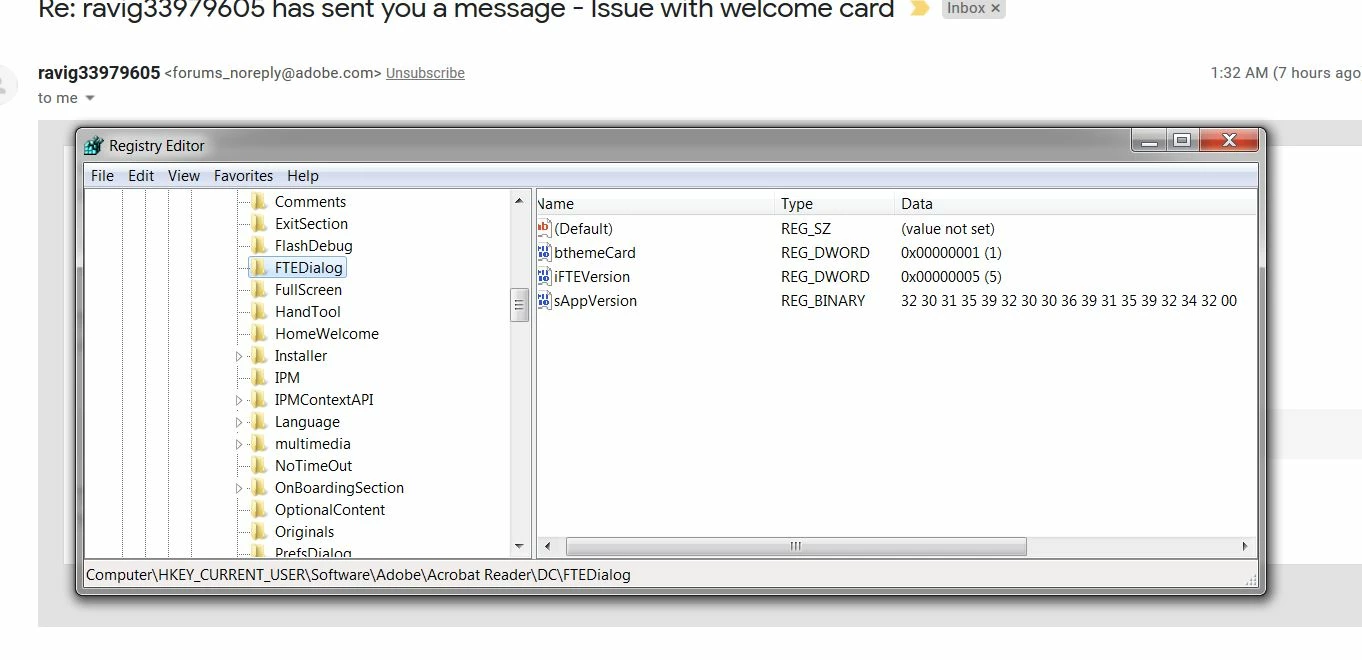
I changed the iFTEVersion value from a 5 to an a. I then created a value called "ILastCardShown" (REG_DWORD) and set it to  "0" (without the parenthesis). Here is the screen shot after the adobe reader DC splash screen registry fix suggested by the forum member.
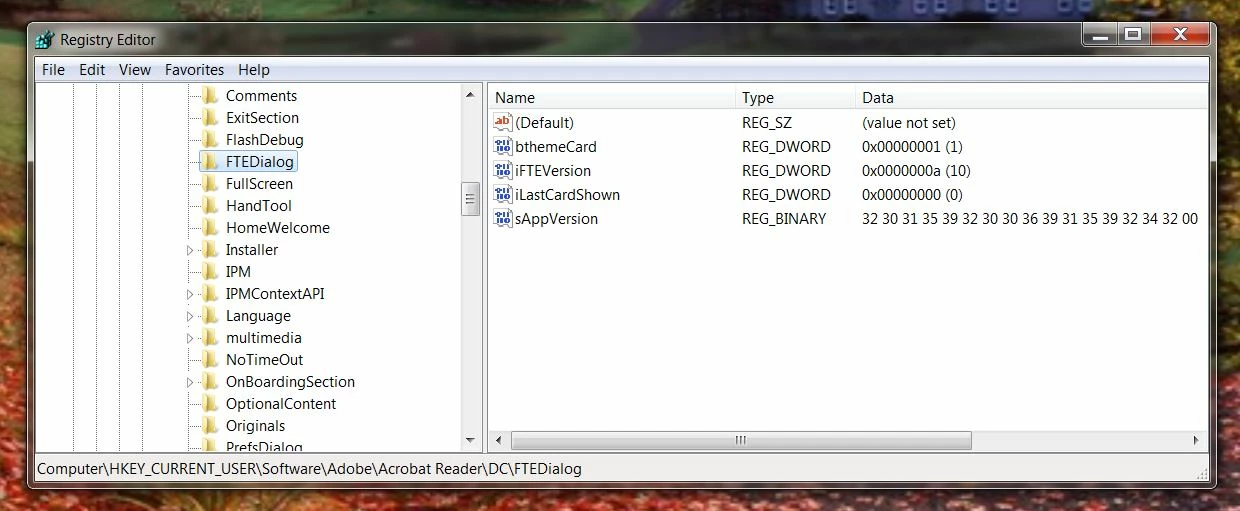
After I made the registry changes I closed the registry window. I then clicked on .pdf file from windows explorer, the .pdf file popped up with out the the splash screen!!! Hope this helps. Cheers.

Rick Ambrosino

5 replies

theEsco
Participant
March 5, 2021

Dear Adobe - Get your act together man.


Why is there a thread a mile long - just to find a workaround for removing the stupid pop-up window?

This shouldn't be a problem. Your software is starting to SUCK on all levels because of this type of stuff.

Just need to open a PDF in Reader and Print it, and I Can't because the stupid Google Chrome Extension Pop-Up cannot be closed. 


Can you imagine a non-technical person trying to do this?

My partner just is stuck never being able to use adobe reader because of this type of stuff - she simply doesn't have the patience. 


FIX YOUR SOFTWARE!

Frankhe
Participant
March 8, 2022

the problem still exists, regedit didn't work, permissions is not the solution.

please don't answer that I am wrong only answer if you have an in program solution.

azbulldog2013
Participant
November 25, 2022

I am running the latest version of Windows 11 and the latest version of Adobe Acrobat Pro. I did not have to change anything. This fix to the registry was already there when I opened the registry editor. I am still getting the pop-up. This fix does not work for everyone.

Participant
April 7, 2020

Well here we are April 2020 and the bug is S T I L L there !!!!

Obviously the way to have a successful and long-lasting business is to ignore your customers. I must try it.

I have windows 10 home and Adobe Acrobat Reader DC Version 2020.006.20042

The Tour pop up comes up every time I open DC reader

I fixed it by editing the registry.

This is what my registry FTEDialog looks like now


looks like now:


Participant
September 11, 2020

The solution suggested by qrwteydfvdvcgggfffff worked for me in windows 10. But why isn't turning it off a menu option in the program? Why did I have to go into the registry, delete a DWORD and add another?


Participating Frequently
November 15, 2018

Hi Guys,

Some of you may find that you need to do this extra step if using Windows 10.

After changing settings above in registry - you need to make the sure the local user has at least READ permissions on the "HKEY_CURRENT_USER\Software\Adobe" key.

Please note that if the user is not a local admin they will not have access to that key so the popup will never go away.

You need to temporarily make the user a local admin, then open regedit as them with admin rights - then give themselves direct READ access to the above key.

darren_cch
Participant
November 19, 2018

Hi,

I'm using Windows 10 Enterprise version.

Adobe Acrobat Reader DC (19.008.20081)

I changed the settings in registry (similar to what JacKal) and ensured at least READ permissions on the"HKEY_CURRENT_USER\Software\Adobe" key, but the popup still appear whenever I open a pdf file. Any other solution for this?

Thanks.

Participant
December 24, 2018

I am having the same problem with Windows 10 and the 'Check out the new Acrobat Reader DC' will not go away.

Please can you give me detail steps how to change the registry, i am the local admin.

Participant
October 10, 2018

Thanks! Worked for me too!

AnandSri
Community Manager
Community Manager
October 8, 2018

Hello Richarda,

We're sorry for the trouble you had with Adobe Reader DC, could you please post a screenshot of the error/message you are getting? To share a screenshot, refer to https://forums.adobe.com/docs/DOC-7043#jive_content_id_How_do_I_attach_a_screenshot

What is the dot version of Adobe Reader DC installed? To identify, refer to Identify the product and its version for Acrobat and Reader DC

Are you getting an error message 'PDF won't display, Please wait', if yes, please refer and try the suggestion from the following article display.

Make sure that you have the latest update of Adobe Reader (19.008.20074) installed, check for any pending updates from help>check for updates, reboot the machine after updating Adobe Reader.

You may also refer to the following Adobe articles Adobe Acrobat Reader DC system requirements

Display PDF in browser Adobe Acrobat, Acrobat Reader

We're here to help, just need more info.

Thanks,

Anand Sri.

Participant
October 9, 2018

Dear Mr. Anand Sri,

"could you please post a screenshot of the error/message you are getting? To share a screenshot,"

"What is the dot version of Adobe Reader DC installed?"

"Are you getting an error message 'PDF won't display, Please wait',"

I am not getting this message, the .pdf file displays and after a few seconds the start tour splash screen comes up.

"Make sure that you have the latest update of Adobe Reader (19.008.20074) installed, check for any pending updates from help>check for updates, reboot the machine after updating Adobe Reader."

"You may also refer to the following Adobe articles Adobe Acrobat Reader DC system requirements

Display PDF in browser Adobe Acrobat, Acrobat Reader "

My computer system information:

My browser information:

OK, I think I answered the questions you asked of me. If you have further questions let me know. If you find a solution let me know. If you find a solution that involves a registry fix let me know. Hoping to hear back from you. Thank you.

Rick Ambrosino 

Participant
October 9, 2018

Dear Ravi Gupta,

The registry fix you gave me worked. Thank you.

Rick Ambrosino