


- Home
- Acrobat Reader
- Discussions
- Re: One sample: trustedNewDoc = app.trustedFuncti...
- Re: One sample: trustedNewDoc = app.trustedFuncti...

Copy link to clipboard
Copied
app.addMenuItem({ cName: "A4", cParent: "Help", cExec: ttt});
app.beginPriv();
var ttt = "app.newDoc(420,595)";
app.endPriv();

 1 Correct answer


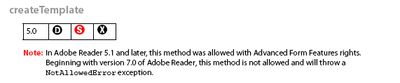
If you see an "X" in the right-most box of the "quick bar" under the method/property name, it means it's not accessible in Reader. For example:
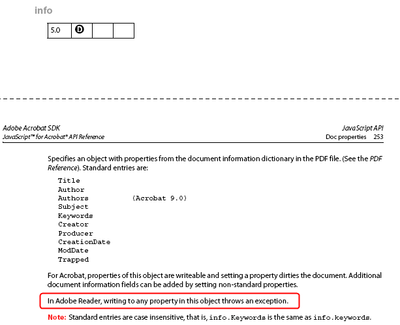
In addition, there are some properties that are Read/Write in Acrobat, but Read-Only in Reader. That will appear in the property's description. For example:

 7
Replies
7
7
Replies
7


Copy link to clipboard
Copied
One sample:
trustedNewDoc = app.trustedFunction( function (nWidth, nHeight)
{
// Additional code may appear above
app.beginPriv(); // Explicitly raise privilege
app.newDoc( nWidth, nHeight );
app.endPriv();
// Additional code may appear below.
})
info: newDoc will not work in Acrobat Reader.
Copy link to clipboard
Copied
Thanks for the help! Where can I see a list of functions that will not work in Acrobat Reader?
Is there any other way to use code in Acrobat Reader?
Copy link to clipboard
Copied
Look at the methods in the Acrobat Javascript reference.
Copy link to clipboard
Copied
I have "Developing Acrobat® Applications Using JavaScript™" and "JavaScript™ for Acrobat® API Reference", but it all works for Acrobat DC and only partially for Acrobat Reader DC!
Where can you see what 100% works for Acrobat Reader? of course I mean javascript
Copy link to clipboard
Copied
If you see an "X" in the right-most box of the "quick bar" under the method/property name, it means it's not accessible in Reader. For example:
In addition, there are some properties that are Read/Write in Acrobat, but Read-Only in Reader. That will appear in the property's description. For example:
Copy link to clipboard
Copied
Many thanks!

Copy link to clipboard
Copied
Especially, consult the "quick bar", a grid at the start of the description of each method. Bear in mind programming of Reader is very limited. Programming is one of the marketing tools for Acrobat: Adobe really want to sell copies of Acrobat to every end user, not just the programmers.


Get ready! An upgraded Adobe Community experience is coming in January.
Learn more
 AdChoices