
Participating Frequently
March 5, 2018
解決済み

How to print 2 copies of a single page in 1 sheet of paper

  • March 5, 2018
  • 返信数 8.
  • 382541 ビュー

Hi everybody! i cant fix this problem. Imagine you have a single page in Adobe Reader, and you want to print the same single page twice in one sheet of paper (one next to the other) does anybody know how to do it?


thanks in advance
解決に役立った回答 try67

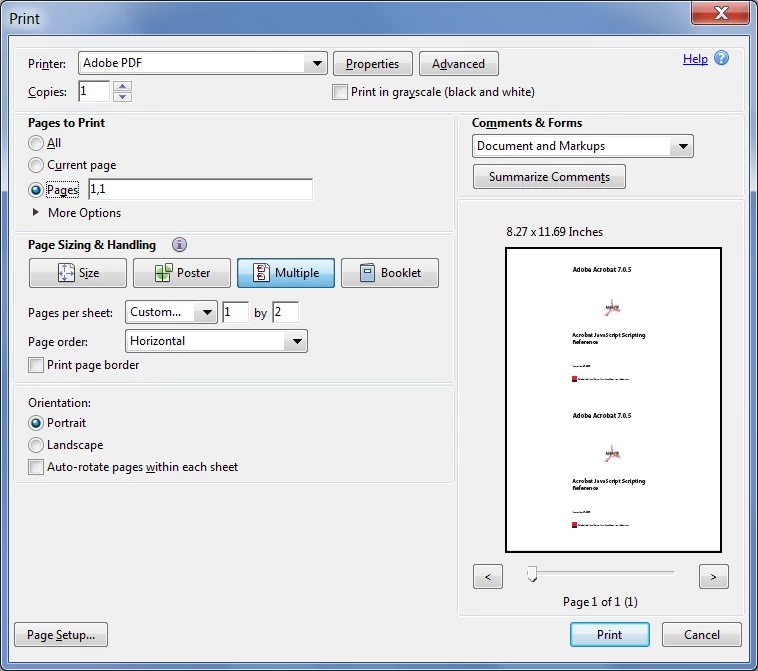
If the file only has one page you can't do it with the free Reader. If it has multiple pages you can do it by using the Multiple option in the Print dialog and enter the page number twice under the "Pages to Print" field.

For example, if you want to print the first page twice, one on top of another, use these options:

返信数 8

bigmack8
Participant
November 12, 2023

If it's one page that you want to print 2-up on a single horizontal page, you must make a 2-page PDF of the same document. Then the Mutliple option with 2 by 1 selected with horizontal page order selected as well, will work.

try67
Community Expert
Community Expert
November 12, 2023

You can't do that with the free Reader. If you have Acrobat, which allows you to duplicate pages then the question is moot anyway.

Participant
July 8, 2023
Participant
December 23, 2022

GIVE YOURSELF MORE COPIES without extra weird programs! Just print the first time to a .pdf with multiple copies (like 2). This gives you multiple pages. Then you can print THAT .pdf you just saved however you want.

amandam33387941
Participant
July 17, 2025

I found your suggestion while searching for the exact question the original poster asked. This 100% worked and was the easiest way to go about it. Thanks!!!!!

Participant
February 11, 2021

Convert your pdf single page to jpg (img) file, crop as reqd. And paste this image file in word file. Adjust size and margin and copy paste as much as reqd. In one page. Save this as pdf. Then print with high print quality.

Participant
April 22, 2022

Much easier than trying to make the other suggestions work.  Thank you!

paulo46133456
Participant
July 28, 2020

I got this to work in mid-2020.  Here's how:  1- open the one-page .pdf in a browser; I used MS-Edge. 2- right-click on the .pdf and choose print.  3- Select Microsoft Print to PDF as your printer and specify 2 copies.  4- specify the page range 1,1. 5- hit the print button.  6- Save the resulting .pdf as a new file.  When I went through these steps, I now had a 2-page .pdf with two identical pages.    Good luck.

Participant
June 21, 2021

This worked!! 

Participant
September 24, 2019

I know this is an old question, but I bet alot of people end up here still, via google. Like I did 😃 

My stupid, unnecessary complicated solution was this:
- Copy the file, so I have two identical copies in the folder. 
- Use PDF candy online to merge the two files. Now I have one file with two identical pages.

- Print two pages at one page like a normal person would in the first place. 

Participant
February 13, 2020

There's an even easier way 
you just print a first the desired number of copies (2 or 4 or 9 or 16) to pdf
then yous use use the multiple option that will now give you the output you want

Participant
February 13, 2020

Interesting! How do you print multiple pages to pdf? I have a one page document, print to pdf, put 4 copies, but the result is one page. 

Participant
September 13, 2018

I used to use Adobe in the same way: to print 2 copies of single page on the same page. Now it's impossible.

crlMidi
Participant
November 18, 2018

The free version of Foxit Reader has this function, but only with the Windows implementation; unfortunate as I'm migrating to Linux. In operation it looks very similar to Try67's screenshot; you have to be patient as the response is slow.

Replicating a page, for example in Scribus, is easy but not a solution for me because I want the same pdf forms input to show on each copy.

try67
Community Expert
try67Community Expert解決!
Community Expert
March 6, 2018

If the file only has one page you can't do it with the free Reader. If it has multiple pages you can do it by using the Multiple option in the Print dialog and enter the page number twice under the "Pages to Print" field.

For example, if you want to print the first page twice, one on top of another, use these options:

July 15, 2021

Thanks for the reply, but this doesn't answer the problem I have.

I have a pdf file, but I am not the author.  This file has several introductory pages that do not have page numbers.  Following is the main body of the document, about 14 pages long.

I want to print one copy of page 1 of the main document (which has page numbers).

If I enter 1 into the range block in the print dialog, I get all the page 1s in the document - two of them.

   One page 1 is the first physical page of the pdf file

   The other page 1 is the first page of the main body of the pdf (which has page numbers)

If I enter, say 10, into the print dialog range, I don't get page 10 of the main doc.  I get some other page.


How do I print exactly the page I want and no other?  Only 1 copy is desired.  I used to have an older copy of Acrobat Reader that allowed me to print what I want, but the automatic updates have replaced what worked with a newer version that might have deleted that feature.    HELP!