


- Home
- Acrobat Reader
- Discussions
- Re: How to restrict content with Adobe Reader?
- Re: How to restrict content with Adobe Reader?

Copy link to clipboard
Copied
Hi, I am editing a PDF file with Adobe Reader. I need your help on a topic. In the PDF file I create, the text can be edited, but I do not want the images to be copied.
How can I do that ? If you help me with this, you will make me very happy.
I uploaded a sample image below.



 1 Correct answer


After going to File - Properties - Security change the value of the "Security Method" drop-down from "No Security" to "Password Security", and this dialog will appear:
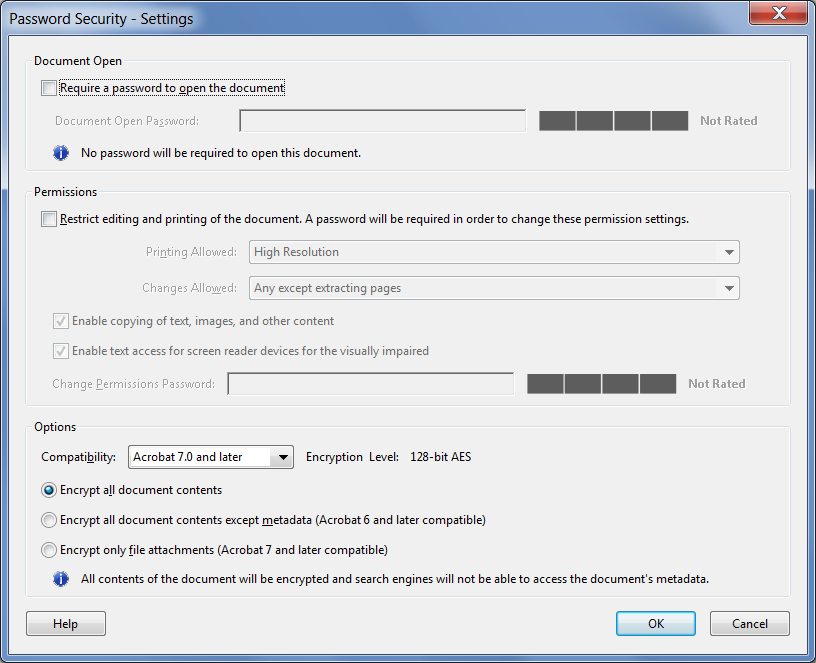
Here you can set two types of passwords: One that is required to open the file and one that is required to edit it.
If you select the second one it will also allow you to select what you want kind of changes to allow, and what not to allow.
For example, in this dialog I've allowed printing the file and filling in form fields, but not
...
 11
Replies
11
11
Replies
11


Copy link to clipboard
Copied
You cannot edit with Reader. You can edit documents with Acrobat Pro or Standard. When possible it is better to recreate the pdf file.
Copy link to clipboard
Copied
I use adobe acrobat pro
Copy link to clipboard
Copied
I think I made a mistake in the title, I apologize.

Copy link to clipboard
Copied
Open the "Properties" for the PDF file. Select the "Security" tab. You can now set the type of password to use and then you can set the 'Document Open" and the "Permissions" passwords. Note that these are two different options which can be individually or jointly set but they should have different passwords.

Copy link to clipboard
Copied
Make sure you read, understand and accept the warning about third party tools. Don’t be surprised later.
Copy link to clipboard
Copied
The file belongs to me and there is no security restriction at this time. I will make the file safe.
This is what I want;
Another person can edit texts. I will restrict pictures and other content. I ask how do I do that?
Copy link to clipboard
Copied
You can't, unless those texts are a part of a form field or a comment.
Copy link to clipboard
Copied
There are not enough resources in my language. As much as I can, I did research information English language. But I could not reach the result.
How will it be? Do you have an article or video that I can examine about it?
Copy link to clipboard
Copied
After going to File - Properties - Security change the value of the "Security Method" drop-down from "No Security" to "Password Security", and this dialog will appear:

Here you can set two types of passwords: One that is required to open the file and one that is required to edit it.
If you select the second one it will also allow you to select what you want kind of changes to allow, and what not to allow.
For example, in this dialog I've allowed printing the file and filling in form fields, but not extracting pages or copying any of the contents of the file:
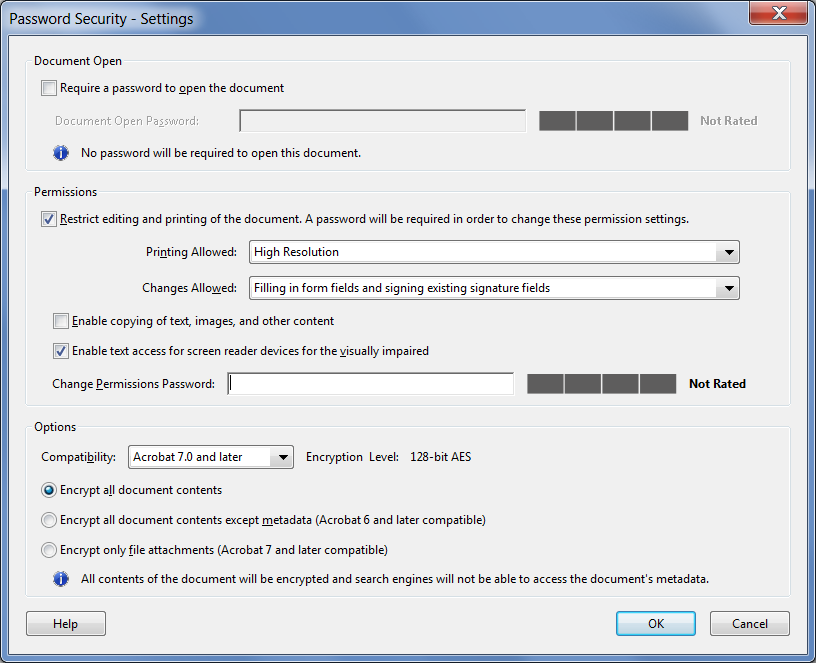
The you enter your password(s), confirm them and press OK. Save the file (preferably under a new name), close it, and then next time you open it it will be secured.
Copy link to clipboard
Copied
Thank you for the answer.
I don't fully understand. How do I make '' Not Allowed '' fields? Could you explain that?

Copy link to clipboard
Copied
In short you need to change the security method to "Password security" and make suitable choices. As I said, you will get a warning. Make sure you understand the very serious implications of it.


Get ready! An upgraded Adobe Community experience is coming in January.
Learn more
 AdChoices