

Turn on suggestions
Auto-suggest helps you quickly narrow down your search results by suggesting possible matches as you type.
Exit

- Home
- Acrobat Reader
- Discussions
- Re: No options for changing language in Mac
- Re: No options for changing language in Mac
0

Community Beginner
,
/t5/acrobat-reader-discussions/no-options-for-changing-language-in-mac/td-p/12540024
Nov 21, 2021
Nov 21, 2021
Copy link to clipboard
Copied
Hi,
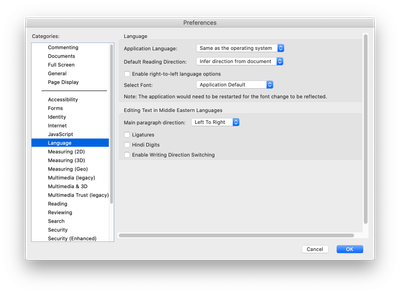
in my Mac (OS 10.15), I cannot find an option to change the language. Preferences > Language > Application Language only gives me option to "Same as the operating system". Any ideas? I need this in order for my digital signature to appear in Spanish, not the OS language (English in my case). Thanks!
TOPICS
Security digital signatures and esignatures

Community guidelines
Be kind and respectful, give credit to the original source of content, and search for duplicates before posting.
Learn more

 1 Correct answer


Community Expert
,
Nov 21, 2021
Nov 21, 2021
Download and install a localized version of Reader from here: https://get.adobe.com/reader/otherversions/

 3
Replies
3
3
Replies
3

Community Expert
,
/t5/acrobat-reader-discussions/no-options-for-changing-language-in-mac/m-p/12540903#M85704
Nov 21, 2021
Nov 21, 2021
Copy link to clipboard
Copied
Download and install a localized version of Reader from here: https://get.adobe.com/reader/otherversions/
Community guidelines
Be kind and respectful, give credit to the original source of content, and search for duplicates before posting.
Learn more
Daniel218634223ebw
AUTHOR
Community Beginner
,
/t5/acrobat-reader-discussions/no-options-for-changing-language-in-mac/m-p/12541434#M85705
Nov 21, 2021
Nov 21, 2021
Copy link to clipboard
Copied
unfortunately, that doesn’t help. Same result after installing the allegedly Spanish version from that page.
--
Daniel Castaño Díez
www.dynamo-em.org
+41(0) 6138 73214
Bio-EM Lab
Biozentrum, University of Basel
--
Daniel Castaño Díez
www.dynamo-em.org
+41(0) 6138 73214
Bio-EM Lab
Biozentrum, University of Basel
Community guidelines
Be kind and respectful, give credit to the original source of content, and search for duplicates before posting.
Learn more

Community Expert
,
LATEST
/t5/acrobat-reader-discussions/no-options-for-changing-language-in-mac/m-p/12541599#M85706
Nov 22, 2021
Nov 22, 2021
Copy link to clipboard
Copied
MOVED TO THE ACROBAT READER FORUM
Acrobate du PDF, InDesigner et Photoshopographe
Community guidelines
Be kind and respectful, give credit to the original source of content, and search for duplicates before posting.
Learn more

Resources
About Acrobat Reader

Reader Help
FAQs
Get ready! An upgraded Adobe Community experience is coming in January.
Learn more
Copyright © 2025 Adobe. All rights reserved.
 AdChoices