
Participant
September 21, 2020
Question

Print Dialogue Not Opening

  • September 21, 2020
  • 12 replies
  • 11986 views

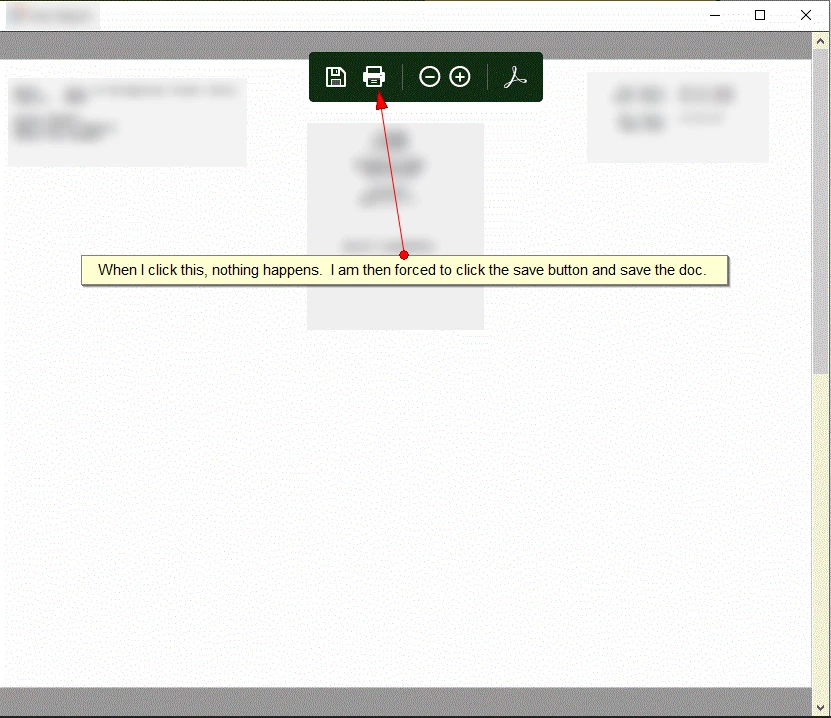
If I open a pdf document directly in Adobe Reader, I can print from there.  However, there are a few programs on my machine that (presumably) embed adobe reader in their software as the default reader.  When I click the print logo (or CTRL+P) nothing happens.  I am then forced to save the document and open with Adobe Reader.


P.S. I don't know what to call the embedded adobe viewer software.
This topic has been closed for replies.

12 replies

Participant
February 15, 2021

I finally found "a" solution.  I have several users that are experiencing the same problem.  The print dialog box does not show when viewing an embedded PDF document with Adobe Reader DC.  Out of despiration, I installed the full version of Adobe Acrobat DC and lo and behold, everything works exactly as it is suppose to.  I have tried this on several of the computers that were having the same issue and everyone of them now function correctly.  My next test will be to see what happens if I uninstall Adobe Acrobat DC but leave the Adobe Reader installed.... will the problem return?  another problem arise? and will things be permanently fixed.... I will experiment and let people know.  Thanks

Egrechin
Participating Frequently
February 15, 2021

Adobe has released version 21.001.20138 (or 20135) that resolved the issue.
So once installing again the Adobe Acrobat, you probably got the latest version

Participating Frequently
February 11, 2021

Some of my users also reported that my Adobe Plug-in could not be loaded or did not exist.

Reinstallation of Adobe reader DC solves the Plug-In problem.

Participating Frequently
February 10, 2021

Hi everyone,


I'm here to tell you all that the print dialogue is back now.

Adobe 21.001.20135

W10 20H2


kind regards

Participant
February 10, 2021

Had my user verify version and confirmed with 21.001.20135 the embedding works as expected and can print from the popup dialogue.

Participant
February 10, 2021

Meant to include they are on 1803 currently; so it doesn't seem to be a WIN version issue, and is based on Reader version.

Legend
February 2, 2021

I see a lot of posts, but nobody says they have ever reported this to Adobe. Has anyone reported it? (Though it may be a normal Protected Mode limitation).

Participant
February 2, 2021

Hey Guys, I have a resolution for this.

1. Launch Adobe Reader DC application from the start menu.

2. Select Edit from the menu

3. Select Preferences.

4. Select Security (Enhanced).

5. Uncheck the boxes for "Enable Protected Mode at Startup" and "Enable Enhanced Security".  If you get a prompt, just click Yes.

6. Click OK to save the changes.

7. Restart Adobe and the application that uses Adobe.

Participating Frequently
February 2, 2021

Hi Wesley,


Thanks for sharing your resolution.Uunfortunatly this did not work for me.

Are you sure this was the case for you?


thx

Participant
December 18, 2020

I once was a Gates fan, but now I am beginning to wonder if he is trying to make the world mediocre?  The processes at MS for development have gone astray as he has decided to attempt to solve the worlds health issues...  The MS update broke the adobe code, this is going to affect many offices that rely on reader.  It makes their jobs more frustrating having to save the pdf and print it.  I guess, we can follow in the Gates way and uninstall acrobat reader and rely on the MS products..... Thats scary.

Participant
December 18, 2020

From what I know this is a bug in Abobe Reader DC that only happens on Win10 Version 2004 and later.

This bug was introduced when Win10 Version 2004 came out around May 2020.

Adobe knows about it - it is listed as a known bug (Bekannte Probleme | Adobe Acrobat DC, Reader DC).


I monitor this forum from time to time to see if there is some official statement from Adobe about this bug.

But in all these months nothing happened.


Since this bug exists now for about 7 months I do not believe Adobe will fix it soon.


Jens

Participant
December 9, 2020

We too have experienced this problem with our system.

Would have love to known this prior to setting up that new machine on this.

For now they have to save and open to print, which is just time consuming.

I do not have rights/access to change the embedding as it is a Gov't controlled system.

Is there any potential for an AHK or other action to allow for that dialog to appear?

or is it "this is the new norm" until it starts miraculosly working again?

Participating Frequently
December 9, 2020

As I mentioned before.

I made a change in my program.

I put a button (print) above my panel where my pdf is shown.

Push the button a shellexecute  command is executed.

This executable is named "PDFtoPrinter.exe" and prints the PDF.

You can download this app 'PDFtoPrinter.exe' for free. (http://www.columbia.edu)


Egrechin
Participating Frequently
December 14, 2020

@Mindert0101 ,


Thank you for sharing this workaround.

It might work, however i'd like to hear from Adobe and Microsoft about the root cause and their plans to resolve this.
We have opened a parallel ticket in Microsoft support, as most likely they respond much faster the Adobe support.


Egrechin
Participating Frequently
November 18, 2020

Hi All,

Do we have any solution/workaround for this issue?

I don't see any statement from Adobe that there is a bug in a specific Windows 10 build

Thank you

Evgeny

Participating Frequently
December 9, 2020

I neither have seen a statement from Adobe.

I don't know why.

May be Adobe doesn't read this Community 

Participating Frequently
October 27, 2020

Hello,


Sadly the new update Windows 20H2 did not fix this issue.

Participating Frequently
October 27, 2020

That's too bad.

I have made a workaround.

I put a button above the form, where the PDF is displayed.

With the shellexecute  command I call a executable "PDFtoPrinter.exe" and print the PDF.

This executable is free.