Copy link to clipboard
Copied
Hey everyone,
We have a HP Desingjet T790 that is shared with our server (windows server 2019). Since we updated driver and firmware, we have the following issue:
In the print preview, the dokument is centered on the sheet:
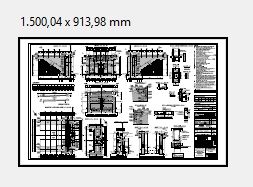
The actuall print however looks like this:
These are the print settings used:
First I thought this was a printer issue, but the strange thing is, that if I print the same file on the same printer with the same settings form Foxit Reader, the print looks like it should.
I'm really greatful for any help or hints!
-Tobi

In case anyone has the same issue, we solved it by using a different driver.
The problem is limited to the PCL driver. The PS as well as the HPGL2 driver work as expected.
Copy link to clipboard
Copied
In the HP forum I found out that if I deselct "choose paper size based on document size" the print tunrs out as expected.
But that is a very useful feature for us, printing large scale plots in different sizes.
Is there a way to keep this feature and have the print turn out centered?
Copy link to clipboard
Copied
In case anyone has the same issue, we solved it by using a different driver.
The problem is limited to the PCL driver. The PS as well as the HPGL2 driver work as expected.
Get ready! An upgraded Adobe Community experience is coming in January.
Learn more
