


- Home
- Acrobat Reader
- Discussions
- Re: Remove "Approved" from Stamp Favorites List [2...
- Re: Remove "Approved" from Stamp Favorites List [2...

Copy link to clipboard
Copied
How do I remove the "Approved" stamp from the stamp favorites list? I right-clicked on it, selected remove but it is still there and the option to remove is now gone. I'd like to make a different stamp my default stamp, which I also added to the favorites list, but it keeps making the "Approved" stamp the default.


 1 Correct answer


Hi AmandaJ,
You can't remove the "Approved" stamp from the list it is As design behaviour.
However, you can add another stamp to your favourite list.
To add a stamp to favourite list.
- Apply the stamp(one you want to set as a favourite) to a file.
- Click on the stamp.
- Click on the stamp tool and choose "Add Current Stamp to Favourites."
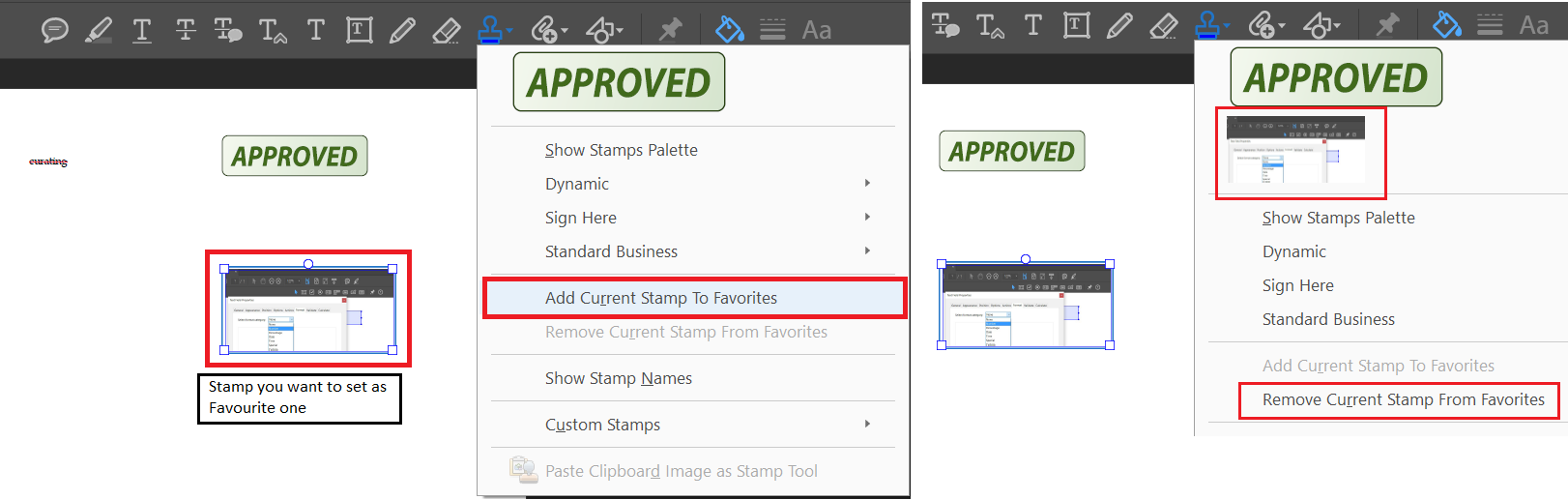
Let us know if that helps.
-Tariq Dar

 15
Replies
15
15
Replies
15

Copy link to clipboard
Copied
Hi AmandaJ,
Would you let us know the version of Acrobat/Reader you are using? Is it Mac or windows running machine you have?
In the meantime, you may visit this help page: Add a stamp to a PDF in Adobe Acrobat DC and let us know if this helps.
-Tariq Dar.
Copy link to clipboard
Copied
Adobe Acrobat Reader DC: Version 2017.009.20044
Windows 7 Enterprise.
That article does not address my question at all. I want to change the default stamp. I already know how to create one. I know how to add it to the favorites list and even remove it from the favorites list. I'm not interested in creating my own. The "Approved" stamp seems to be locked as the default stamp in the favorites list and will not come off. I want to change it to the stamp I use.
Copy link to clipboard
Copied
Hi AmandaJ,
You can't remove the "Approved" stamp from the list it is As design behaviour.
However, you can add another stamp to your favourite list.
To add a stamp to favourite list.
- Apply the stamp(one you want to set as a favourite) to a file.
- Click on the stamp.
- Click on the stamp tool and choose "Add Current Stamp to Favourites."

Let us know if that helps.
-Tariq Dar
Copy link to clipboard
Copied
As I have said, twice now, I already know how to add stamps to my favorites list. But thank you for, finally, telling me that what I was asking for is impossible.

Copy link to clipboard
Copied
That's ridiculous! Why should I be forced to have the Approved stamp on my favorites list. I want it GONE!!!!!
Adobe Acrobat DC is making me nuts.

Copy link to clipboard
Copied
It’s easy to remove the “Approved” stamp from the Favorites list on the Stamp pull-down menu in Acrobat.
1) Go to: C\Program Files x86\Adobe\Acrobat 2015\Acrobat\plug_ins\Annotations\Stamps\ENU
2) Copy the “StandardBusiness” PDF file.
3) Paste the copy of the “StandardBusiness” PDFfile on your Desktop (this is a temporary location).
4) Open the copy of the “StandardBusiness” PDF file from your Desktop.
5) Delete Page 1 (the “Approved” stamp page).
6) Save and close the copy of the“StandardBusiness” PDF file.
7) Copy the “StandardBusiness” PDF file from your Desktop (the one you modified).
8) Go to: C\Program Files x86\Adobe\Acrobat10.0\Acrobat\plug_ins\Annotations\Stamps\ENU
9) DELETE the existing “StandardBusiness” PDF file from that folder.
10) Paste the “StandardBusiness” PDF file you copied from your Desktop.
11) Close Acrobat.
12) Reopen Acrobat – the “Approved” stamp will begone from your Favorites list!
13) By the way, the “Approved” stamp will, also, be gone.
14) You can, then, DELETE the “StandardBusiness” PDF file from your Desktop.


Copy link to clipboard
Copied
Users with Acrobat Reader can't delete pages.

Copy link to clipboard
Copied
The above works and if you don't want to lose your "Approved" stamp you can extract page 1 at step 5 before you delete it. Follow the rest of the instructions. Then start over and insert the extracted page at the end of the file. It will be added to your Standard Business stamps and will not be in your favorites.

Copy link to clipboard
Copied
This did not work entirely, for even after reinserting the APPROVED page into the StandardBusiness PDF and re-saving that PDF to the ENU folder, the APPROVED stamp was still gone. It just doesn't see it. The only way to get it back was to create a Custom stamp out of the extracted one-page APPROVED pdf. Then it's available in the custom stamps selection. But it's gone from the StandardBusiness group, even though the PDF in the ENU folder shows that page as part of that pdf. I even tried placing it as the second page, rather than the last page, but no difference, still gone.

Copy link to clipboard
Copied
Thank you for the detailed instructions. They worked perfectly.
Copy link to clipboard
Copied
Unfortunately these instructions no longer work as of 2023-03-09 -> attempting to follow them led to a "Bad Parameter" error when attempting to access the Stamps tool.

Copy link to clipboard
Copied

Copy link to clipboard
Copied
Some of us are working on network computers and the program files workaround won't suffice. I mean, why is it that important to default APPROVED there. If a user adds another stamp (completed for example), we should be able to remove approved as a favorite. Particularly if we never used the approved stamp and would prefer completed there.
I mean, the organizations are paying for Adobe Pro so you would think this would be an accessibility and pro type feature to offer paying users.

Copy link to clipboard
Copied
I want to move "Approved" stamp from my favorites list so it defaults to the stamp I use daily. I know I can't delete it I just want to move it!! If I could remove approved from favorites I wouldn't have to go in and pick which stamp I want to use. Adobe please help me accomplish this simple setting change. Thank you!

Copy link to clipboard
Copied
Hi @kelly_5176,
Hope you are doing well. Thanks for writing in!
Please fill in the feature request here: https://adobe.ly/417Vll1 to ensure it reaches the development team directly for review and future implementati0n.
Also, once filled, please share the link to the post here for future users with the same request to leave an upvote.
The more the upvotes, the better the impact.
Regards,
Souvik.


Find more inspiration, events, and resources on the new Adobe Community
Explore Now
 AdChoices