


- Home
- Acrobat Reader
- Discussions
- Transfering signature to new computer: export=.cer...
- Transfering signature to new computer: export=.cer...
Transfering signature to new computer: export=.cer, .fdf, .p7c import only .p12, .pfx

Copy link to clipboard
Copied
I am trying to transfer my signature from Adobe Acrobat Reader DC on my old computer to a new one.
I am following instructions described in another post:
1. On the old computer, pull down Edit - Preferences
2. In the Categories list, select Signatures
3. in Identies & Trusted Certificates, click the MORE button
4. a dialog opens and Digital IDs is highlighted. Select the signature in the right side of the dialog and click the EXPORT button at the top
5. a dialog appears. Choose "Save the data to a file" and click NEXT
6. Select a location for the file. Select the "Save as type" has 3 choices: *.fdf *.p7c *.cer
7. On the new computer navigate to the same screen and click the Add Digital ID button
8. a dialog appears. Select "My existing digital ID from:" and select "A file" and click NEXT
9. Click the Browse button. It only displays *.p12 and *.pfx files. Also it is expecting a password on the file, yet no password was set when the file was created.
Please clarify this process for moving signatures from one computer to another.


 12
Replies
12
12
Replies
12


Copy link to clipboard
Copied
Use the .pfx files of the old computer. On Windows you will find the files at:
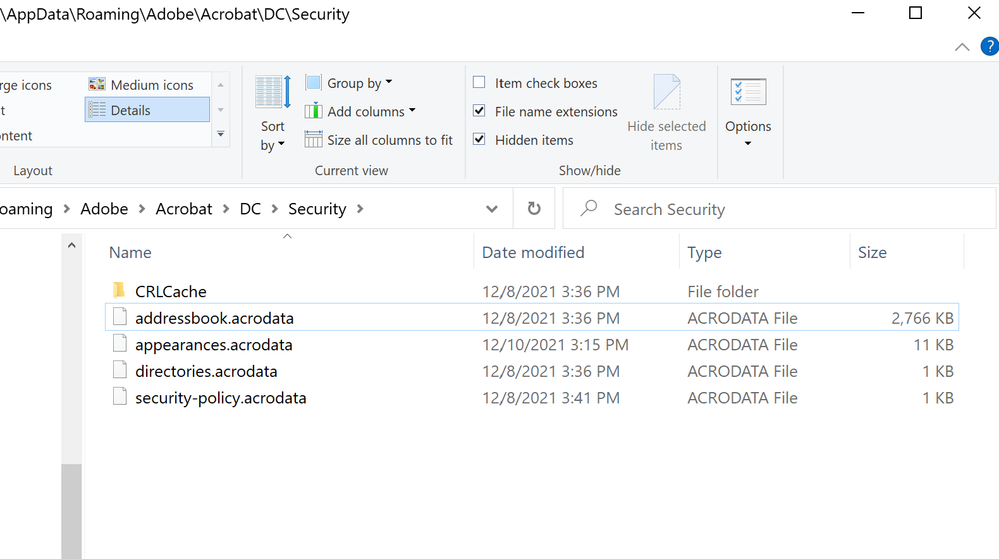
C:\Users\<user>\AppData\Roaming\Adobe\Acrobat\DC\Security

Copy link to clipboard
Copied
FYI this does not work if you are trying to transfer a "Windows Digital ID"
Copy link to clipboard
Copied
Hello dhabz
Where you able to transfer the signature. It is not working for me. I am trying to transfer my digital signature from my laptop to my desktop and no success. When I export my signature from my laptop it gives me three options (*fdf), (*.p7c) and (*.cer). I tried all three options and when adding the digital signature in my desktop the only options are (*.p12, or *.pfx).
How do I export and import my signature to a different device?
Thank you,
Copy link to clipboard
Copied
Read my reply.
Copy link to clipboard
Copied
I do not see the .pfx files. See attached screenshot.

Copy link to clipboard
Copied
hi,
your guidance ws helpful and i copied the finle to my new laptop but when i try to open it it asks for a password for that pfx file. i tried my old device password but it didnt work. any idea how to get this password?


Copy link to clipboard
Copied
Hope you are doing well. Sorry for the trouble with using certificate files.
.pfx files are password-protected, so they can only be used by the intended holder.
I found a link to a discussion on the Microsoft forums on how to recover the passwords to those files.
Please give the thread a view and let us know if it helps: https://adobe.ly/48gNjcm
Regards,
Souvik.
Copy link to clipboard
Copied
thnx for the help
i went through the thread but it is mainly applicable for Azure, i tried to replicate for Adobe but it didnt work.
i also tried this single tab thing but also didnt work
Copy link to clipboard
Copied
Thanks for letting me know.
Are these certificates created by you or issued by any organization?
If you have issues with an organization, you can always reach out to them to obtain the credentials for the file.
If you created it, you can create a backup of the entire certificate database by navigating to Credential Manager > Cloud certificates > Backup.
Please let me know if you have tried both.
Regards,
Souvik.
Copy link to clipboard
Copied
it is a digital signature i created on Adobe, i exported it as file ut when i try to install it on my new device it asks for a password
i checked credential manager as you guided but it is not there

Copy link to clipboard
Copied
Hi there
++ Adding to the discussion
Please go through the help page https://adobe.ly/43UJQii and see if that works.
~Amal

Copy link to clipboard
Copied
I just want to say it's insane that Adobe doesn't have a straightforward way of doing this.


Get ready! An upgraded Adobe Community experience is coming in January.
Learn more
 AdChoices