


- Home
- Acrobat Reader
- Discussions
- Re: Unable to set default email option
- Re: Unable to set default email option

Copy link to clipboard
Copied
Hi All,
With the new version, i can no longer click the email button and it attaches the pdf to outlook.
Now, I have to select email-> send as attachment -> select type (Microsoft outlook/ web mail) -> continue which takes me to outlook.
Is it possible to configure default which takes me direct to outlook when I press the email icon?


 1 Correct answer


Hi tams7909370,
Apologies for the inconvenience caused!
Could you please follow the steps in the below article to use the email icon to send PDF directly as email attachment.
Link : How to use the email icon to directly send file as attachment
Please let me know in case of any concerns.
Regards,
Arvind

 5
Replies
5
5
Replies
5

Copy link to clipboard
Copied
Hi tams7909370,
Apologies for the inconvenience caused!
Could you please follow the steps in the below article to use the email icon to send PDF directly as email attachment.
Link : How to use the email icon to directly send file as attachment
Please let me know in case of any concerns.
Regards,
Arvind
Copy link to clipboard
Copied
Great. It worked.
Thanks

Copy link to clipboard
Copied
Is there an updated link to resolve this issue? Your link is no longer available.

Copy link to clipboard
Copied
Hi bludel,
Thank you for reaching out.
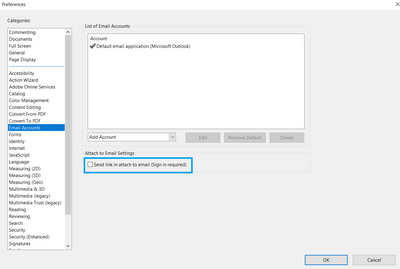
To send the PDF as an email attachment, disable the "Send link in attach to email (Sign-in required)" option in Acrobat Preferences.
Go to Edit > Preferences > Email accounts in Acrobat or Acrobat Reader on a Windows machine. For Mac, Application Preferences > Email accounts.
Refer to the screenshot attached below:
Thanks,
Meenakshi
Marking a reply or response “Correct” will help future users with the same issue quickly identify the correct answer.

Copy link to clipboard
Copied
Your request highlights the extra steps introduced in the new version when emailing a PDF. You can mention that previously, clicking the email button directly attached the PDF to Outlook, but now, the process requires selecting the email option, choosing the type (Microsoft Outlook or web mail), and then continuing to Outlook. You're asking if it's possible to configure a default setting that bypasses these steps and directly opens Outlook when the email icon is pressed. This will help streamline your workflow.


Find more inspiration, events, and resources on the new Adobe Community
Explore Now
 AdChoices