
willytk
Participant
March 28, 2018
Answered

Why are you bundling a commercial version of Mcafee with Adobe DC reader

  • March 28, 2018
  • 4 replies
  • 6879 views

Sorry to be saying this, but I turned 70 this year and am unhappy with where applications like Adobe seem to be going.  I needed a new version for my Windows 10 system as Microsoft's Edge program fails to open some of my Adobe files.  Downloaded the 'Adobe dc reader' and it does its job.  But I was puzzled by the two applications that were bundled with it, apparently a scanner and a partially crippled McAfee virus scanner.  I did not ask for these or see anything about them in the download offer on the Adobe site.  To add insult to injury at boot the next morning the McAfee program installed a second on-line virus scanner on its own.  I have since uninstalled both, but would rather not have to go through this when I am attempting just to download the Adobe Reader.  I fear this behavior of infecting my computer with unsolicited software which McAfee then wants me to pay for and the resent Facebook abuse of user privacy fall into the general area of software vendors no longer respecting user rights.  Its sad  Adobe's free reader is a nice service, but I gather the world is changing to a more commercial nature and Adobe just couldn't resist infecting their download with McAfee products.
Correct answer try67

I don't work for Adobe or speak on their behalf, but I'll try to answer your questions:

- It's a common practice to bundle commercial applications with free software. It's one of the ways the company can offset the development costs of such applications.

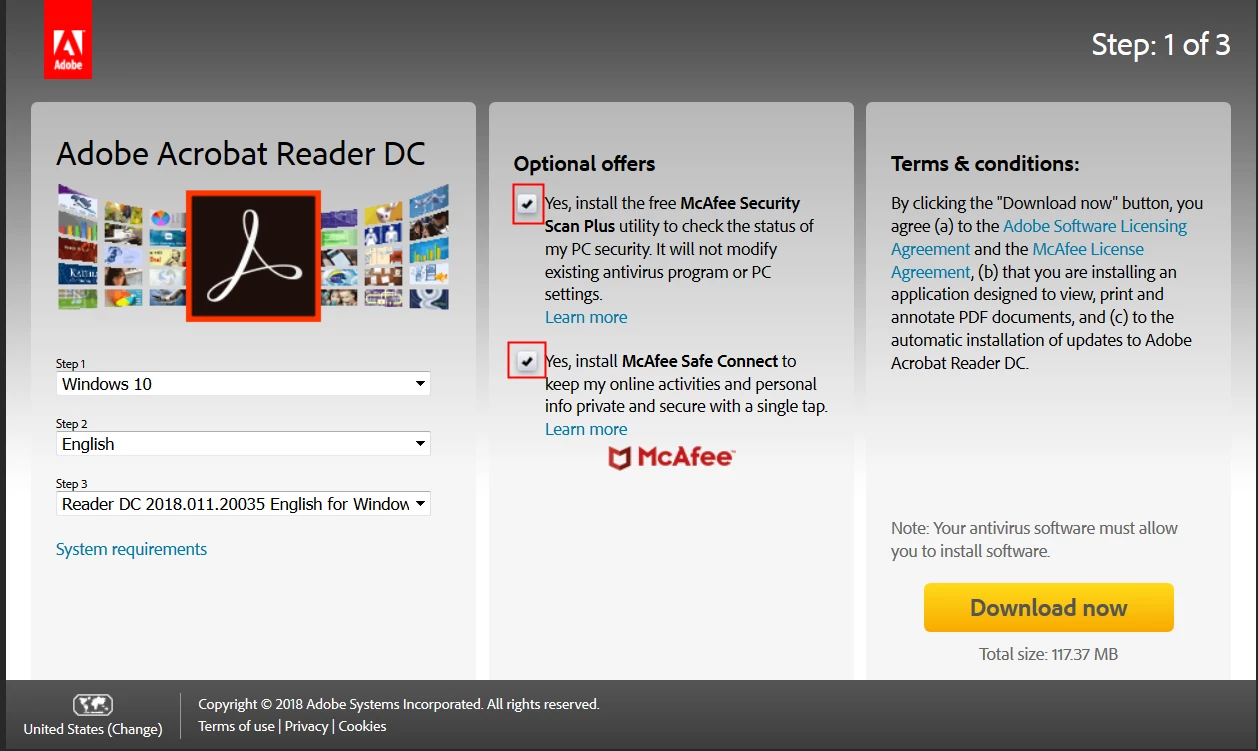
- These applications are bundled by default with Reader, but there's a clear way of disabling it before downloading the installer, by ticking off the two check-boxes that appear on the download page's "Optional Offers" section, which I've highlighted in this screenshot I took of it just now:


- I agree that it would have been better to have these boxes ticked off by default and allow the user to "opt-in" to have them, instead of "opting-out".

- This has nothing to do the latest Facebook scandal, as it's not a user privacy issue in any way.

4 replies

Participant
February 21, 2025

I downloaded Adobe Acrobat, and I saw NO option to refuse McAfee.  And now,  just spent my morning struggling to uninstall McAfee on my computer!  They tell you that this is a common practice, but you don't have any sort of choice, AND I couldn't uninstall it!  I found out there is a separate program McAfee makes you download to remove it.  And before you click "yes" on the agreement, read the fine print: They want you to agree that McAfee is NOT RESPONSIBLE for any damage to your computer while uninstalling! (I have screenshots of this, if anyone wants to see it.) I finally contacted McAfee, and "chatted" with someone whose name led me to believe they weren't even in the Northern Hemisphere, let alone in North America.  I finally had to allow them to  them remotely take over my computer to get that done which is a heinous business practice, because it endangers my security--from a company that is supposed to be in the business of internet security.  So now, I've got to spend days changing all of my relevant passwords. I saved all kinds of screenshots, plus got my ipad to record this process. I no longer respect Adobe as a company for even allowing this. They--and McAfee, PURPOSELY made it difficult for any regular customer to understand this was going to happen. They knew that the average customer wouldn't see it. If these were such quality programs, their name and reputation should speak for themselves, and not resort to such cheap marketing tactics.   I have filed customer reviews with the Better Business Bureau and send all this to the FTC, in hopes that others, especially Senior Citizens, who may not be tech savvy, won't get scammed. There is no excused for this.

S_S
Community Manager
Community Manager
May 25, 2025

Hi @wendy_5919,


Hope you are doing well. Sorry for your experience with installing Acrobat Reader.


In case you are still looking for a solution, you might want to download the installer from here: https://adobe.ly/43uHgyt.


Once downloaded, double-click the installer file to start the installation.


Let us know if this helps.


Regards,
Souvik.

JR Boulay
Community Expert
Community Expert
January 22, 2022

MOVED TO THE ACROBAT READER FORUM

Acrobate du PDF, InDesigner et Photoshopographe
Participant
January 21, 2022

Reference: https://community.adobe.com/t5/acrobat-discussions/why-on-earth-is-mcafee-being-installed-when-i-attempt-to-update/td-p/11407968#

So, they claim it's optional... 


After trying to install the simple free version of acrobat reader, I found that Mcafee was also being installed, though given no option. I had to manually cancel the Mcafee installations by force closing the installer. Somehow, acrobat reader was able to install, while I was able to cancel the Mcafee installation.


For any of you that don't already know, Mcafee Antivirus is basically a virus itself. Think about it. Remember all those stupid Mcafee notifications you could never find a way to disable? Have you witnessed a noticeable difference in performance with vs. without?

Mcafee might not be a trojan horse or a worm, but would compare well with a common cold. 'Deadly' virus or not this program is terrible for the health/performance of your PC. They claim its optional, but is it really optional if they try to mislead you into thinking it isn't? Don't be a victim, force close your installer if you must!


For a very inappropriate, yet informative video on how to uninstall Mcafee see: https://www.youtube.com/watch?v=bKgf5PaBzyg&t=156s

try67
Community Expert
Community Expert
January 24, 2022

Each time I open the download page for Reader (https://get.adobe.com/reader/) these check-boxes appear, and they are always unselected by default. However, others have reported that they appear selected by default, or not at all.

I think the former is determined by your location. If you access it from the EU (like I do), where there are strict rules about opting-in to such offers, it seems the check-boxes are disabled. My guess is that's not the case if you access it from the US, and probably other places, too.

I have yet to see evidence of these boxes not appearing at all, so if you could provide it, that would be interesting. Please send a screenshot of the page from which you get the installer, not the installer itself (as it's too late at that point).

Participant
May 10, 2023

I strongly agree with the argument that Adobe R behavior is intentionally designed based on where you are located. In West Africa, Adobe will at no time give any notification that they would bundle their app with McAfee. You only get to see McAfee downloading along with the Adobe R, altthough the informed-consent page makes no mention of McAfee. You will at no time have the option to abort the McAfee unless you abort the Adobe R installation. I took screen shots of the 8-step process. I could only use my mobile phone to snap step 4 (the consent page). Adobe was already denying me from taking a screenshot of the informed consent which makes no mention of McAfee.


Earlier today, I downloaded Adobe R because I had a few issues when using MS Edge to edit a PDF file. I downloaded the Adobe R and got both Adobe abnd McAfee installed unto my computer. Shortly after the download, my PC went slow. I thought it had to be related to the recent changes: McAfee and or Adobe. I tried uninstalling McAfee - I just couldn't - the uninstall option was grey shaded. I had to uninstall the Adobe and that allowed me the uninstall the McAfee.


Immediately after uninstalling them, my computer became as fast once again. That was when I thought to find out if the Adobe - McAfee effect was unique to me. I love using Adobe but I can't risk installing it if i am not sure what's going on. It would be good to hear from Adobe.    

try67
Community Expert
try67Community ExpertCorrect answer
Community Expert
March 28, 2018

I don't work for Adobe or speak on their behalf, but I'll try to answer your questions:

- It's a common practice to bundle commercial applications with free software. It's one of the ways the company can offset the development costs of such applications.

- These applications are bundled by default with Reader, but there's a clear way of disabling it before downloading the installer, by ticking off the two check-boxes that appear on the download page's "Optional Offers" section, which I've highlighted in this screenshot I took of it just now:


- I agree that it would have been better to have these boxes ticked off by default and allow the user to "opt-in" to have them, instead of "opting-out".

- This has nothing to do the latest Facebook scandal, as it's not a user privacy issue in any way.

willytk
willytkAuthor
Participant
March 28, 2018

Interesting.  I got no such screen, but the applications were installed.

I obtained a Master's degree in Computer Science in 1986 and its not the sort of warning I would have ignored.  I was interested enough to uninstall the application, then download and run the installer again.

Behavior today was different, again no such screen as you posted, but neither did it install Mcafee either.  Something has changed in the last 24 hours.  Be nice if Adobe would be willing to address this.  I will continue to disagree with you about the nature of privacy and whether the meaning of customer service is changing for the worse.

Participant
October 7, 2020

Just installed Adobe Reader two days ago. This screen no longer comes up.


Adobe is the only software I download that still does this. Do they own Mcafee? No one I know needs another anti-virus these days. The ship has sailed. Adobe continuing to prompt installation, or worse stealth install, what is essentially crapware surprises me.