
December 12, 2016
Answered

Airline website asks me for acrobat reader to Check In (iOS Safari)

  • December 12, 2016
  • 1 reply
  • 1087 views

Airline website asks me for acrobat reader to Check In (iOS Safari), I installed the app in my iPhone, but it doesn't work and still asking to install Adobe Acrobat Reader at my iPhone, I just installed from app store, erase History at Safari, I re-Open website at Safari iOS(10.1.1), but it doesn't work

pese help!!!

Try It please @iPhone Safari:

Website (Spanish):

Identificacion pasajero web check-in

Boliviana de Aviación

Apellido: Quiroga

Documento Nacional de Identificación: 4413926

origen: Cochabamba
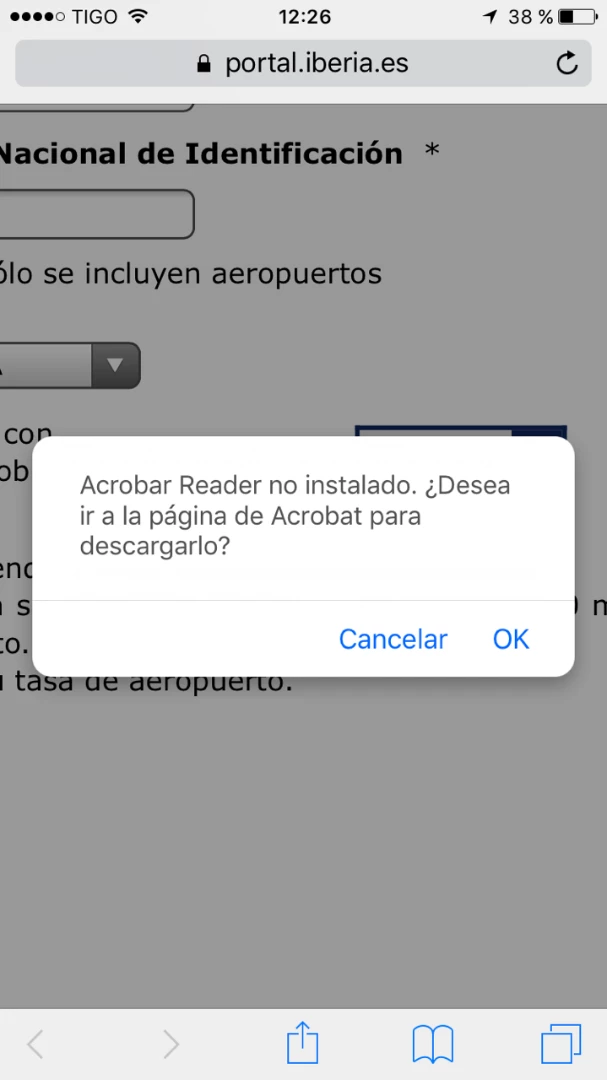
This topic has been closed for replies.
Correct answer AkanchhaS8194121

Hi Gabex17,

Thanks for sharing the detailed information.

We were able to reproduce the same at our end as well and found that this is a problem with the website.

Websites often detect whether or not a plugin for Reader is installed.

On mobile, the devices do not allow plugins in the browser, so no plugin CAN be installed. Websites need to be updated to support mobile workflows which can’t have browser plugins.

Regards,

Akanchha

1 reply

AkanchhaS8194121
AkanchhaS8194121Correct answer
Legend
December 15, 2016

Hi Gabex17,

Thanks for sharing the detailed information.

We were able to reproduce the same at our end as well and found that this is a problem with the website.

Websites often detect whether or not a plugin for Reader is installed.

On mobile, the devices do not allow plugins in the browser, so no plugin CAN be installed. Websites need to be updated to support mobile workflows which can’t have browser plugins.

Regards,

Akanchha

December 20, 2016

Thank you so much Akanchha !!!

really appreciated! I'll contact website to request update it.

regards!

Gabriel Q.

AkanchhaS8194121
Legend
December 20, 2016

You'r welcome!