Participating Frequently
June 3, 2021
Question

Can’t open Adobe acrobat reader icon

  • June 3, 2021
  • 4 replies
  • 1356 views

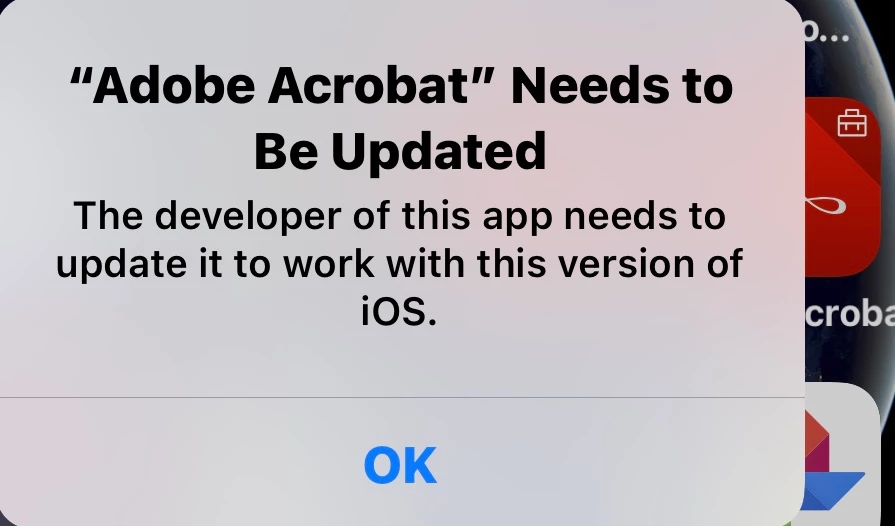
Hi, I can't open the reader app and reach to my saved files on my iPhone after installing the latest update of ios as they say that the developers didn't update the Adobe acrobat application.

Model of device: IPhone X

IOS update: 14.6

Application version: 18.05.29(20180529)

Please help me as soon as possible to reach my saved files with powerful solution for tge above icon other than useless traditional ways like rebooting my device

it is not the first time to lose my important files with Adobe updates.    Thanks

This topic has been closed for replies.

4 replies

ls_rbls
Community Expert
Community Expert
June 30, 2021

I may be wrong, but I think that in this particular case the developer of this mobile app is Apple.


Have anyone asked the same question in the Apple support forums?


Also, does everyone posting here with the same problem as the original poster have the same old version of this app installed in your mobile devices?

Participant
June 29, 2021

I'm facing same problem, did u find a solution.?

Legend
June 29, 2021

That's a very old version. Have you actually updated it, using the App Store?

Participant
June 29, 2021

Even my iPad showing the same problem. Do solve this problem..

Participating Frequently
June 8, 2021

I need a reply, I am really disappointed with Adobe every time

Participant
June 10, 2021

Hi, i am having the same problem, unable to open Adobe reader after iOS software update.  The information to be recovered is very important.  Can the developer please provide a solution to this urgent problem!

Participant
June 10, 2021

i am having the same problem, help please