Exit
  • Global community
    • Language:
      • Deutsch
      • English
      • Español
      • Français
      • Português
  • 日本語コミュニティ
  • 한국 커뮤니티
0

Can't use fill and sign

New Here ,
Nov 28, 2020 Nov 28, 2020

Fill and sign in Adobe Acrobat isn't work on my Huawei
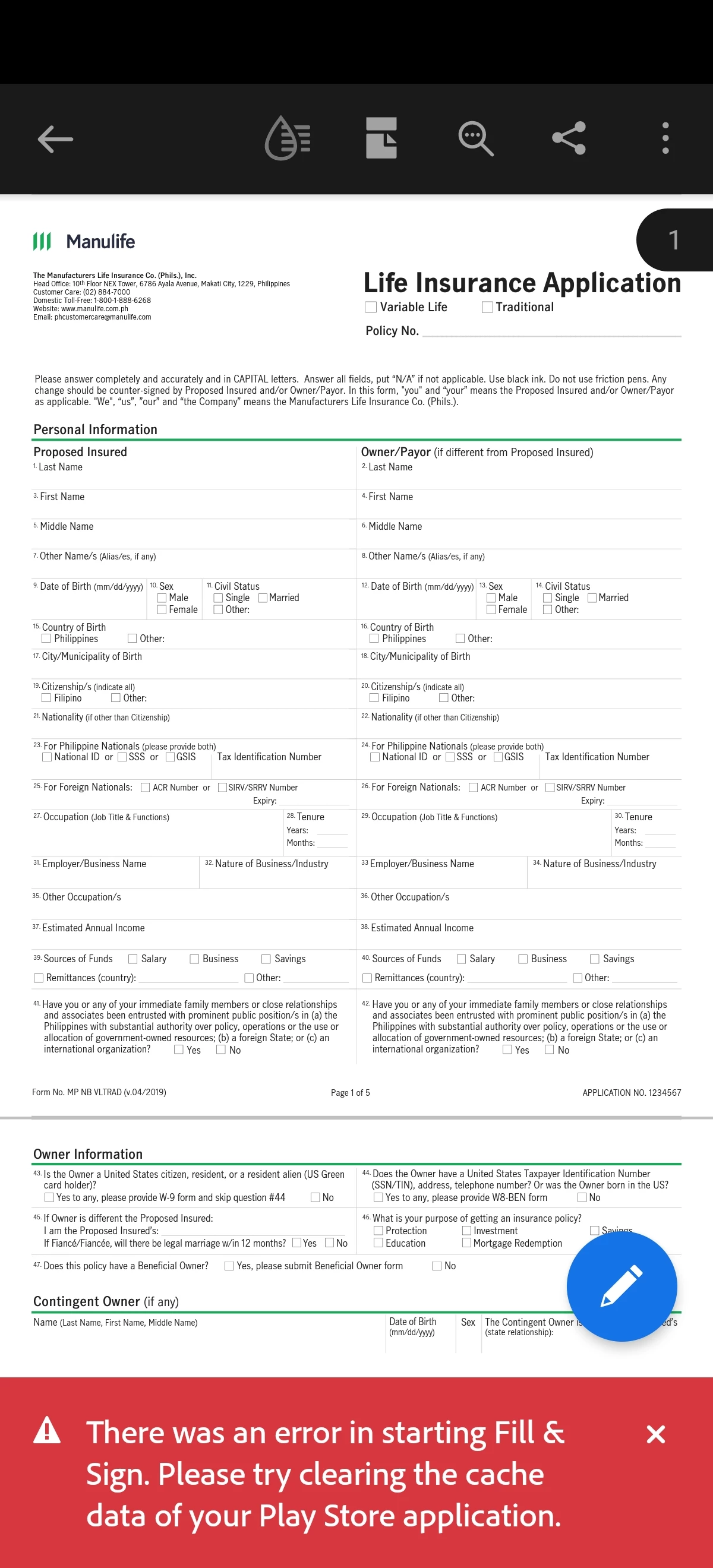
Screenshot_20201129_122843_com.adobe.reader.jpg

P40 Pro 

TOPICS
Android
2.1K
Translate
Report
Community guidelines
Be kind and respectful, give credit to the original source of content, and search for duplicates before posting. Learn more
community guidelines
1 ACCEPTED SOLUTION
Adobe Employee ,
Dec 12, 2024 Dec 12, 2024

Hi there


Hope you are doing well. We have got the update from the team,

Acrobat Reader Mobile is currently available for download exclusively through the Google Play Store and the Samsung Galaxy Store. The app relies on core services provided by Google and Samsung to enable various features and functionalities. These services include user authentication, in-app purchases, cloud integrations, and notifications, which are essential for delivering a seamless and feature-rich user experience.

However, due to Google’s suspension of business operations with Huawei in 2019, access to Google Mobile Services (GMS) on Huawei devices was blocked. This restriction has a direct impact on Acrobat Reader Mobile because it depends on these services for core operations and functionality https://support.google.com/android/thread/29434011/answering-your-questions-on-huawei-devices-and-go...


Hope this information will help.


View solution in original post

Translate
Report
Community guidelines
Be kind and respectful, give credit to the original source of content, and search for duplicates before posting. Learn more
community guidelines
Adobe Employee ,
Dec 06, 2020 Dec 06, 2020

Hi,
Thanks for contacting us.

We apologise for the inconvenience faced by you. Can you please try clearing the app’s data ? To clear app data Open Settings app -> Apps -> Adobe Acrobat -> Storage -> Clear data. Do remember that clearing data would reset your local Settings of reader app.
Let us know if this helps.
Thanks
Acrobat Android Team

Translate
Report
Community guidelines
Be kind and respectful, give credit to the original source of content, and search for duplicates before posting. Learn more
community guidelines
New Here ,
Aug 29, 2024 Aug 29, 2024

Did you solve this problem? I get this problem on my huawei matepad too

Translate
Report
Community guidelines
Be kind and respectful, give credit to the original source of content, and search for duplicates before posting. Learn more
community guidelines
Adobe Employee ,
Aug 29, 2024 Aug 29, 2024

Hi @maz_5359


I hope you're doing well, and thanks for reaching out!


Could you please let me know which version of the Acrobat Reader mobile app you're using? You can find this by tapping the profile icon and selecting "About Adobe Acrobat." Also, if you haven't already, try updating the app through the Play Store (for Android) and then restart your device to see if that helps.


If you're still having issues, you might want to clear the app data as mentioned in the earlier message.


~Amal

Translate
Report
Community guidelines
Be kind and respectful, give credit to the original source of content, and search for duplicates before posting. Learn more
community guidelines
New Here ,
Oct 05, 2024 Oct 05, 2024

I get this problem on my huawei matepad too.

Acrobat ver 24.10.0.35812.Beta


Translate
Report
Community guidelines
Be kind and respectful, give credit to the original source of content, and search for duplicates before posting. Learn more
community guidelines
Adobe Employee ,
Oct 09, 2024 Oct 09, 2024

Hi @maz_5359


I hope this message finds you well! Thank you for reaching out regarding the issue you're experiencing.

As mentioned earlier, have you had a chance to clear the cache memory of the application? This can often resolve unexpected behavior. Please give it a try and let me know if it improves the situation.

If you’re still encountering problems after clearing the cache, I would appreciate it if you could share a short video recording that demonstrates the steps you are taking and the issue as it occurs. This will help us investigate the matter further and find a solution more quickly.

Thank you for your cooperation, and I look forward to your response!


~Amal

Translate
Report
Community guidelines
Be kind and respectful, give credit to the original source of content, and search for duplicates before posting. Learn more
community guidelines
New Here ,
Oct 22, 2024 Oct 22, 2024

Hi, 


Encountering the same problem with my huawei tablet. Tried clearing cache of the appn and the playstore equivalent, restarted device. But sam problem exists

Translate
Report
Community guidelines
Be kind and respectful, give credit to the original source of content, and search for duplicates before posting. Learn more
community guidelines
Adobe Employee ,
Oct 22, 2024 Oct 22, 2024

Hi @J_C12


I hope you're doing well!

To help us investigate the issue you're encountering, could you please provide the following details?

  1. Operating System Version: Kindly share the version of the operating system (iOS or Android) you're currently using.

  2. Acrobat Reader Mobile App Version: Please include the version of the Acrobat Reader Mobile app installed on your device.

  3. Video Recording: If possible, could you also share a short video that demonstrates the steps you’re taking and highlights the issue as it occurs? This will give us a clearer understanding of the problem.

Once we have this information, we’ll be able to assist you more effectively.

Thank you for your cooperation, and I look forward to your response!


~Amal

Translate
Report
Community guidelines
Be kind and respectful, give credit to the original source of content, and search for duplicates before posting. Learn more
community guidelines
New Here ,
Dec 05, 2024 Dec 05, 2024

Hi, I am having the same issue as well. 

The cache has been cleared and is still the same. I enclosed the video for your reference please let me know how can I solve this problem. Thank you.  

I am using Huawei MatePad Pro. 

Translate
Report
Community guidelines
Be kind and respectful, give credit to the original source of content, and search for duplicates before posting. Learn more
community guidelines
Adobe Employee ,
Dec 09, 2024 Dec 09, 2024

Hi there


Hope you are doing well and thanks for sharing the details. Please give us some time to get this checked further by our product team. We will share the update as soon as we get any information to share.


Translate
Report
Community guidelines
Be kind and respectful, give credit to the original source of content, and search for duplicates before posting. Learn more
community guidelines
Adobe Employee ,
Dec 12, 2024 Dec 12, 2024

Hi there


Hope you are doing well. We have got the update from the team,

Acrobat Reader Mobile is currently available for download exclusively through the Google Play Store and the Samsung Galaxy Store. The app relies on core services provided by Google and Samsung to enable various features and functionalities. These services include user authentication, in-app purchases, cloud integrations, and notifications, which are essential for delivering a seamless and feature-rich user experience.

However, due to Google’s suspension of business operations with Huawei in 2019, access to Google Mobile Services (GMS) on Huawei devices was blocked. This restriction has a direct impact on Acrobat Reader Mobile because it depends on these services for core operations and functionality https://support.google.com/android/thread/29434011/answering-your-questions-on-huawei-devices-and-go...


Hope this information will help.


Translate
Report
Community guidelines
Be kind and respectful, give credit to the original source of content, and search for duplicates before posting. Learn more
community guidelines
New Here ,
Mar 15, 2025 Mar 15, 2025
LATEST

it this already solve Bro? i just bought my Matepad 11.5 s papermatte edition. still not working. same problem as you.

Translate
Report
Community guidelines
Be kind and respectful, give credit to the original source of content, and search for duplicates before posting. Learn more
community guidelines
