Participant
August 12, 2015
Answered

Changing language while converting pdf to word

  • August 12, 2015
  • 2 replies
  • 20659 views

Trying to conver pdf to word, but the document is in Russian, and I dont have that language in the menu, Is there a way to add it?

This topic has been closed for replies.
Correct answer MobileDeveloperCK

Hi keirs32567513​,

The Help page below describes the supported languages for OCR in Adobe Export PDF (as part of Document Cloud PDF online services).

Using OCR in Adobe Export PDF, Document Cloud, Reader

The desktop version of Acrobat Pro DC provides the OCR feature called "Recognize Text".
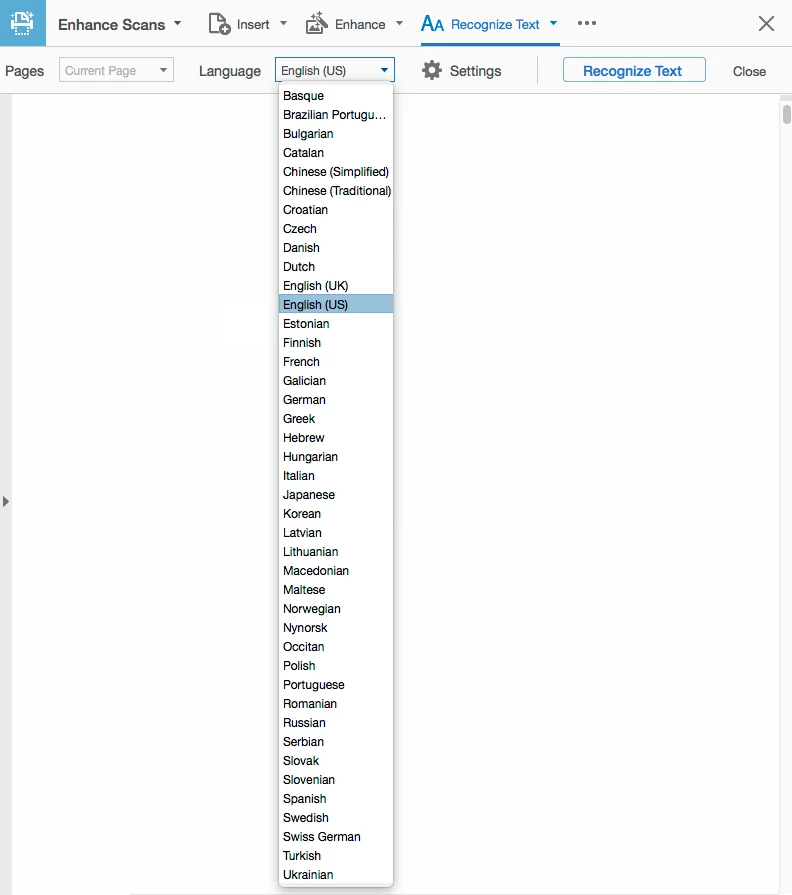
(Tap/click the image above to enlarge)

Unfortunately, neither one of them support Vietnamese.  Sorry for the inconvenience.

I'd recommend searching the Internet with keywords such as "OCR" and "Vietnamese" for alternative solutions.

2 replies

Participant
August 11, 2016

Thank you:  that was the solution. I appreciate your help

Community Manager
August 13, 2015

Hi,

Are you trying to convert a scanned PDF document in Russian to Word using the Adobe Export PDF online service?

The language option is used only when you try to recognize text in a scanned PDF document.  If a PDF document already contains text, Adobe Export PDF will not translate to other language.

Please note that Russian is not included in the supported languages for the Adobe Export PDF online service.

Adobe Export PDF converts PDF files containing content in various western languages, including English, Danish, Dutch, Finnish, French, German, Italian, Japanese, Norwegian, Brazilian Portuguese, Spanish, and Swedish. Optical character recognition (OCR) is currently available in these same languages.

FAQ | Adobe Export PDF

However, Adobe Acrobat Pro DC (desktop app) supports Russian OCR.

Adobe Acrobat Pro DC is a paid application for a Windows or Mac desktop computer.

You can download a 30-day free trial of Acrobat Pro DC to see if it suits your needs.

Download Adobe Acrobat free trial | Acrobat Pro DC

Please let us know if you have additional questions.

Participant
August 13, 2015

Hello!

Thank you very much for your reply!

I am not using the online service, I am actually using Adobe Reader pro dc.

I have registered in that program and paid for service, however it is still

have limited options on languages. I am sending you a screenshot to make it

clear.

I will be thankfull, if you can suggest possible ways to add Russian to the

program.

Thank you in advance.

Danilenko Ekaterina

On Thu, Aug 13, 2015 at 5:27 PM, MobileDevCK <forums_noreply@adobe.com>

Community Manager
August 14, 2015

Hi,

Which app do you have?  Acrobat Reader DC or Acrobat Pro DC?  (There is no product called "Adobe Reader Pro DC".)

Because you paid for the service, you must be using the Adobe Export PDF online subscription service from Acrobat Reader DC (free desktop app).  Is that correct?

Unfortunately, Adobe Export PDF does not support Russian.  Please see the "What languages does Adobe Export PDF support?" section of the FAQ document below.

FAQ | Adobe Export PDF

You need to use Acrobat Pro DC (paid desktop app) to be able to use Russian for OCR.