
Participant
November 2, 2018
Answered

Lost option to save web page as PDF?

  • November 2, 2018
  • 2 replies
  • 7403 views

Since the latest app update, I’ve lost the ability to save a web page as a PDF.

Previously, while viewing a web page, I would press the SHARE icon and select the option SAVE AS PDF (using Acrobat Reader). After the PDF was created and saved, I was able to edit the file name, and foward it via email.

As of today—the SAVE AS PDF option no longer appears when I touch the SHARE icon. When I open the Adobe Reader app, all of my previously created files are still there.

The only reason i downloaded this app is to create PDF docs from web pages. Is this a bug in the recent update? Or has Adobe removed this feature?
This topic has been closed for replies.
Correct answer MobileDeveloperCK

Hi,

Adobe Acrobat Reader for iPhone and iPad does not provide the ability to save a web page as a PDF via Share.

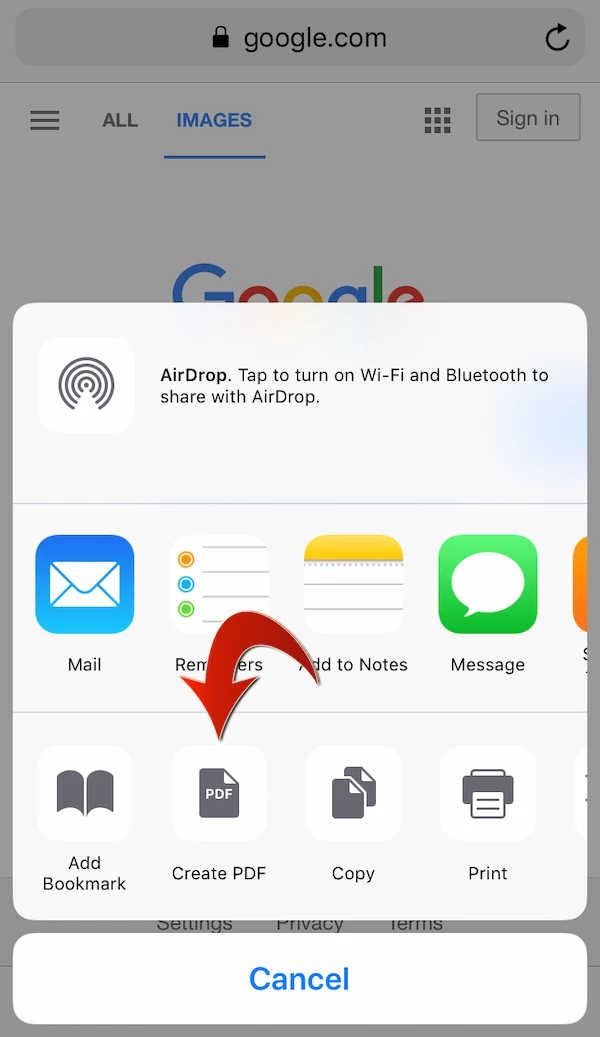
This is what you see when you open a web page and tap the Share icon in Safari (the default web browser).

Apple's Safari (not Adobe Acrobat) offers the Create PDF option on iOS 11 or later.

This option is available even if you do not have Adobe Acrobat Reader installed on your iPhone/iPad.

If the Create PDF option is not initially visible on the Share sheet, you can scroll to the right to find it.

Hope this helps.

2 replies

Participant
November 6, 2018

Power on

MobileDeveloperCKCommunity ManagerCorrect answer
Community Manager
November 3, 2018

Hi,

Adobe Acrobat Reader for iPhone and iPad does not provide the ability to save a web page as a PDF via Share.

This is what you see when you open a web page and tap the Share icon in Safari (the default web browser).

Apple's Safari (not Adobe Acrobat) offers the Create PDF option on iOS 11 or later.

This option is available even if you do not have Adobe Acrobat Reader installed on your iPhone/iPad.

If the Create PDF option is not initially visible on the Share sheet, you can scroll to the right to find it.

Hope this helps.

Participant
November 3, 2018

Hi, and thanks for taking the time to contact me. It’s much appreciated.

I see what you’re saying. It’s actually Safari that’s been ‘creating’ the PDF. Then, when I tap the Share icon, it presents me with a list of potential places to put the PDF doc. I’ve been sending the PDF’s to the Acrobat Reader app; renaming the files; and using the ‘Share a Copy’ feature to email them to others.

The problem occurred when the ‘Create PDF’ icon was no longer visible when I tapped the Share icon. I always had to scroll to the right to access it, but it was no longer there.

I finally tried rebooting my iPhone, and thankfully—all is now back to normal.

I do appreciate your helpful explanation of how it works behind the scenes.

Denise.

Sent from my iPhone

Community Manager
November 3, 2018

Glad to hear that it's working for you again!