adiliag86568417
Participating Frequently
January 9, 2018
Answered

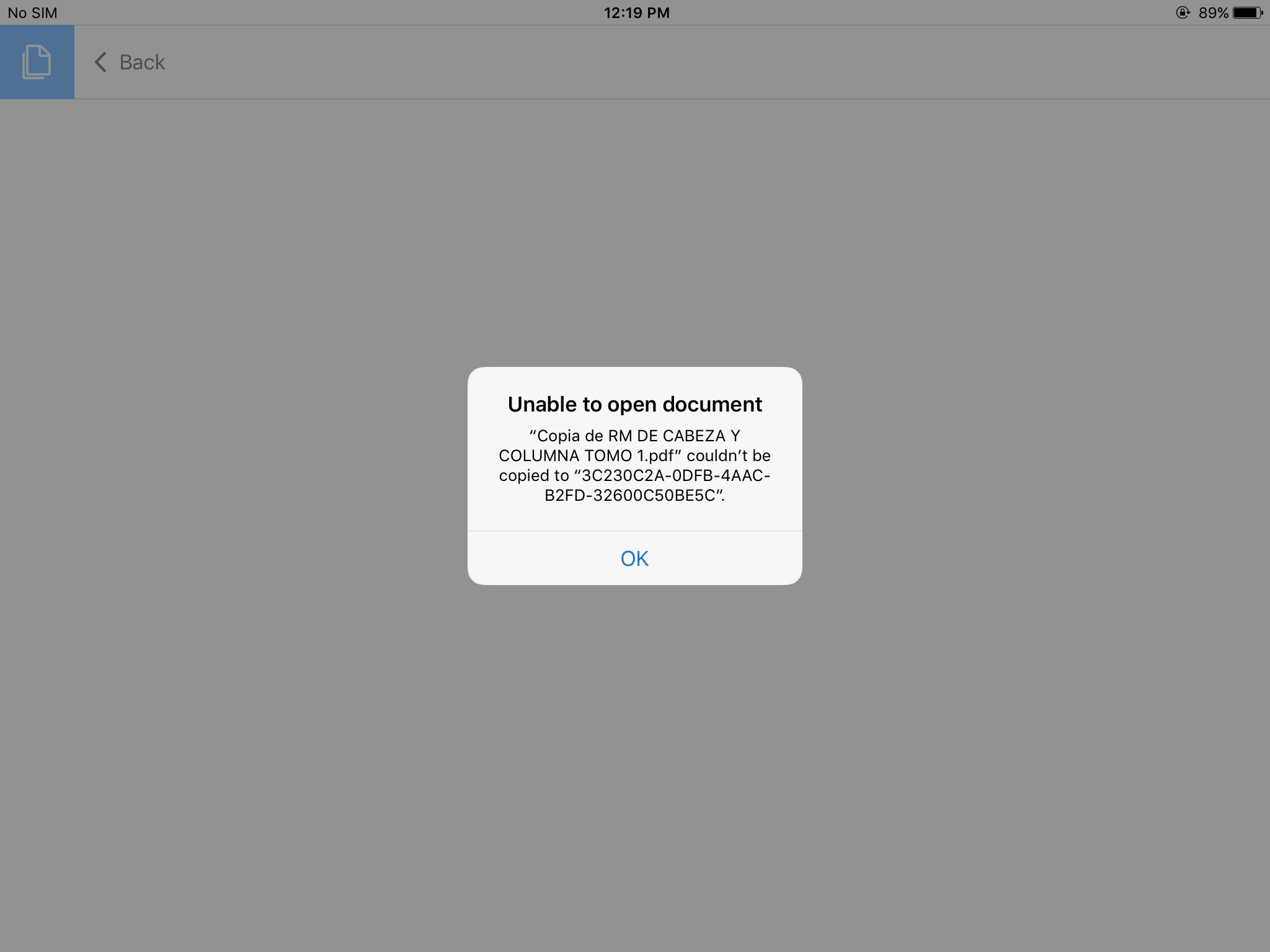
Some PDFs in my iPad are not opening... They used to before.

  • January 9, 2018
  • 2 replies
  • 52062 views

When I try to open it I get that the PDF couldn't be copied to.....and a series of numbers and letters. I have the last update of the app.

This topic has been closed for replies.
Correct answer MobileDeveloperCK

Hi adiliag86568417​,

Sorry to hear that deleting unused/unnecessary files did not help.

Here are the recommended steps for you to try when you get home.

  1. Back up all of your PDF documents (that are stored locally on your iPad) to your MacBook Pro using the iTunes app.
    How to back up and restore PDF documents on iPad/iPhone using iTunes
    See the section: "How to transfer documents from your iPad/iPhone to your computer".
  2. Open PDF documents that have been backed up on your MacBook Pro to make sure that they are not corrupted or damaged during file transfer.
  3. Uninstall Acrobat Reader.
  4. Install Acrobat Reader from the App Store.
  5. Restore the PDF documents.
    See the section: "How to transfer documents from your computer to your iPad/iPhone" of the FAQ document above.

It wouldn't hurt to restart your iPad, either.

Please let us know what you find out.

Thank you.


Hi adiliag86568417​,

We just released Acrobat Reader 17.01.22 to the App Store.

This is the latest official release (that is identical to the pre-release version that you tried) as of January 23.

We apologize for the inconvenience caused.

Thank you for your patience.

2 replies

mauriciotrentin
Participant
November 7, 2019

If you have any VIRTUALSPEECH app, delete the app. It crashes PDF files on iOS13. If any other app are doing that, the only way to find is to send yourself a pdf attached to an e-mail, and open the e-mail in the iOS device that is not working. When you see the attachment, some strange logo/brand will be on the PDF file ICON instead of a PDF letters or a Acrobat logo. Find which installed app does have that logo. Delete the app, because probably some bug are messing PDF files on the new iOS.

October 27, 2020

October 27, 2020

So tgat isxegat I get when trying to ope a pdf orcword doc on iOS phone. Updated reader and word uninstalled / reinstalled several times and rebooted.   Very annoying.  No new applications added to cause a problem help!

Legend
January 10, 2018

Hi adiliag86568417​,

Would you please provide us more details about the problem so that we can reproduce it at our end?

  • What is the iOS version?  Go to Settings > General > About > Version.
  • What is the version of Acrobat Reader ?  Go to Settings > Adobe Acrobat > Version.  By "the last update", do you mean 17.12.15?
  • What is the other app that you are trying to open the PDF document? Can you try opening from Apple Safari or Mail to see if it works?  We are trying to determine if the other app has a problem.

Thank you.

adiliag86568417
Participating Frequently
January 10, 2018

Hello, mi iPad is a model MD368LL/A, theiOS version is updated to the 9.3.5, the system says that it is in fact updated, my Adobe version is 17.12.15.

I have not tried to open the PDFs with other app, or email them, they are heavy medical books of 399 MB, but some of 165 MB do open and some of 21 MB do not open. I have always been able to open my PDFs in my iPad even if is an old one.

MobileDeveloperCKCorrect answer
Legend
January 23, 2018

Hi adiliag86568417​,

Sorry to hear that deleting unused/unnecessary files did not help.

Here are the recommended steps for you to try when you get home.

  1. Back up all of your PDF documents (that are stored locally on your iPad) to your MacBook Pro using the iTunes app.
    How to back up and restore PDF documents on iPad/iPhone using iTunes
    See the section: "How to transfer documents from your iPad/iPhone to your computer".
  2. Open PDF documents that have been backed up on your MacBook Pro to make sure that they are not corrupted or damaged during file transfer.
  3. Uninstall Acrobat Reader.
  4. Install Acrobat Reader from the App Store.
  5. Restore the PDF documents.
    See the section: "How to transfer documents from your computer to your iPad/iPhone" of the FAQ document above.

It wouldn't hurt to restart your iPad, either.

Please let us know what you find out.

Thank you.


Hi adiliag86568417​,

We just released Acrobat Reader 17.01.22 to the App Store.

This is the latest official release (that is identical to the pre-release version that you tried) as of January 23.

We apologize for the inconvenience caused.

Thank you for your patience.