
Participant
February 17, 2023
Question

What a high quality App OMG

  • February 17, 2023
  • 1 reply
  • 2347 views

Was für ahnungslose Programmierer seid ihr eigentlich? Seid ihr nicht einmal in der Lage, die Funktionalitäten eures eigenen Produktes Adobe Acrobat Reader DC anständig und funktionierend in eine App für Handy und Tablet zu packen? So etwas Stümperhaftes ist mir wirklich noch nicht begegnet!!!! Ihr braucht euch nicht zu wundern, wenn euch die Leute weglaufen... wahrscheinlich eher eure Masche, die kostenpflichtige Version zu pushen...? Dass ich nicht lache!!! Hochmut kommt vor dem Fall...heißt es bei uns....


What kind of clueless programmers are you? Are you not even able to pack the functionalities of your own product Adobe Acrobat Reader DC decently and functioning in an app for cell phone and tablet? I really haven't come across anything so bumbling yet!!!! You don't need to be surprised if people run away from you... probably more your scam to push the paid version...? That I do not laugh!!! Pride comes before the fall...they say with us....
1 reply

ls_rbls
Community Expert
Community Expert
February 18, 2023

Well, you obviously seem pissed off...


What exactly is your question ?  Do you need help ? 


Share that file. I can take a look at it.


Participant
February 18, 2023

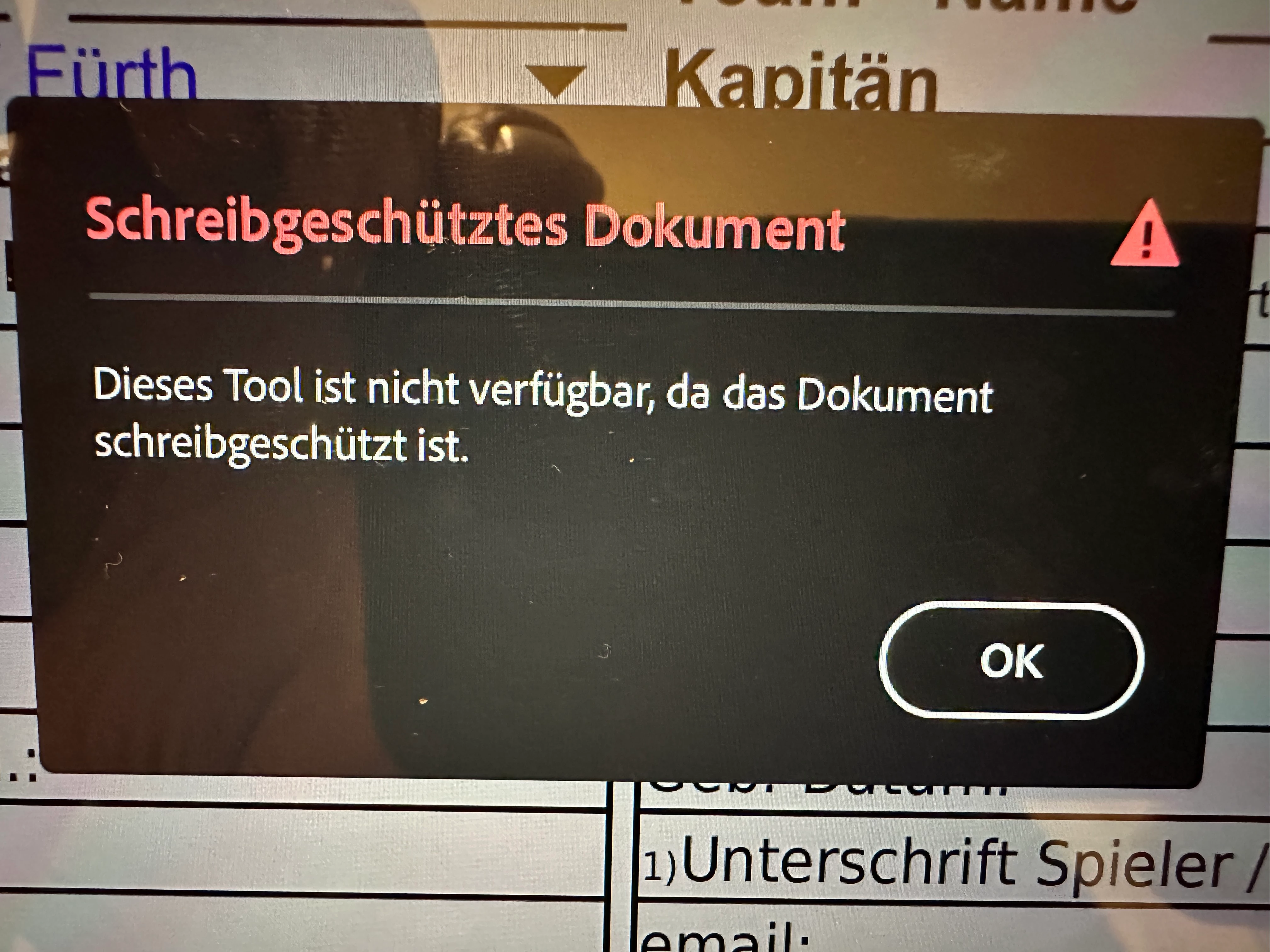
Yesterday I tried to fill out a document, which is only released for filling out, signing and printing, that is otherwise protected against changes password, on the iPhone 14pro or on the iPad Pro by means of the great app, and it comes constantly this error message! On the iMac or PC, the filling and signing works without problems.
Basically, the research of the problem has already come out that this is already known for more than 6 months at Adobe and it is simply ignored, as a first measure, the app should be taken from the AppStore and revised, before you simply ridiculous ... with such a counter like Adobe!

ls_rbls
Community Expert
Community Expert
February 23, 2023

hi souvik 


Thanks for pointing this out, but why is the Adobe "Reader" in the iOS app (iPhone & iPad) so truncated and stripped of functionality that is released on all other systems (Windows, Mac and Android)? I find something like this impossible! Why change proven and open the door to other competitors?

About the Fill & Sign proposal... what did you do there? Drop-down menus are not displayed and signature fields as such are not displayed either. Furthermore, I doubt that the document is locked against changes with the signature as one should expect.
Another half-heartedly developed app that is as pointless as the "your restrictions in the reader...

Unbelievable but with this you lose customers very quickly!!! I hope that you and your board members are aware of this...


Hi,


This was no easy peasy. Here are my findings:


There is nothing wrong with your form nor the Acrobat Mobile App.


Altough it is true that the ecryption that is currently enforced in your file may not be supported with the Fill & Sign feautre of the mobile app, it is fully supported with Adobe Sign.


It is worth noting that, the mobile app industry is almost up to par with full desktop features but not just yet.


For instance, some mobile apps like "Foxit PDF Editor" or "I♥ PDF" will render a secured PDF just fine, and it will allow you to execute the signing action. However, because you've included certificate-based digital signature fields in your PDF form, these apps will expect that a copy of the signers certificate is available somewhere in the mobile device.


If the user of the form doesn't know  how to export or import digital signing certificates, there is no point in knowing about these features... you're better off with Adobe Sign and it does provide the highest encryption support for this types of files (try your current PDF with Adobe Sign and you'll see).


And let me be clear, none of these mobile app technologies are perfect; they all have advantanges and disadvantages over each other.  Moreover, some of these features doesn't work right away unless you pay for it.


In other words,  you do have options and alternatives out there that include features that could be better than Adobe Acrobat mobile,  but this also depends proportionally on how the forms will be distributed to your users.


Evaluating the pros and cons between apps will let you choose what works best according to your intended workflow.


For instance, since this PDF is available for download from the DSAB website, most users with Adobe Reader (or similar PDF software) may use the form with their full desktop versions with no problem. But for the best mobile device experience with a PDF that is rendered in the Acrobat Mobile app, you must use Adobe Sign.


Everything considered, if you are distributing this PDF via E-mail to other users you must use Adobe Sign(not have them open the PDF directly in the mobile apps to use the Fill & Sign service). And best of all, the Adobe Sign service to request e-Signatures is already included with your Acrobat Pro paid subscription.


When you send a PDF with Adob Sign, the user will receive the email; clicking on that Adobe Sign email link will open up the Acro Sign form.


This service detects all of the certificate-based digital signature fields allowing each recipient to choose what portion of the form to fill and sign.


Also, the form is accessed directly from a web browser on a desktop computer, or mobile device. Your recipients need no paid subscription of Adobe Acrobat nor required to have  Adobe Reader installed in their systems.


But enough of that talk!


I wanted to share with you a PDF that I recreated from your original, just to prove a point that all that security and encryption didn't stop me from hacking that PDF and come up with my own version of the DSAB registration form.


I work a lot with secured government PDF forms and when something needs to get done quickly it turns out to be a headache.


Personally, I can't stop working because of outdated secured PDFs  and I  don't have the patience.


So I will always find a work-around to the problem.


In addition, most of the time these forms doesn't fully support the original intent of the workflow that was meant to work right out-of-the-box.


As a result, over 60% of my duties in an office space have to deal with recreating PDFs that no one is able to use  appropriately because they are unnecessarily over-encrypted.


Usually these secures PDFs get kicked back because of erros (specifically with certificate-based digital signatures).


Needless to say that, the average computer user out there never go this far; they just stop an entire production workflow while waiting for somebody else to come up with a solution or remedy.


I make emphasis on this observation because you must consider if the users will be downloading and printing this PDF to sign it by hand. In which case, all that security and electronic records compliance may (AND WILL) goto hell in a heartbeat.


But just for the kicks, I wanted to contribute to your cause and I started looking into this interesting hobby and sport. I got into the BSAD fever now!!  This is entirely new for me, and I 'm gonna start following.


So... I added a reset button to clear the form (top left corner of the form on top of the darter logo, first slide below), a high quality BSAD logo (top right corner, shown in the second slide below); the darter illustration figure is based off of  your original picture but with an olympic look and feel.


RESET (is visible but doesn't print), THE BUTTON CLEARS THE FORM SO IT CAN BE REUSED MANY TIMES (THE USERS DON'T NEED TO MANUALLY DELETE EVERY BLANK):


HIGH QUALITY DSAB LOGO:


In addition, I also re-created every text field from scratch and aligned the text field objects properly to match the height and width of the blanks provided.  If you would like to use this form send me a private message and I'll give you the password so that you can unlock the editing rescrtrictions and do whatever you want with it.


Anyaway, I tested your original PDF and mine with different computing devices and different PDF editing mobile apps, so I left the same restrictions that you had originally in your form but I lowered the encryption level so it could be opened in iPad Pro or iOS devices if a user chooses to use Fill & Sign (I don't recommend it).


I tested it on an iPad Pro and it renders beautifully. Although, It also allows to user to use the Fill & Sign feature it won't render the certificate-based digital signature fields.


See the slides below using an iPad Pro with Fill & Sign:


TO USE FILL AND SIGN JUST LONG-PRESS A TAP ON THE DESIRED BLANK AND THE CONTEXT MENU WILL POP UP; SELECTING "Sign" will execute Fill & Sign"


NOTE: I must say again, using the Fill & Sign service only employs electronic signatures; it doesn't respect certificate-based digital signature fields... You must employ Adobe Sign (shown in the next slides).


NEXT SLIDES SHOWS USING "Request e-Signatures" ON iPAD WHICH WILL EXECUTE THE ADOBE SIGN SERVICE:


THE FOLLOWING SLIDES SHOW THE NEXT SEQUENCE OF ADOBE SIGN IN ACTION BUT USING  AN ANDROID MOBILE DEVICE:


LAST NOTES:

It is worth noting that the URL links won't execute from mobile apps as they would with the full desktop versions when the PDF is not run inside of a web browser. I am not aware of any modern family of mobile web browsers that will allow to do this due to security restrictions (but I may be wrong with this assertion, JavaScript scripting is possible for Acrobat Mobile app but it is quite different from Acrobat JavaScript with the full desktop versions).


To execute the embedded web links you may, however, select the web link in iPad Pro and a context menu will pop up allowing to slect "Open Link" (it will open in whatever web browser is the default browser in that device). See last slide below:


Here is a copy of the test file with same restrictions but lowered encryption: