Answered
adobe reader iphone 4
Hi,
I was trying to install adobe reader for the first time in my old iphone 4, but it is not compatible. Is there any way to install an older compatible version?
Thank you!

Hi,
I was trying to install adobe reader for the first time in my old iphone 4, but it is not compatible. Is there any way to install an older compatible version?
Thank you!
Hi irb2,
The latest version (18.01.22 as of February 2, 2018) of Acrobat Reader requires iOS 9.0 or later.
According to the Wikipedia page (List of iOS devices - Wikipedia), the highest iOS version that you can install on your iPhone 4 is iOS 7.1.2.
However, the App Store provides the latest compatible version of Adobe Reader for your iPad or iPhone running iOS 7 (or even older version of iOS).
Do you see the following dialog with two buttons (Download and Cancel)?
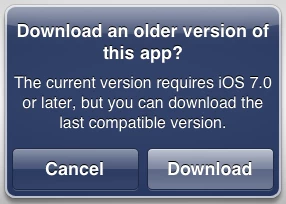
(The dialog that you see should show "iOS 9.0" instead of "iOS 7.0".)
Please tap the Download button to install the last compatible version.
If you see the dialog with the OK button only (i.e. no Download button), it means that you have never installed Adobe Reader using the particular Apple ID before.
To associate Adobe Adobe Reader with your Apple ID, you will need a Windows or Mac computer and iTunes (desktop app).
Now you can switch back to your iPad/iPhone and try downloading the latest version of Adobe Reader. You will be presented with the dialog with the Download button.
Please let us knows if it works for you.
Thank you.
Already have an account? Login
Enter your E-mail address. We'll send you an e-mail with instructions to reset your password.
 AdChoices