Participant
March 31, 2017
Answered

Hyperlinks in a PDF: how to work with them in iOS?

  • March 31, 2017
  • 1 reply
  • 30486 views

I have made a project with QGIS Cloud that allow to reach some PDFs contained in my DropBox space.

In the PDFs there are some Hyperlinks that work correctly on pc/Mac (after downloading the file) but don't work with iPhone/iPad, also after opening the PDFs with Adobe Acrobat for iOS.

Could you help me please?

Thank you

This topic has been closed for replies.
Correct answer MobileDeveloperCK

I thank you for your reply: I will follow the indication that you gave me.

I have a last doubt: if in the sample file that I sent you there are no links, how is it that by opening the PDF in Adobe Acrobat (Mac version) the links work?

Could you, please, send me a PDF in which the links work, so that I could try activate the links on an iOS device?

Cheers

Nino


Hi,

As I mentioned in the previous reply, the PDF document that you sent to us has no real hyperlinks.

The "Create links from URLs" option specifies whether links that weren’t created with Acrobat are automatically identified in the PDF document and become clickable links.  It is enabled in the desktop version of Acrobat Reader/standard/Pro DC by default.

To disable the Create links from URLs" option

  1. Open the Preferences dialog in Acrobat Reader/Standard/Pro (desktop app).
  2. Select General in the left pane.
  3. Uncheck the "Create links from URLs" check box.  (You are disabling the option now.)
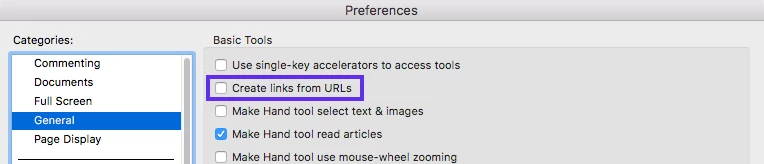
    (Click the image to enlarge)
  4. Open your PDF document (Senza nome.pdf).
  5. Try clicking each link at the bottom of the page.

The text (http://...) is no longer a hyperlink.

Please check a new forum private message to find the shared link to the PDF document containing the real hyperlinks that I created using Acrobat Pro DC.  You should be able to tap the hyperlinks in Acrobat Reader to open them in Safari on iPad/iPhone.

Hope this helps.

1 reply

Legend
April 2, 2017

Hi ninovillari​,

Do the hyperlinks in your PDF documents point to the URLs to your Dropbox (e.g. https://www.dropbox.com/...​)?  Are the URLs https or http?

Would you please open some of your PDF documents in iBooks (instead of Acrobat Reader) on your iPad/iPhone?

If you would like to share your PDF document with us (Adobe), we can send you the information about how to share it privately via a forum private message.

Thank you for your help.

Participant
April 3, 2017

Hi,

thank you for the reply.

The links from my QGIS Cloud project pointing to the ULSs in myDropBox are all http.

The links contained in PDFs in my DropBox are some with https, some with http: I have made an additional test with these last, but they don’t work, also if I open them with iBooks.

Here is one of these last PDFs with both https and http:

I have tried to create the PDF both from “print” and from “save to” but the result is always the same negative.

Greetings

Nino

[personal information removed by moderator]

Participant
April 5, 2017

Hi,

As I mentioned in the previous reply, the PDF document that you sent to us has no real hyperlinks.

The "Create links from URLs" option specifies whether links that weren’t created with Acrobat are automatically identified in the PDF document and become clickable links.  It is enabled in the desktop version of Acrobat Reader/standard/Pro DC by default.

To disable the Create links from URLs" option

  1. Open the Preferences dialog in Acrobat Reader/Standard/Pro (desktop app).
  2. Select General in the left pane.
  3. Uncheck the "Create links from URLs" check box.  (You are disabling the option now.)

    (Click the image to enlarge)
  4. Open your PDF document (Senza nome.pdf).
  5. Try clicking each link at the bottom of the page.

The text (http://...) is no longer a hyperlink.

Please check a new forum private message to find the shared link to the PDF document containing the real hyperlinks that I created using Acrobat Pro DC.  You should be able to tap the hyperlinks in Acrobat Reader to open them in Safari on iPad/iPhone.

Hope this helps.


Hi,

thank you indeed: it works finally!

I'll buy Acrobat Pro DC and I will have only to add real hyperlinks to each one PDF (they are hundreds, but it's really OK!).

The only downside I see is the high cost.

Cheers

Nino