davidr17924565
Participant
June 26, 2016
Answered

My Adobe PDF form appears blank

  • June 26, 2016
  • 8 replies
  • 102893 views

My Adobe PDF form is being sent as an email attachment. With the prior version in IOS IPhone when I opened the PDF through Adobe Acrobat the form would show all the populated fields.

With the new update, the form show up blank....the fields do not appear Populated unless I highlight the cell.  Once the cell is closed, the cell it goes blank again.

FYI on a Windows or Mac laptop the PDF is populated.   It appears to be an IOS issue. How can I modify or fix to allow the form to be fully visible on the IPhone?

Correct answer MobileDeveloperCK

Hi,

We received your PDF form via email.  Thank you!

First, I opened your PDF form in the desktop version of Acrobat Reader DC on a Mac computer.  The populated fields appeared blank as well.

The Document Properties dialog (File > Properties...) shows that the PDF form was generated by Mac OS X 10.11.1. Quartz PDFContext.
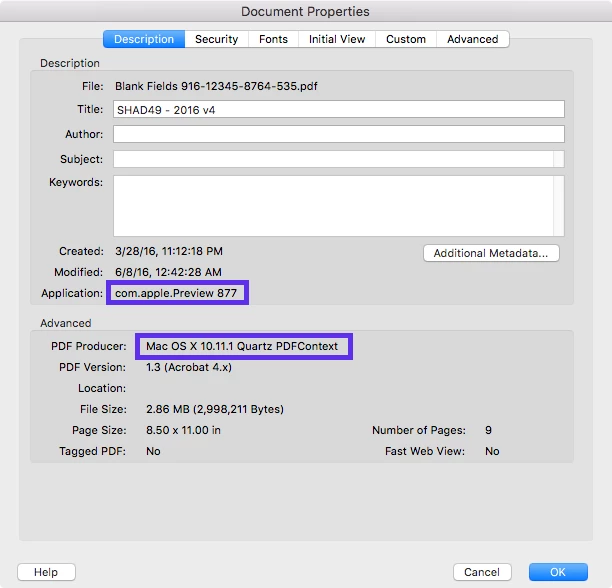
The PDF forms generated by Apple products or filled out in Apple Preview (desktop app) contain invalid entries that cause populated fields to appear blank.

To repair the existing faulty PDF form

  • Open the PDF form in Acrobat Reader (desktop or mobile app), click/tap each populated field, append space, and remove the space.  (This repairs an individual field.)
  • Open the PDF form in Acrobat Pro or Standard (paid desktop app), clear all of the text fields, then fill out the form again.

In the future, it is recommended to

  • Avoid using Apple Preview (desktop app) on a Mac computer to fill out PDF forms.
  • Use the Acrobat Reader mobile app for iOS or Android to fill out PDF forms.
  • Use the desktop version of Acrobat Reader DC on a Mac or Windows computer to fill out PDF forms.

Please let us know if you have further questions.

Thank you.

8 replies

Maggie I
Known Participant
April 15, 2025

I am having a similar issue with a fillable form I have produced. When receiving the completed fillable form, some text appears blank and can only be seen when I click on the field. This disappears again and won't print. A workaround but not a solution is to change the font on each field. On the example attached form, there is text missing that appears when clicked on, in the large field on Page 1. The 3rd large field on Page 2 and the 1st and 2nd field on Page 3. The other fields appear to be ok. Any help with this problem would be gratefully received. Maggie

Amal.
Legend
April 21, 2025

Hi there


Hope you're doing well, and thank you for reaching out.

To better assist you, could you please let us know if this issue occurs with a specific PDF file or with all PDFs? If you haven’t already, please try opening a different PDF to see if the issue persists.

Additionally, could you share the version of the Acrobat mobile app and the operating system you're using? You can find this information by tapping on the profile icon > About Acrobat. Also, please check for any pending updates in the App Store or Play Store and restart your device once the updates are installed.

If the issue continues after updating, kindly share a sample PDF file along with a short screen recording showing the steps you’re taking and the issue as it occurs. This will help us investigate further and provide a more accurate solution.


Participating Frequently
April 27, 2022

Printing to PDF does NOT resolve it for me. Interestingly enough Adobe Acrobat reader DOES display the data, but its Acrobat DC that doesn't display any data. Of course chrome, firefox, edge, iphone, etc all work but Acrobat does NOT. Going to create a ticket with Adobe. Maybe there is an update that can address this issue.

Participating Frequently
April 28, 2022

@defaultjy06atlv3d01 


Hello,


Hope you are doing well. Thank you for bringing this to our attention.


Would you mind sharing a few details with us?

1. The form that you are trying to open through a private message.

To do that, click on my name-> it should open my profile-> click on the blue box that says send a message.

2. The version of Acrobat you are using.

3. Whether you are working on a Windows or a Mac and its version.


Please help us with the details so that we can check on our end as well.


Thanks,

Souvik.

Participating Frequently
April 28, 2022

Hi Souvik, I just shared the form with you and included the Acrobat version. I forgot to mention we are running it on Windows.


thanks for your attention to this.

Participant
January 14, 2021

Just so everyone knows, the Adobe tech advice above is incorrect because of their mistaken premise that Apple Preview editing is the cause of the blank fields. The example of the OP was NOT edited in Preview, it was edited in Adobe Acrobat, as the document information clearly shows. I created an editable document in Acrobat Pro on my MacBook Pro from a saved PDF that was created with Adobe InDesign, added text fields and filled them in Acrobat, and the saved PDF also displays empty fields in Acrobat. The file looks fine in Preview, it doesn't display correctly in Adobe Acrobat. What Adobe is saying is, don't enter data in PDFs using a Mac, and that's simply unacceptable.

Participant
January 21, 2021

100%  Agree

Participant
December 11, 2020

I'm seeing the exact same problematic behavior on a PC with Adobe Acrobat Pro DC on a form created in Adobe InDesign CS6 (Macintosh).  The file opens correctly in Adobe Acrobat Pro DC, can be filled out and saved.  However, when I open it up again the Adobe Acrobat Pro DC, the form flickers, redraws itself, and all of the fields are automatically cleared out.  When I go to close the file, it asks if I want to save it.  I can open these same files in Adobe Acrobat Pro CS5.5 WITHOUT this behavior.  This is clearly NOT an issue with Apple Preview but a problem with the Adobe upgrade.  Screenshot attached to show it's NOT Apple Preview.  Please advise on how this problem will be resolved.  


Participant
September 29, 2020

Quick work around to this is to print to pdf the form that appears to be blank, it will print with all the fields filled out. This works from adobe pro dc. 

Participant
October 11, 2020

its not working. this is not MAC issue as well, because i am using an android device and its giving me same problem

annieh70512094
Participating Frequently
October 15, 2020

same. I use PC. Can't get it to work

Participant
August 13, 2020

That "solution" doesn't work for me either. Adobe Reader is the problem. It is opening PDFs as blank when the same pdf can be opened in Chrome or other applications completely populated. Clicking on the cells where there should be text doesn't reveal anything. This seems to be a new development in Adobe Reader; I haven't had the issue before today.

Participant
August 26, 2020

Just talked wtih a support rep from Adobe. Sounds like it has to do with changing over to Adobe Sign. Will need that to view and fill forms out from now on I guess. Happened to us too and we already pay for Adobe Pro DC. 

Participant
September 1, 2020

**My workaround to view a completed form that comes back "blank"**

I created an adobe fillable form for my clients, and they must have completed it in another app because their responses came back blank. Adding a space into the fields when viewing didn't work for me as they disappeared again as I continued down the form. My workaround is to right click and open the completed form in Preview (mac), and export it, choose jpg format and save it as a jpg. Then the form is viewable with the data. Hope this helps.

MobileDeveloperCKCorrect answer
Legend
July 2, 2016

Hi,

We received your PDF form via email.  Thank you!

First, I opened your PDF form in the desktop version of Acrobat Reader DC on a Mac computer.  The populated fields appeared blank as well.

The Document Properties dialog (File > Properties...) shows that the PDF form was generated by Mac OS X 10.11.1. Quartz PDFContext.

The PDF forms generated by Apple products or filled out in Apple Preview (desktop app) contain invalid entries that cause populated fields to appear blank.

To repair the existing faulty PDF form

  • Open the PDF form in Acrobat Reader (desktop or mobile app), click/tap each populated field, append space, and remove the space.  (This repairs an individual field.)
  • Open the PDF form in Acrobat Pro or Standard (paid desktop app), clear all of the text fields, then fill out the form again.

In the future, it is recommended to

  • Avoid using Apple Preview (desktop app) on a Mac computer to fill out PDF forms.
  • Use the Acrobat Reader mobile app for iOS or Android to fill out PDF forms.
  • Use the desktop version of Acrobat Reader DC on a Mac or Windows computer to fill out PDF forms.

Please let us know if you have further questions.

Thank you.

Participant
November 27, 2019

This seems to be an Adobe  bug - not an Apple preview bug.


I've been completing PDF forms with Apple Preview for literally years and never had a problem until recently with one customer. They found this bug report online and pointed me here.

Apple Preview SHOULD be compatible with Acrobat and PDFs in general and vice versa.


Participant
April 3, 2020

I won't label this as an Adobe "bug", but I do find it intriguing since I discovered this issue recently with our users as well. Adobe Acrobat(and Reader) are tremendously widely used programs on both Windows and Mac, both of which we have in our own environment. I have found that these PDF filled forms edited from Apple's PDF preview are readable in other applications outside of  Adobe. Is this particular "inconvenience" being addressed or is there any discussion between Adobe and Apple to sort this out? If Apple isn't complying with "ISO PDF" specification, shouldn't Adobe at least be working to ensure compatibility between the two? I see that above it is recommended to "Avoid using Apple Preview (desktop app) on a Mac computer to fill out PDF forms", but unfortunately this is often out of our control as we work with external contacts.


I am Tech Support for a high school and we have run into this issue extensively this year.  Our experience would most certainly support the conclusion that this issue lies somewhere in the Mac OS operating system, however it would probably take Adobe fixing it for this issue to be completely eliminated across platforms.  One of our administrators created a form for our teachers to fill out on his iMac (the majority of our teachers use PCs).  He did not however use Preview, he actually used Adobe Acrobat DC.  The issue is as others have described, filling in forms on this file and then saving will yield a file that opens and shows the fields as blank until they are clicked on.  I have found that simply adding a space to the field seems to "fix" the form and the text stays visible after a save and subsequent reopening of the file on another system.  I am guessing that however these forms are created by MacOS is somehow fundamentally different than on a PC so something is, in essence, lost in translation when the file is opened and edited on a PC. I have found that adding a change to the form seems to overwrite the previous data in the form and causes it to show correctly.  The other strange thing is that sometimes the forms will show up just fine, but opening the same file repeatedly on the same system will eventually cause some of the forms to go blank.  We also have seen it happen even when the latest Adobe Acrobat DC version is intalled, or when an older version is installed.  I would not be quick to assign "blame" to Apple or to Adobe, since each has reasons for the ways their code works.  I do think that since the one thing that is the same across platforms is the fact that Acrobat is an Adobe product, the burden of fixing this issue should mostly be the responsibility of Adobe.  Since getting the file to show "correctly" would essentially involve changing the file as it is opened, some sort of warning would probably need to be shown to the user (this file was not created on the same OS and must be reformatted to show correctly on your station, or something to this effect).  I have seen posts about this issue online that stretch back over a decade and going from Mac to PC (or vice versa) seems to be the common theme.  I'm guessing it is something that Adobe knows about but is probably a complex problem to fix as it involves proprietary code in Apple products. That code is also subject to change with OS updates and Apple is not exactly forthcoming with the inner workings of their devices, even to developers they have a decent relationship with (like Adobe).  Please excuse the long post to the this old question, just thought I'd add my 2 cents.

Legend
June 27, 2016

Hi,

I created a new forum thread for you.

Have you used any other non-Adobe apps on your mobile device or computer to create or fill out the form?  In particular, have you used Apple Preview on your Mac laptop to fill out the form?

To properly diagnose the problem, we would like to examine your PDF form.

Would you be willing to share your PDF form with us (Adobe)?  I sent you a private forum message with the instructions on how to share your PDF form with us.

Thank you for your help!
