New Participant
December 3, 2015
Answered

Why don't PDF links work. This is a serious problem

  • December 3, 2015
  • 5 replies
  • 318564 views

We develop output with URL links in PDF's that work great (as advertised) on desktops, but don't work on mobile (ios & android) devices.

Please Adobe - this needs to get resolved or explained (and I have asked, but it drifts into the depths of ambivalence).  Help - I have users that are not happy right now.

This topic has been closed for replies.
Correct answer MobileDeveloperCK

Hi benp76942208,

We received your PDF document via email.  Thank you!

I investigated the link problem with your PDF document and concluded that your PDF document does not contain real hyperlinks.


I opened your PDF document in Acrobat Pro DC (desktop app) and used the Edit PDF feature to check if links are available in page 3.

Acrobat Pro DC reported: "There are no links to the Web on this page."
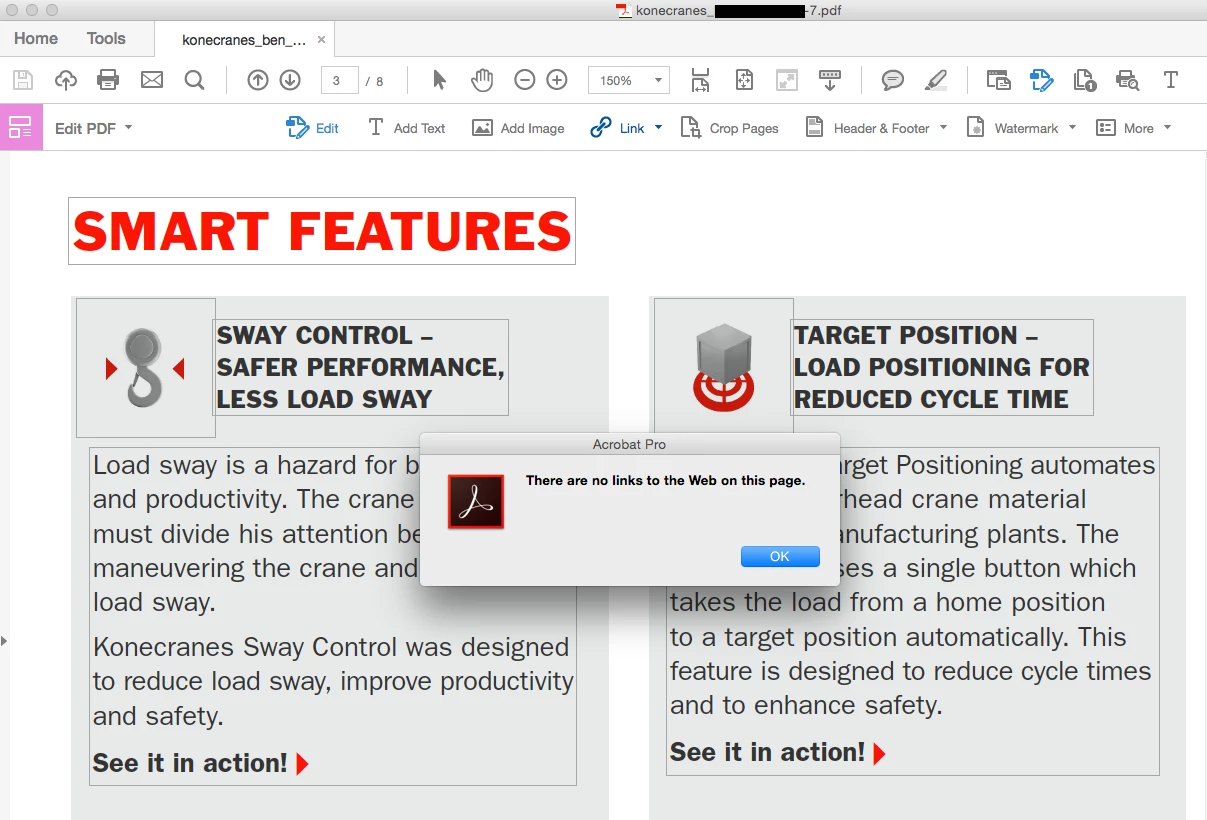
(Click the image above to enlarge)


You may be wondering...Why do the "links" work in the desktop version of Acrobat Reader on a Windows or Mac computer?


Because the desktop version of Acrobat Reader has the auto link detection feature.  When Acrobat Reader encounters URL text, such as "http://www.adobe.com" and "somebody@adobe.com", it automatically converts the URL text to links on the fly.


The feature can be enabled/disabled by selecting/deselecting the General > "Create links from URLs" option in the Preferences dialog.  (Please note that the Preferences dialog is available in Acrobat Pro, Standard, and Reader desktop apps only.)
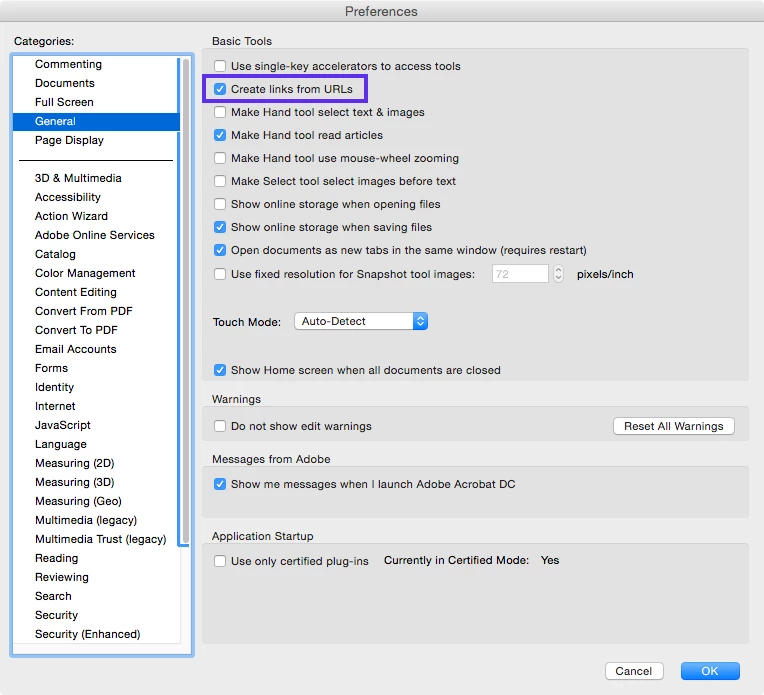


If you deselect the "Create links from URLs" option and reopen your PDF document, you will notice that the "links" no longer work.


Unfortunately, the auto link detection feature is not supported by all PDF viewers on desktop computers or mobile devices.

Here are a few examples of the PDF viewers that do not support the auto link detection.

  • Acrobat Reader mobile apps (for iOS, Android, Windows Phone)
  • Apple Preview for Mac (desktop)
  • Apple PDF preview feature in Apple iOS apps, such as Mail, Safari, iBooks

If you are interested in making web links work in a vast majority of PDF viewers for desktop and mobile, I'd highly recommend creating real hyperlinks (instead of relying on the auto link detection feature).

  • Go back to your original source document (e.g. Microsoft Word document, Adobe InDesign document), add hyperlinks, and export to PDF.
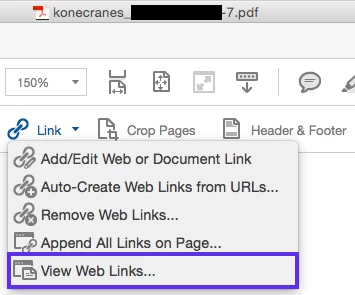
  • Use Acrobat Pro DC to add hyperlinks to your existing PDF document.
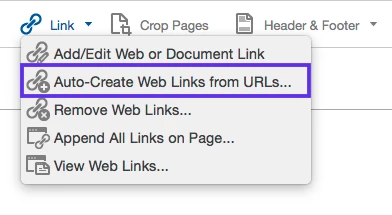
If you do not have Acrobat Pro DC, you can download and install a free trial for your Windows or Mac desktop computer.

Download Adobe Acrobat free trial | Acrobat Pro DC

Please let us know if you have additional questions.


Thank you.

5 replies

New Participant
February 26, 2020

Weblinks created in a PDF document open on desktop apps, however in the same when opened in the mobile phone app, the links don't work. I can't seem to figure out why.

New Participant
August 7, 2017

I create links in Acrobat for a PDF to open a web page.  While they work on many devices, Apple Preview does not open them.  It changes the cursor, seeming to recognize the text as a link, but then fails to do anything.  These are not spelled out links made active via some auto-detect in the viewing application.  They are buttons created in Acrobat to open a web link on mouse down.  Elsewhere I've read that Preview is stricter about what it accepts as a valid link.  OK, so that's crappy programming (i.e. why doesn't an error message pop up asking if I really want to open the link or something), but I would go back and change the code in the link if Adobe (or anyone else) explained how.  Very frustrating that something that worked fine for years and makes PDFs useful now is dead.   Anyone find a fix?

Francine Caron
New Participant
August 7, 2017

IN Frencher pleine.

Le 7 août 2017 18:09, "christopherjhoh" <forums_noreply@adobe.com> a écrit :

Why don't PDF links work. This is a serious problem created by

christopherjhoh <https://forums.adobe.com/people/christopherjhoh> in *Acrobat

Reader for Android phones and tablets* - View the full discussion

<https://forums.adobe.com/message/9751408#9751408>

New Participant
May 8, 2017

I have looked through all known blogs and help lines and as of May 8, 2017, there is still no good answer to this problem. What a sad state of affairs that in 2017, you can't use a Mac Microsoft Office product with an Adobe Product. I am not sure which company is being the obstinate party, but both impede work flow for several customers. Unfortunately, customers like the little guys they perceive us to be, do not matter. Maybe shareholders and stocks or some other monetary entity will change their minds. Whoever 'they' are!!!

New Participant
June 25, 2016

I have a similar problem except I am creating links to other PDF files in the same folder. When I copy the PDF file out to the desktop on my PC, clicking on the links works fine and opens the next PDF in Acrobat. When I copy them to the iPad, the links don't work in Acrobat but they do work in Goodreader. How do I make the links I am adding to other PDFs work in Acrobat?

New Participant
July 6, 2016

I came her with the same problem as LRandyB . Hoping to find a way to make it work.  Will look into goodreader! Thanks.

Participating Frequently
July 15, 2016

just tried goodreader. Seems to work ok, doesn't read buttons only hyperlinks created in acrobat. This is crazy that a third party app. can open another file link and Acrobat for mobile does not! Must be embarrassing!

Community Manager
December 3, 2015

Hi,

What kind of hyperlinks do you have in your PDF documents?

  • Go to a page view (within the same document)
  • Open a web page
  • Open a file

Acrobat Reader mobile apps (for iOS, Android, and Windows Phone) support the first two types only, whereas Acrobat Reader desktop app supports all three types.

New Participant
December 3, 2015

Open a Web Page

Again, works great with desktops & laptops

we did find a PDF reader for android that worked: XODO

Community Manager
December 3, 2015

Hi,

In general, Acrobat Reader for iOS works with web links in PDF documents.  So the problem may be file-specific or how those hyperlinks are defined in your PDF documents.

Which mobile Reader app are you using?  Acrobat Reader for Android, iOS, or something else?  What is the version of the app?

Would you please share one of your PDF documents with us (Adobe) so that we can investigate the cause of the problem?  I have sent you the instructions on how to share your file via a separate forum private message.

Thank you for your help.