
Exit
  • Global community
    • Language:
      • Deutsch
      • English
      • Español
      • Français
      • Português
  • 日本語コミュニティ
  • 한국 커뮤니티
0

Issue: Some tabs appears blank, without title

New Here ,
Mar 30, 2021 Mar 30, 2021

Hi, sometimes some tabs appears blank without title:

2.PNG


What can i do ?

I just try to reinstall, to reboot pc, to make updates (Windows and Adobe) but nothing.


Please help

TOPICS
General troubleshooting , PDF forms , View PDF
2.8K
Translate
Report
Community guidelines
Be kind and respectful, give credit to the original source of content, and search for duplicates before posting. Learn more
community guidelines
Community Expert ,
Mar 30, 2021 Mar 30, 2021

What can you see at title in the properties of this documents?

Translate
Report
Community guidelines
Be kind and respectful, give credit to the original source of content, and search for duplicates before posting. Learn more
community guidelines
Community Expert ,
Mar 30, 2021 Mar 30, 2021

Hi @Saf5F99 


Do you know who created the PDFs?


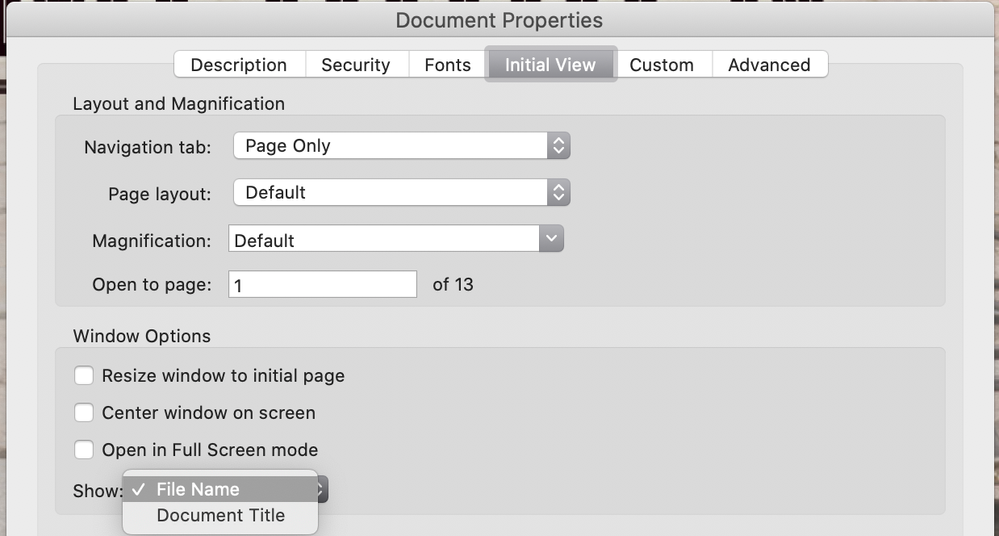
In the Acrobat Properties dialog, the tab can be set to show either the Document Name or the Title. It appears that the creator chose Title, then failed to give the document a title and left the field blank. Look in File > Properties to see if a Title exists.


~ Jane

Translate
Report
Community guidelines
Be kind and respectful, give credit to the original source of content, and search for duplicates before posting. Learn more
community guidelines
New Here ,
Mar 30, 2021 Mar 30, 2021

Hi, no, the title not exist


pdf title.PNG


What can i do ? There is a preference to choose someother etherwise the title ?

Or how can i insert the tile ?

Translate
Report
Community guidelines
Be kind and respectful, give credit to the original source of content, and search for duplicates before posting. Learn more
community guidelines
Community Expert ,
Mar 30, 2021 Mar 30, 2021

In the preferences of Acrobat Reader DC you can specify to show either the document name or the title.


Translate
Report
Community guidelines
Be kind and respectful, give credit to the original source of content, and search for duplicates before posting. Learn more
community guidelines
New Here ,
Mar 30, 2021 Mar 30, 2021

Can you give me a screenshot please ?

Translate
Report
Community guidelines
Be kind and respectful, give credit to the original source of content, and search for duplicates before posting. Learn more
community guidelines
Community Expert ,
Mar 31, 2021 Mar 31, 2021

Look at Edit > Preferences

Translate
Report
Community guidelines
Be kind and respectful, give credit to the original source of content, and search for duplicates before posting. Learn more
community guidelines
New Here ,
Mar 31, 2021 Mar 31, 2021

Thank you very much. It is ok

Translate
Report
Community guidelines
Be kind and respectful, give credit to the original source of content, and search for duplicates before posting. Learn more
community guidelines
Community Expert ,
Mar 31, 2021 Mar 31, 2021
LATEST

The full version (paid) of Acrobat has an Initial View tab in Properties where the creator can choose the File Name or the Document Title. This tab is not available in the free version. The person who created your PDFs chose Document Title, then left that field blank in the Description tab.

Jane
jane-e_0-1617189132675.png


Translate
Report
Community guidelines
Be kind and respectful, give credit to the original source of content, and search for duplicates before posting. Learn more
community guidelines
