


es43669064
Participant
May 11, 2016
Question

A radio button is permanently selected. How to save form, unselected?

  • May 11, 2016
  • 3 replies
  • 8351 views

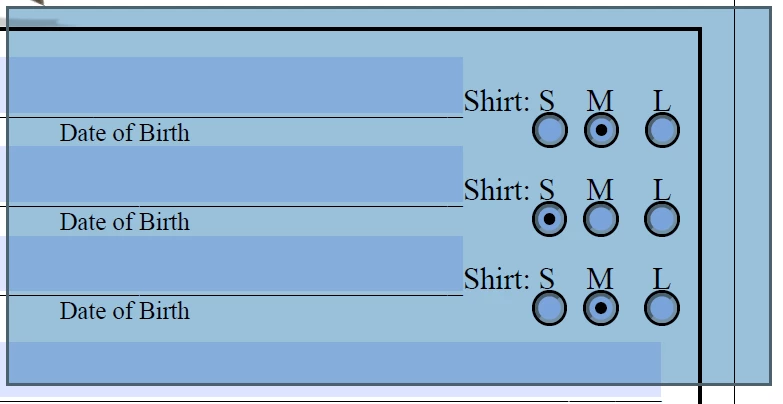
My Acrobat Pro DC form contains radio buttons. When I select them in preview, they stay selected, leaving me a form that will not allow users the option for selecting them. How to save the form with buttons unselected? Also, how do I de-select them, so that I may share the form?
This topic has been closed for replies.

3 replies

Participating Frequently
June 13, 2019

I agree.

When the form is saved or refreshed it should be AUTOMATICALLY CLEARED.

Why we must manually clear it is nuts.

That way we can provide a clear, clean, blank, fillable form after testing it as good.

try67
Community Expert
Community Expert
June 13, 2019

Absolutely not. Clearing a saved form by default is "nuts". If it worked like that form fields would be useless.

If you want to clear the form when the file is opened (or saved) you can do so using a script, but the users of your file are going to be pissed off, and rightfully so.

Participating Frequently
June 13, 2019

Okay, while in "development mode" then. Allow the "creator" to easily and automatically clear the form.

I get that you don't want to lose user-filled data but let's make development a bit more intuitive on this issue.

Thanks.

Inspiring
December 19, 2016

I have a number of forms with Yes/No radio buttons. In reality, each group consists of three buttons (sometime boxes) and they are named Yes, No and blank.The blank button always remains a button (the shape doesn't matter) and I set the Properties as:

Border Color: White

Fill Color: White

Line Style: Solid

and I leave the General > Common Properties > Form Field: Visible. (But on a white paper "form," it will, of course, be invisible.)

All three are "in line" but only two show. If one of the Yes or No buttons is checked and I want both to be unchecked, I mouse over the location to the right of the last button in the group and when the universal hand pointer appears, I click, selecting the "invisible" button. The other (visible) button in the group is cleared.

There are a number of ways you can mark the location of the invisible choice, such as above a period (it doesn't matter the size of the invisible button).

Since button sets must belong to the same named group in order for alternate selection (I have as many as five groups with visible Yes/No options), it doesn't matter where you put the third or fourth or other "control" button for the group as long as on the same page

May not be the perfect answer, but it is the best workaround I can come up with. With a color background, substitute the color for white by using the RGB editor and add to Custom Colors.

No need to resort to scripts.

try67
Community Expert
Community Expert
December 19, 2016

Or simply use check-boxes instead of radio-buttons...

Inspiring
December 19, 2016

Not satisfactory for certain forms. For example, an order submission with four credit card options. Or a version that leaves all options blank if someone changes their mind and wants to use a different payment method. "Click here" with a concealed button would clear whatever choice someone made and changed their mind. I proposed an option for the use of radio buttons, not the replacement of them.

Inspiring
May 11, 2016

Have you tried to clear the form before saving the form?

es43669064
Participant
May 12, 2016

Thanks, how do I do this?

Inspiring
May 12, 2016

While in the "Prepare Forms" mode, under "More" is an option to clear the form.

You could create a custom tool to clear the form or any form.

You could add a button to the form.