



bebarth
Community Expert
April 16, 2020
Answered

Accented characters exported in a .csv file

  • April 16, 2020
  • 2 replies
  • 8857 views

I wrote a script to merge the data of different form in a cvs file attached to a document.
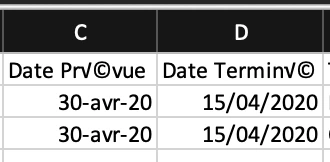
Everything works fine, execpt for the accented characters which don't appear correctly in the .csv file.

For exporting the data, I use the util.streamFromString with utf-8 setting.
I tryed all other setting but no one is correct.
Is there a way to export correctly the accented characters?

FYI, merging data with the Acrobat tool works fine.

Thanks for your answer.


This topic has been closed for replies.
Correct answer Thom Parker

UTF-8 refers to the ANSI character set. So it won't properly translate Unicode Characters. Basically, you can't put Unicode (16 bit) into a plain text ( 8 bit) document. 

Use "utf-16".   


However, why are you using a stream? The "createDataObject()" function takes a string as input. You'll save yourself some trouble if you use this function, since JavaScript is native Unicode, so all strings are Unicode. 

2 replies

JR Boulay
Community Expert
April 21, 2020

I have the same issue than bebarth.

When created from a variable, the attachment encoding is an issue.

According to my tests it depends on the computer used:

Acrobat Mac = Western MacOS Roman

Acrobat Windows = Western Windows Latin 1


So far so good since until now in the process used by my documents the users does not change computers to open the attachment they just created, but it is not correct.


But we cannot use Thom's tip (updating a previously created attachment) when both the PDF and its attachment are created on the fly.

If you want a true sample of this issue install my (free) FormReport utility and use it on a Mac and on a Windows computer : the attachment encoding is not the same … but the script is the same.

(I can share the not minified and full commented JavaScript of FormReport if needed)

Acrobate du PDF, InDesigner et Photoshopographe
Thom Parker
Thom ParkerCorrect answer
Community Expert
April 16, 2020

UTF-8 refers to the ANSI character set. So it won't properly translate Unicode Characters. Basically, you can't put Unicode (16 bit) into a plain text ( 8 bit) document. 

Use "utf-16".   


However, why are you using a stream? The "createDataObject()" function takes a string as input. You'll save yourself some trouble if you use this function, since JavaScript is native Unicode, so all strings are Unicode. 

Thom Parker - Software Developer at PDFScriptingUse the Acrobat JavaScript Reference early and often
bebarth
bebarthAuthor
Community Expert
April 17, 2020

Thank you for your answer Tom!

"Use "utf-16"" -> That doesn't work neither.

"However, why are you using a stream? The "createDataObject()" function takes a string as input." -> Because I haven't thought about that! But the result is the same...

However, I found a solution. I attach a txt file already utf-16 formatted then I fill that file. That works fine...
@+


Thom Parker
Community Expert
April 17, 2020

Actually it does work, but you have to specify the correct Mime Type, since UTF-8 is the default.


This works

createDataObject("Tst2.Txt", "Some ascii text then, ©™Σ","text/html; charset=utf-16")


By pre-attaching a file that is already UTF-16, you are pre-setting the mime type. 

You're first solution would have worked if the file was created with a UTF-16 mimetype. 

It's all about being consistent with the typeing all the way through the process.


Thom Parker - Software Developer at PDFScriptingUse the Acrobat JavaScript Reference early and often
