


August 17, 2016
Answered

Adobe PDF Printer not showing any fonts

  • August 17, 2016
  • 1 reply
  • 1698 views

HI Folks,

I extremely facing an issue while trying to embedding fonts using adobe PDF Printer, it show no fonts C:\windows\fonts while there's about 1500 font installed see attached screen for more details.
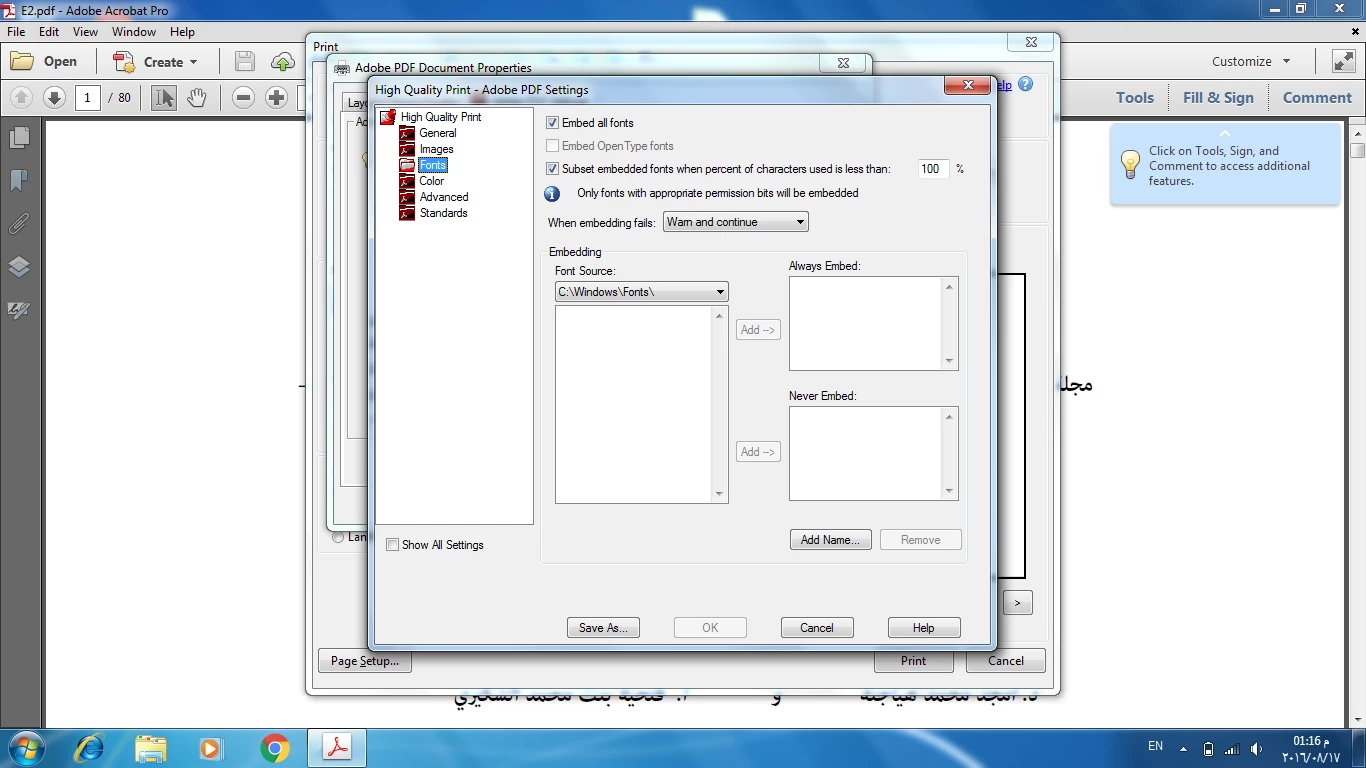
Windows 7 Professional SP1

Adobe Acrobat XI Pro 11.0.16

any help please

This topic has been closed for replies.
Correct answer Adorobat

HI,

I already logged in with local administrator, also i tried to add everyone in permission but it's the same issue.


Hi ahmede15148234 ,

Try to perform following steps:

1- Download and run Cleaner tool from here : Download Adobe Reader and Acrobat Cleaner Tool - Adobe Labs

2- Restart the computer.

3- Login into Local Administrator account and reinstall Acrobat.

Let us know about the results.

Thank You!

Shivam

1 reply

Adorobat
Community Manager
Community Manager
August 18, 2016

Hi ahmede15148234  ,

Try to perform the following steps:

1- Close Acrobat.

2- Locate Acrobat XI .exe file on desktop, right click on it and select Run as administrator.

3- If step 2 doesn't work, try making Adobe PDF printer as your default printer in Control Panel.

Let us know about the results.

Thank You!

Shivam

August 18, 2016

Hi Shivam,

Thanks for help, it works, but i faced another issue when trying to add fonts to be embedded  i got this error in below screen

i tried to update adobe to latest version, remove fonts and reinstall it , uninstall adobe acrobat and reinstall it ,, but no avail

thanks in advance

Adorobat
Community Manager
AdorobatCommunity ManagerCorrect answer
Community Manager
August 22, 2016

HI,

I already logged in with local administrator, also i tried to add everyone in permission but it's the same issue.


Hi ahmede15148234 ,

Try to perform following steps:

1- Download and run Cleaner tool from here : Download Adobe Reader and Acrobat Cleaner Tool - Adobe Labs

2- Restart the computer.

3- Login into Local Administrator account and reinstall Acrobat.

Let us know about the results.

Thank You!

Shivam