iBabs2
Inspiring
June 23, 2018
Answered

Automate the ability to add PDF's to an existing Index?

  • June 23, 2018
  • 1 reply
  • 1679 views

Hello!


I am trying to find a way to have an Index automatically add new PDF files once added to a folder? Is this possible?

I am trying to get companies to use the Index feature more, but everyone has the same issue. Great at starting it, not great at adding the new ones to rebuild the existing Index. So, I am trying to find a way to automate that process.

Any thoughts, suggestions or guidance here?

Cheers,

babs

This topic has been closed for replies.
Correct answer BarlaeDC

Hi Malcolm,

So sorry for the late reply.

I was not successful and have gone back a few times, but still struggling to get this to work.

I am not that familiar with either Automator or AppleScript, have done a little in both, but nothing too complex.

This was my last attempt, but I keep getting stuck in the AppleScript in Automator.

To test it, I placed a folder on my Desktop and named it Index_Adobe - I dropped a few PDF's in there.

I then Created a Index File in Acrobat and named it Training_Files.pdx - this is the Index I would want to try and rebuild each time I place PDF files inside of the Index_Adobe Folder.

I opened up Automator and started a NEW Folder Action.

Here is my script:

.............

te
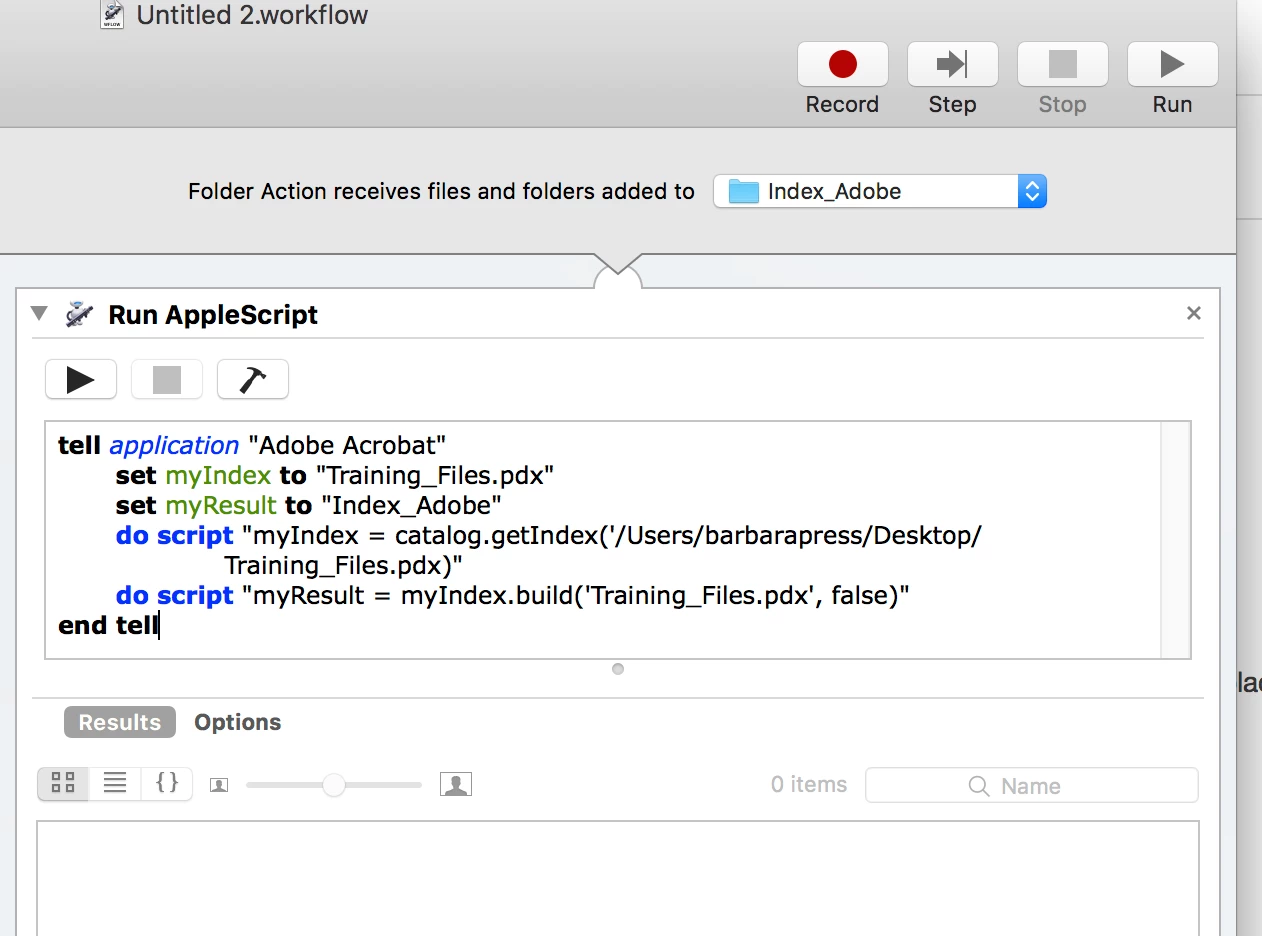
I feel like I tried every sequence, but I just can't get anything to work.

Would you mind looking at this and give me some guidance. I am sure with a little help, I will have success!!

Thank you!Babs


Hi,

Just looking at the screen shot, you appear to be missing a quote on the following line

do script "myIndex = catalog.getIndex('/Users/barbarapress/Desktop/Training_Files.pdx)"

// which should be

do script "myIndex = catalog.getIndex('/Users/barbarapress/Desktop/Training_Files.pdx')"

// note the single quote before the closing bracket.

Hope this helps, if not will take another look

Malcolm

[Edit, fixed typo]

1 reply

Inspiring
June 24, 2018

If you can leave a computer constantly on, you could create a JavaScript that runs a script the uses the  setIntervalt to run at a determinal time a script to build the index. Not a simple JavaScript tsk.

iBabs2
iBabs2Author
Inspiring
June 26, 2018

Thank you for your reply.

At least I know it can be done.

I will continue to research this.

Probably need to hire someone to write the script to automate.

Thank you!

babs

iBabs2
iBabs2Author
Inspiring
July 16, 2018

Hi,

I believe you should be able to use the Automater (application) to have this done for you automatically.

If you create a new workflow in Automater.

Select "Folder Action"

Then Drag "Run AppleScript" from the second list

Then place this Applescript in the area that appears, changing the path name to match your folder location ( this might be computer specific in which case we can revisit, but best to check it works first)

tell application "Adobe Acrobat"

    set myIndex to ""

    set myResult to ""

    do script "myIndex = catalog.getIndex('/PATH/TO/INDEX/FILE/HERE.pdx)"

    do script "myResult = myIndex.build('', false)"

end tell

That should rebuild the index every time a file is added to the folder,

Hope this helps, sorry about the delay took me longer to get to it than I expected.

Malcolm


Hi Malcolm,

So sorry for the late reply.

I was not successful and have gone back a few times, but still struggling to get this to work.

I am not that familiar with either Automator or AppleScript, have done a little in both, but nothing too complex.

This was my last attempt, but I keep getting stuck in the AppleScript in Automator.

To test it, I placed a folder on my Desktop and named it Index_Adobe - I dropped a few PDF's in there.

I then Created a Index File in Acrobat and named it Training_Files.pdx - this is the Index I would want to try and rebuild each time I place PDF files inside of the Index_Adobe Folder.

I opened up Automator and started a NEW Folder Action.

Here is my script:

.............

te

I feel like I tried every sequence, but I just can't get anything to work.

Would you mind looking at this and give me some guidance. I am sure with a little help, I will have success!!

Thank you!Babs