


dhhsc84757271
Known Participant
August 22, 2018
Answered

Can I unmask the data if using the password option in text field properties?

  • August 22, 2018
  • 1 reply
  • 2290 views

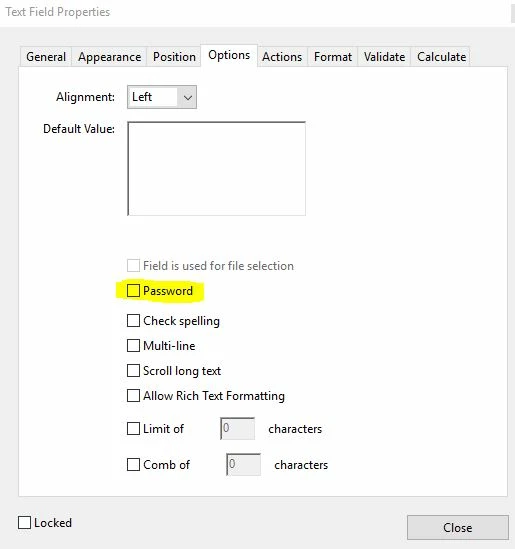
I am using Adobe Pro DC and noticed that the properties box for a text field has the option of "Password".  I tried it and really appreciate that the masking is done automatically.  My question is how do you go about unmasking it?  It seems like a useless feature to be able to hide data but have no recourse to unhide or view that data later.  Is this something that can be resolved by inserting a button with JavaScript to mask/unmask? 
This topic has been closed for replies.
Correct answer try67

Yes. I've seen that warning on several threads.  However, I'm being asked to hide (preferably) encrypt SSN and I really don't have any ideas on how to do that via PDF. Hiding them with an asterisk is a short term solution, but for the security of the data, I'd like to identify a better option.  Are you aware of any encryption methods I can check out?


You need to be very very careful. You could be legally responsible if someone's SSN leaks out and is used for identity theft.

Basically, I would say you shouldn't include it at all in a PDF file, as there's no fool-proof way of protecting it from a third-party who is willing enough to extract it.

1 reply

try67
Community Expert
Community Expert
August 22, 2018

If you uncheck that box the value will return to its original state.

dhhsc84757271
Known Participant
August 22, 2018

Thanks!

dhhsc84757271
Known Participant
August 22, 2018

You need to be very very careful. You could be legally responsible if someone's SSN leaks out and is used for identity theft.

Basically, I would say you shouldn't include it at all in a PDF file, as there's no fool-proof way of protecting it from a third-party who is willing enough to extract it.


That was my thought as well.  Thank you for confirming!