



kimhuff1701
Known Participant
January 30, 2016
Answered

Check all that apply. Is it possible to make my form do this with checkboxes?

  • January 30, 2016
  • 1 reply
  • 2437 views

I am making an option for possible blood-borne diseases.  It needs to be a required field so we know they didn't miss it.  I currently have it set as a checkboxes.  I know I could make it as a dropdown and people could hold the shift/control key and select the options necessary, but not everyone gets that.  So, I would like for it to be checkboxes.. quick and simple, right?
this

So, how can I make something like this work.

Do you have any of the following? (Client privacy will be protected as per HIPAA laws):

[___] None [___] Hep B [___] Hep C [___] HIV

[___] Other - Specify ____________________________________________________

Here is what the InDesign panel looks like
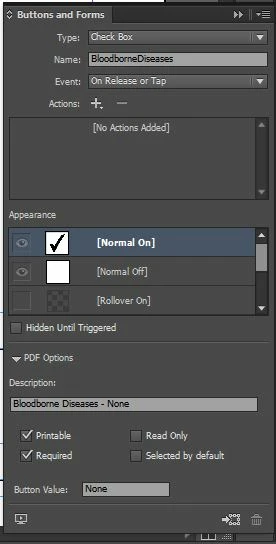
I saw nothing in there about allowing multiple choices. And when I went in to edit the form in Acrobat, I saw nothing about multiple choices.

Any help is greatly appreciated.

Kim

This topic has been closed for replies.
Correct answer try67

try67 wrote:

You don't need a script. I just explained how to do it...

You said you can create them individually, but then you cannot enforce the required, but that can be done with a script.  So, maybe what I need is if nothing is checked, then I need to point it out that something must be selected... I am just not sure I know what that code should be.  I will take a look at the links BR gave me a week or so ago, but if I can't figure it out, do you have any suggestions on where else I can look?

Thank you again for your time.

Kim


For example, it can be something like this:

if (this.getField("CheckBox1").value=="Off" && this.getField("CheckBox2").value=="Off" && this.getField("CheckBox3").value=="Off") {

    app.alert("You must first select one of the check-boxes before submitting the file.");

} else {

    this.mailDoc({cTo: "me@server.com"});

}

1 reply

try67
Community Expert
Community Expert
January 30, 2016

If you don't give the check-boxes the same name then you'll be able to select multiple ones at the same time, as they won't have anything to do with one another. However, you can set them as required but it won't be enforces. You'll need to use a script to enforce that.

kimhuff1701
Known Participant
January 30, 2016

try67 wrote:

If you don't give the check-boxes the same name then you'll be able to select multiple ones at the same time, as they won't have anything to do with one another. However, you can set them as required but it won't be enforces. You'll need to use a script to enforce that.

Hmm.. Is there a script that allows you to make the group accept multiple answers?

Kim

try67
Community Expert
try67Community ExpertCorrect answer
Community Expert
January 31, 2016

try67 wrote:

You don't need a script. I just explained how to do it...

You said you can create them individually, but then you cannot enforce the required, but that can be done with a script.  So, maybe what I need is if nothing is checked, then I need to point it out that something must be selected... I am just not sure I know what that code should be.  I will take a look at the links BR gave me a week or so ago, but if I can't figure it out, do you have any suggestions on where else I can look?

Thank you again for your time.

Kim


For example, it can be something like this:

if (this.getField("CheckBox1").value=="Off" && this.getField("CheckBox2").value=="Off" && this.getField("CheckBox3").value=="Off") {

    app.alert("You must first select one of the check-boxes before submitting the file.");

} else {

    this.mailDoc({cTo: "me@server.com"});

}