


Participant
February 27, 2018
Question

Clear Form Button will not reset fill color after check box is cleared

  • February 27, 2018
  • 1 reply
  • 995 views

First off, thank you to anyone who takes the time to read this and attempt to help me.

I made a PDF form with check boxes. I used a mouse up Java Script so that when the check box is checked aka "Yes" the fill and font are a specific color:
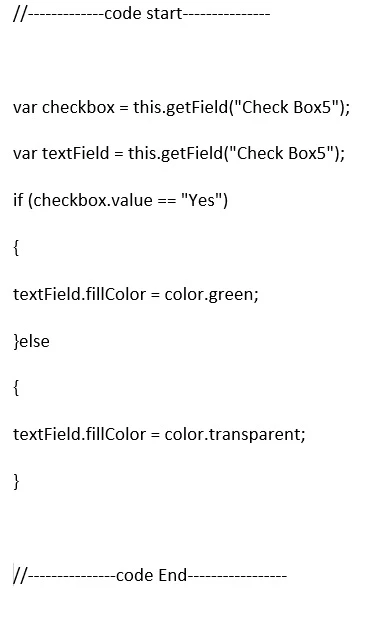
I then made a Clear Form button which when clicked does clear all the check boxes but it leaves the form boxes with the fill color of when the box is checked instead of going back to unfilled. The only way to then clear the form box fill is to check the box and then uncheck. I have over 100 check boxes. To clear the check box fill one by one would be a pain in the arse. Any thoughts or suggestions?

This topic has been closed for replies.

1 reply

Thom Parker
Community Expert
Community Expert
February 27, 2018

Resetting a form only affects the field values. The colors or any other property you choose to set in a script has to be reset with a script. Just add a script action to the Clear button.

Thom Parker - Software Developer at PDFScriptingUse the Acrobat JavaScript Reference early and often
Participant
February 27, 2018

Thom, thank you. I am having trouble finding a JavaScript to add to the Clear Button that will accomplish this. Any examples?

try67
Community Expert
Community Expert
February 27, 2018

You can use exactly the same code as you used to set the color originally:

this.getField("Check Box5").fillColor = color.transparent;