



Color swatch : The values of color fields are getting overriden after saving the values in dialog
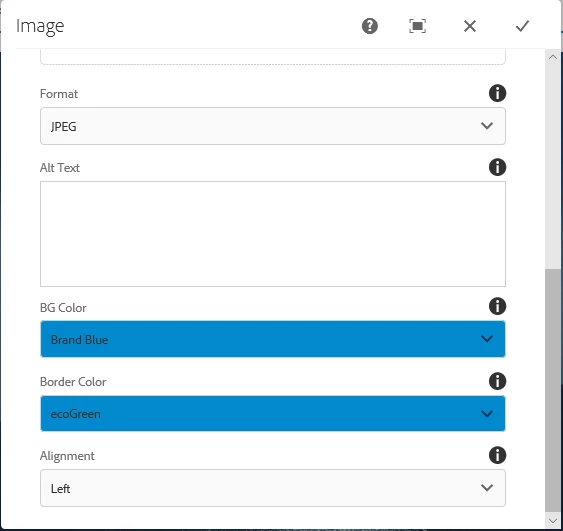
I have an image component which has two color fields "background color" and "border color". Initially when opening the dialog and selecting the value, the color swatch is working fine. But once I have saved the values in dialog, on opening it again the value of background color is overriding the value of border color. I have written a custom colorpicker.js. The code is
$(document).on("click", ".bgColor ul", function(e) {
var dropdown=$(this).parent().closest('span').find('ul');
var button=$(this).parent().closest('span').find('button');
var hexcode =$(this).parent().closest('span').find('select');
touchDialog.colorDropDown(dropdown,button,hexcode);
});
$(document).on("foundation-contentloaded", function(e) {
var dropdown = $('.bgColor ul');
var button = $('.bgColor button');
var hexcode = $('.bgColor select');
touchDialog.colorDropDown(dropdown,button,hexcode);
});
var touchDialog = {
colorDropDown : function(dropdown,button,hexcode) {
var hexcode = hexcode;
var dropdown = dropdown;
var button = button;
if(dropdown != undefined || dropdown != null){
var childlist = dropdown.children();
var hexcodelist = hexcode.children();
if (childlist.length > 1) {
for (i = 0; i < childlist.length; i++) {
var attr = hexcodelist.getAttribute("data-hexcode");
if (attr) {
$(childlist).css("background-color", attr);
$(childlist).css("border-style", "solid");
}
if($(childlist).hasClass("is-highlighted")&& attr){
$(button).css("background-color", attr);
}
if(!attr){
var color = hexcode.children('option:selected').data('hexcode') ;
$(button).css("background-color", "transparent");
$(button).css("background-color", color);
}
}
}
}
}
};
Is there any way on how we can properly save the values of color fields without overriding the other field. Please find the attached snapshot as well.
 AdChoices