+++Adding to this discussion,
I thought that you asked how to do this straight from the radio buttons. NesaNurani answer is pretty much what you need; is simple, and to the point.
If you want this work through the radio buttons though, it is a lot more complicated than I thought.
I had to get out of the basic scripting comfortable zone in order to make it work from the radio buttons as a MouseUp event, not as a custom calculation script copied on every field manually. You can, however, copy a caalculated script onto every field with one action event triggered when a radio button is checked.
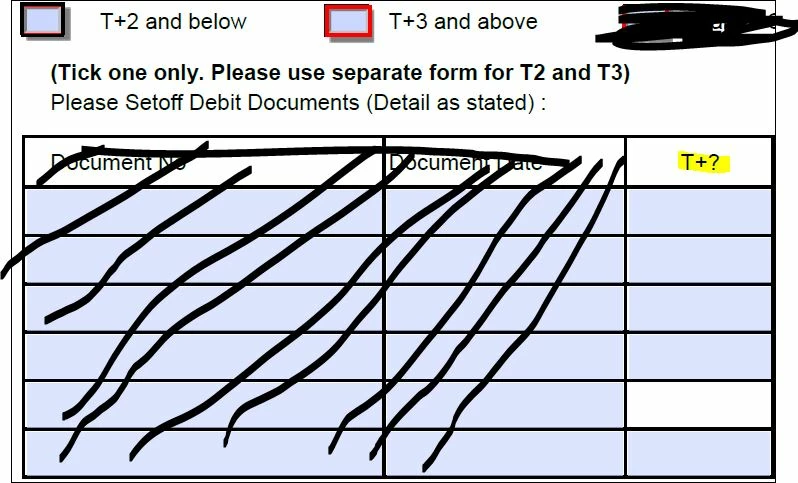
This matters if you a have a table with more than 50 "TotalRow" fields on 3 pages across the same PDF, and more than just a pair of mutually exclusive checkboxes or radio buttons grouped with different names and export values.
So I came up with this: Using a for loop script you can set an custom calulation script through the "setAction()" method and define it with parameters that will affect the behavior on each of the TRow fields when the script is executed.
An event action will allow to define a keystroke script, a validation script, and/or a custom calculation script.
All of this is possible with the setAction() method.
In my example, I named both of the radio buttons as "T", and assigned different export values to each one (i.e. Choice1 and Choice2 respectively).
In the T+2 radio button (with export value of "Choice1") I used this script:
for (var i = 0; i < 6; i++)

this.getField("TRow"+i).setAction("Calculate", "if(event.target.value >=3 || event.target.value < '0')  event.value =''; else event.value =  util.printf('%d', event.target.value);");
In the T+3 radio button (with export value of "Choice2") I used this script:
for (var i = 0; i < 6; i++)

this.getField("TRow"+i).setAction("Calculate", "if(event.target.value >=12 || event.target.value <= 2)  event.value =''; else event.value =  util.printf('%d', event.target.value);");



 AdChoices