


Participant
January 25, 2022
Question

Create a sequential PO Number (that is saved) in a fillable form every time the document is saved as

  • January 25, 2022
  • 1 reply
  • 671 views

Hi,


I have a fillable PDF I have created in Acrobat - I am trying to create a senario where everytime the user opens the master PO form I have created a new PO number is generated sequentially (ideally starting at 0001) in the "Invoice" field of the form.
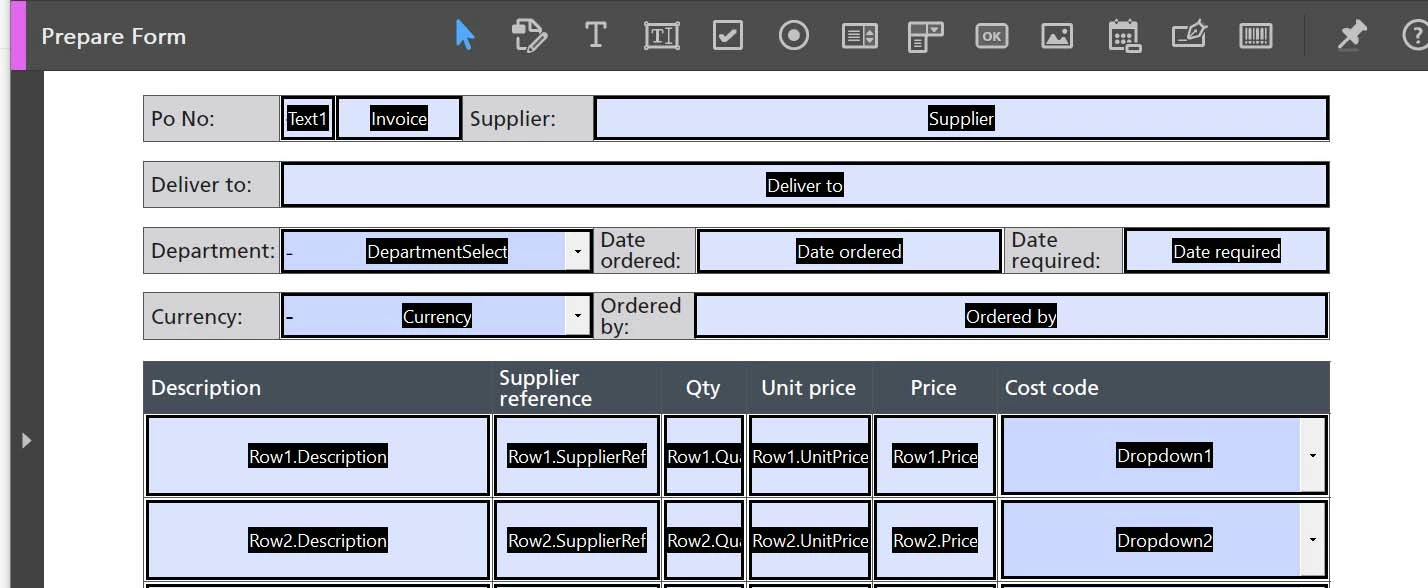


I have read lots of threads on similar questions, however I am trying to achieve the following:

  • User opens master document
  • The generated number appears in the "Invoice" field e.g. 0002
  • The user then "saves as" on computer and gives the document a name - lets give it the name "PO-Form-0002"
  • The user completes the form and fills in all the fields
  • Saves and closes the form
  • When the document "PO-Form-0002" is reopened I would like the "Invoice" field to maintain the SAME number it generated origianlly - as per this example  it would be 0002. 
  • When the master document is opened next the "Invoice" field generate the number 0003 and the user the saves the file as "PO-Form-0003" and so on.


Can anyone advise me with a possible script/s for this please?

I'm really struggling and would appreciate help! 


Thank you,

Anisha

This topic has been closed for replies.

1 reply

try67
Community Expert
Community Expert
January 25, 2022

The code itself is very simple. However, you need to carefully think about how this will work.

For staters, will this file will only be used by one user? If not, you'll get duplicate numbers, which is probably not what you want. Also, when should this number not update? If you use a script to update it each time the file is opened that will also happen after the user saved it as "PO-Form-0002", for example, and then that number will no longer match the file name, etc.

Participant
January 25, 2022

Thanks so much for your reply.


So with that in mind, I do not want the number to update everytime the file is opened as "PO-Form-0002" would need to retain the number 0002 on the form.


Yes, it would potentially be opened by muliple users.


Do you have any ideas on what the best way to go about this would be?


In my attempts so far, I have tried to lock the field "Invoice Field" with a script once the form is filled out in order to retain the 0002 - but that didn't work! 

Participant
January 25, 2022

This can be done with a custom-made script that assigns a value to the field, backed by a global variable that keeps track of the last number used. If you have Acrobat Pro you can even use an Action to process multiple files at once.


If you're interested I could develop this script for you (as well as the Action), for a small fee.

You can contact me via [try6767 at gmail.com] to discuss it further.


Thanks - this sounds like a great option for me so I can get in touch with you via your email address once I've spoken to my client. 


Can I just check if you were to develop the script and it was used in the way you have described would we then be able to achieve the following?


  • User opens master document
  • The generated number appears in the "Invoice" field e.g. 0002
  • The user then "saves as" on computer and gives the document a name - lets give it the name "PO-Form-0002"
  • The user completes the form and fills in all the fields
  • Saves and closes the form
  • When the document "PO-Form-0002" is reopened I would like the "Invoice" field to maintain the SAME number it generated origianlly - as per this example  it would be 0002. 
  • When the master document is opened next the "Invoice" field generate the number 0003 and the user the saves the file as "PO-Form-0003" and so on.