


Participating Frequently
September 16, 2016
Question

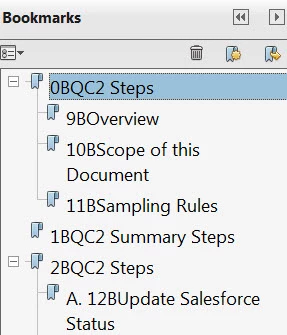
Creating bookmarks from Word headings getting extra numbering added ("0B, 9B)"

  • September 16, 2016
  • 2 replies
  • 1334 views

I normally use Acrobat XI Pro to convert complex Word 2013 training documents to pdf. I add bookmarks using the headings in the Word document. It had been working fine, but all of a sudden I started getting extra characters automatically added to my bookmarks, (like numbering at the beginning of each bookmark, "0B, 9B, etc." Of course, it looks awful and I can't publish this way. How do I fix this?
This topic has been closed for replies.

2 replies

lmnowelsAuthor
Participating Frequently
September 16, 2016

I believe it has something to do with the ZWAdobeF font. The extra characters show up in the Word Navigation Pane and in the Acrobat Bookmarks. I don't know how to fix this. Does anyone know?

lmnowelsAuthor
Participating Frequently
September 16, 2016

Actually, my Word is 2016.

try67
Community Expert
Community Expert
September 16, 2016

That makes a big difference... What exact version of Acrobat do you have?

Also, how exactly are you converting the Word file to a PDF file? What command are you using?

lmnowelsAuthor
Participating Frequently
September 16, 2016

Acrobat XI Pro. I am converting using the Acrobat ribbon in Word - Create PDF.