Participating Frequently
October 1, 2020
Answered

Declare signature field as mandatory field

  • October 1, 2020
  • 1 reply
  • 1534 views

Hello everyone,

I have a form which has different signature fields. One of the fields is the signature of the CEO. But the signature of the CEO is not always necessary. It depends on a field in the form. If this field is checked, the CEO has to sign. If the field is not checked, the CEO does not have to sign. I have solved this hiding and showing of the signature field with JavaScript.


But I can only lock the document if all signature fields in the form are filled in.

Here my hiding with JavaScript is ignored.


Although the field has been hidden by JavaScript and all visible signature fields are signed, I cannot lock it. Only if I show the signature field of the CEO and insert a signature here, I can block it.

Can someone explain a solution to me here? Is it possible to declare a signature field somewhere as an option and not as a mandatory field?


Thanks a lot already
Bastian
This topic has been closed for replies.
Correct answer try67

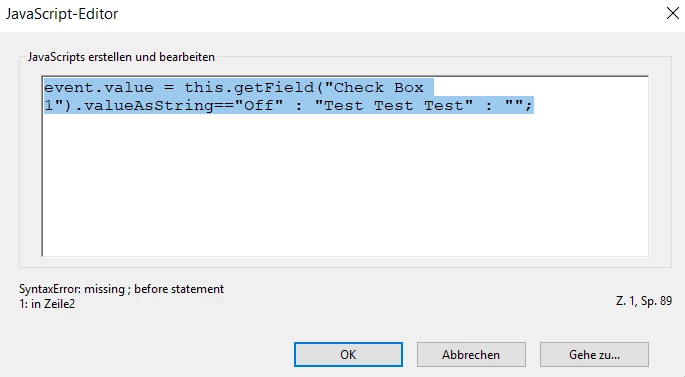
Sorry, but there is an error message. Did I do something wrong? The field where the value should be written is called Text42.


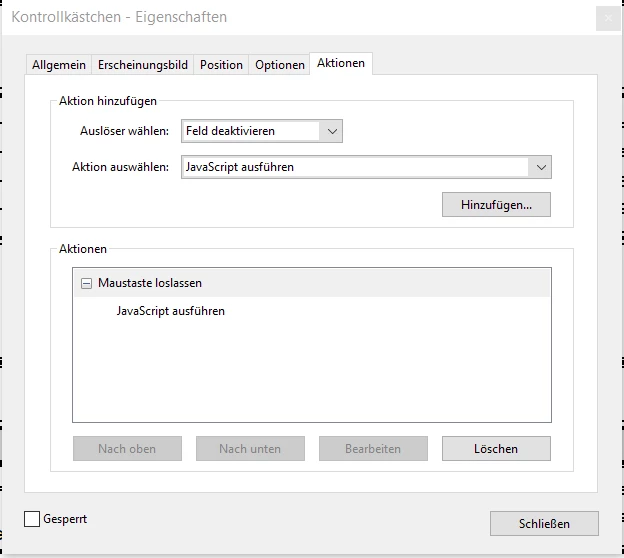
Properties of Check Box 11


I fixed the code (see above), but you also didn't place it in the right location. Read my reply carefully, please.

1 reply

try67
Community Expert
Community Expert
October 1, 2020

> But I can only lock the document if all signature fields in the form are filled in.


What do you mean by that, exactly? How are you "locking the document"?

Participating Frequently
October 1, 2020

In the screenshot "not lockable" not all signatures are signed. In the screenshot "lockable" all signatures are signed.

But I only get the screenshot "lockable" if the hidden signature field is also signed.


Screenshot "lockable"


Screenshot "not lockable" 


try67
Community Expert
try67Community ExpertCorrect answer
Community Expert
October 2, 2020

Sorry, but there is an error message. Did I do something wrong? The field where the value should be written is called Text42.


Properties of Check Box 11


I fixed the code (see above), but you also didn't place it in the right location. Read my reply carefully, please.